
What is the Difference Between 4K and UltraHD
Updated April 2026
Executive Summary
While “4K” and “UltraHD” are often used interchangeably in marketing, they represent two distinct resolution standards with different origins and technical specifications. 4K (4096×2160) is the cinema-standard resolution defined by DCI for professional production and digital cinema projection. UltraHD (3840×2160), also called UHD-1, is the consumer broadcast and display standard adopted for TVs, monitors, and video conferencing systems. UltraHD has a 16:9 aspect ratio and approximately 8.3 megapixels—four times the pixel count of FullHD (1920×1080). For enterprise video conferencing, UltraHD delivers noticeably sharper participant video, clearer screen sharing, and more immersive remote collaboration—provided your infrastructure, endpoints, and network bandwidth support it.
|
Aspect |
4K (DCI) |
UltraHD (UHD-1) |
Relevance to Video Conferencing |
|---|---|---|---|
|
Native Resolution |
4096 × 2160 |
3840 × 2160 |
UltraHD aligns with standard 16:9 displays used in meeting rooms |
|
Aspect Ratio |
~1.9:1 (cinematic) |
16:9 (consumer standard) |
UltraHD avoids letterboxing on typical conference screens |
|
Pixel Count |
~8.85 MP |
~8.29 MP |
Both deliver ~4× FullHD detail; difference is negligible in practice |
|
Primary Use Case |
Digital cinema, professional production |
Consumer TVs, monitors, streaming, video conferencing |
UltraHD is the practical choice for enterprise UC deployments |
|
Bandwidth Requirement (H.264/AVC) |
25–50 Mbps |
20–40 Mbps |
TrueConf’s SVC optimization reduces effective bandwidth needs |
|
Hardware Compatibility |
Professional cinema projectors, high-end production gear |
Modern smart TVs, monitors, video bars, conferencing endpoints |
UltraHD support is widely available in business-grade AV equipment |
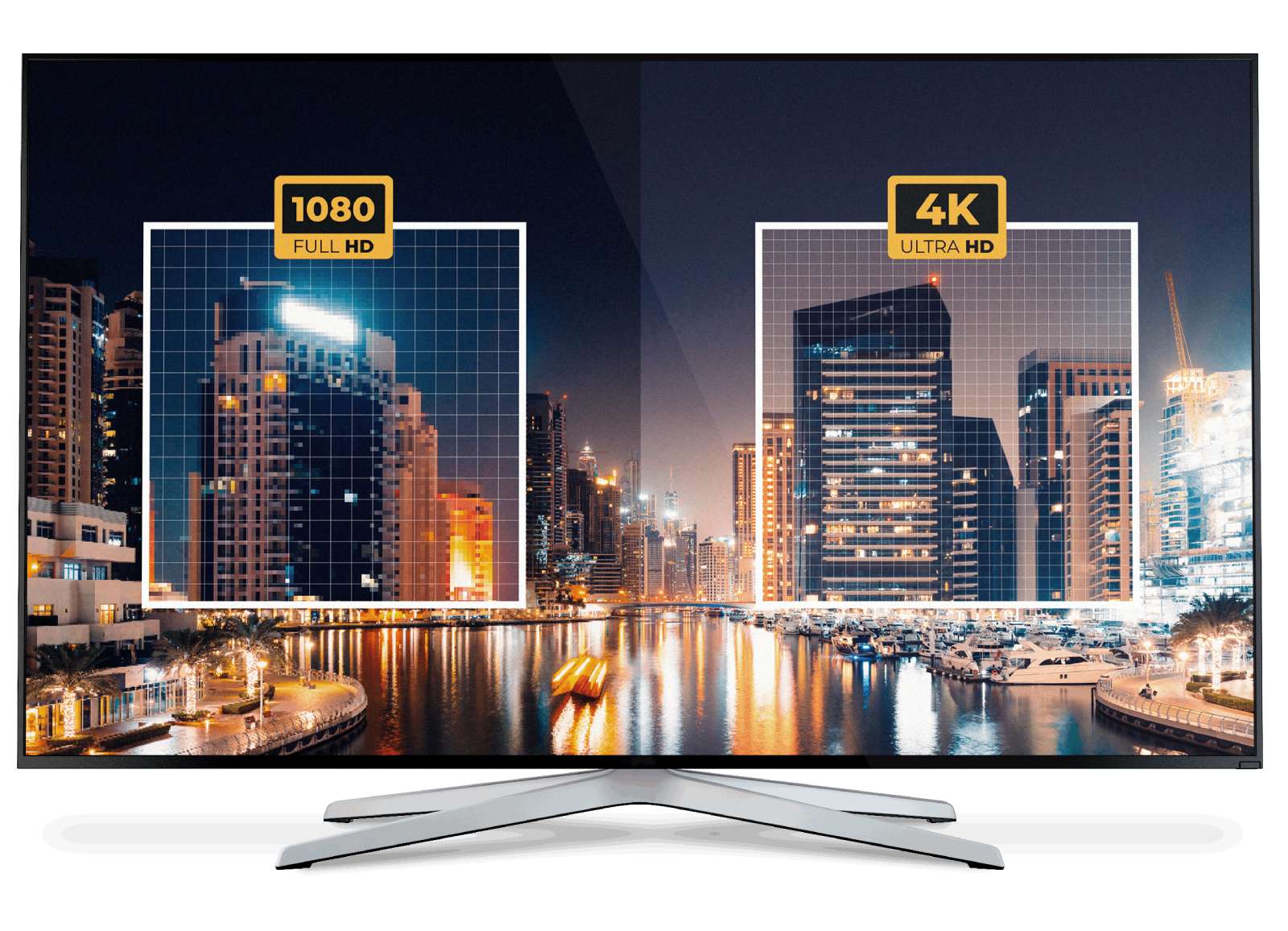
Though often used interchangeably, 4K (4096×2160) is a cinema-standard resolution, while Ultra HD (3840×2160) is the consumer version used in TVs and monitors. Ultra HD has slightly fewer pixels but is commonly marketed as “4K” for simplicity.

Having worked in the video technology industry for over a decade, I’ve witnessed the evolution of video resolutions firsthand. When Ultra high definition made its debut, many of us in the field were left pondering: What’s the real difference between “4K” and “UltraHD”? I remember the days when FullHD was the definition of clarity, and many of us were skeptical about any further enhancements. But technology always finds a way to surprise us.
In 2012, I had the privilege of attending a tech conference where the new UltraHD definition was unveiled. This groundbreaking development was released by the renowned Japanese broadcasting corporation NHK. Their presentation, backed by years of research and development, was a testament to the steps we were making in video technology.
During my time working with video resolutions, I’ve often encountered the terms UltraHD and 4K used interchangeably. It’s a common misconception that they represent different technologies. Drawing from my hands-on experience with these displays, I can clarify that they refer to the same technology. The term ‘4K’ is derived from the approximately 4000 pixels in its horizontal resolution.
Insight #1: Deployment Context Matters More Than Pixel Count
When evaluating resolution standards for enterprise video conferencing, the practical difference between 4096×2160 and 3840×2160 is rarely perceptible to end users.
What truly impacts experience is how the resolution integrates with your deployment model: on-premises infrastructure, cloud hybrid architecture, endpoint compatibility, and adaptive bitrate streaming.
A solution like TrueConf that optimizes UltraHD delivery via SVC (Scalable Video Coding) ensures consistent quality across heterogeneous devices—something raw resolution specs alone cannot guarantee.
Brief Summary
UltraHD is an ultra high definition format with a resolution of 3840×2160 pixels. Comparing with FullHD, where the resolution is 1920×1080, we can see that UltraHD resolution has 4 times more pixels, delivering more bright, realistic and detailed picture.
Such a number of pixels provides a very high-definition image, especially noticeable when comparing 4K vs 8K UHD displays. UltraHD also provides for the increased number of the displayable colors and more details in the lightest and darkest colors. Combined, this gives us the image as close to reality as possible.
Displaying 4K video requires special equipment — a screen that supports UltraHD resolution.
Key Technical Requirements for UltraHD Video Conferencing
To reliably deliver UltraHD quality in business communications, your environment should meet these baseline criteria:
- Display: Native 3840×2160 panel with HDMI 2.0 or DisplayPort 1.4 support
- Camera: UltraHD-capable sensor with appropriate field of view for room size
- Codec Support: H.265/HEVC or VP9 for efficient compression; H.264/AVC with high profile for broader compatibility
- Network: Sustained 25–40 Mbps symmetric bandwidth per UltraHD stream; QoS prioritization recommended
- Endpoint Processing: Hardware-accelerated encoding/decoding to maintain low latency
- Platform Intelligence: Adaptive resolution scaling based on participant capability and network conditions
|
Requirement |
Minimum for UltraHD |
Recommended for Enterprise |
Notes |
|---|---|---|---|
|
Network Bandwidth |
25 Mbps down / 10 Mbps up |
50 Mbps symmetric |
TrueConf’s SVC reduces effective load by sending layered streams |
|
Endpoint CPU |
Quad-core modern x86 |
Dedicated media processing unit |
Hardware offload prevents UI lag during multipoint calls |
|
Display Interface |
HDMI 2.0 (18 Gbps) |
HDMI 2.1 or DP 1.4+ |
Ensures support for HDR and higher refresh rates if needed |
|
Camera Sensor |
8MP stills capability |
Global shutter, low-light optimized |
Critical for consistent participant visibility in variable lighting |
|
Platform Scalability |
Single-server UltraHD support |
Distributed MCU with load balancing |
TrueConf Enterprise enables UltraHD across 1,500+ participant deployments |
UltraHD Video Conferencing in TrueConf

|
Video Conferencing Modes |
UltraHD Possibility |
|---|---|
|
Multipoint Video Conferencing, Video Lecture — 9 participants |
Up to 3840×2160 total |
|
Multipoint Video Conferencing, Video Lecture — 16 participants |
Up to 5120×2880 total |
|
Multipoint Video Conferencing, Video Lecture — 25 participants |
Up to 6400×3600 total |
Using SVC (Scalable Video Coding) technology allows TrueConf video conferences to support UltraHD mode.
Insight #2: Adaptive Resolution Is a Strategic Advantage, Not a Compromise
Many buyers assume “highest resolution always wins,” but in real-world hybrid meetings, participants join from diverse devices and networks.
A platform that intelligently scales resolution per participant—sending UltraHD to a conference room endpoint while delivering 720p to a mobile user—maximizes overall experience without overloading infrastructure.
TrueConf’s SVC-based architecture implements this granular adaptation natively, ensuring fairness and efficiency across the participant spectrum.
Experience UltraHD Video Conferencing with TrueConf
Host stunning Ultra HD meetings for up to 1,500 participants with full local deployment. Enjoy secure team messaging, cross-platform compatibility, and scalable architecture built for performance.
This happens as follows:
During a multipoint conference for 9 participants, the resolution of all their video windows adds up to 3840×2160 pixels, which means that, on average, each of the 9 video windows has about 960 pixels.
When TrueConf is used in fullscreen mode on an UltraHD screen, the total of the video resolutions is increased to 3840×2160.
This occurs because the server adjusts the video stream to the 4K screen. Even if your partner has joined the conference from a mobile device, you’ll still be getting the quality supported by your hardware (the quality is limited by the possibilities of the participants’s camera). And vice versa – in a conference with a 4K screen, the participant with a mobile device will receive the stream, adapted to his tablet or smartphone.
Insight #3: Governance and Integration Often Outweigh Raw Resolution in Platform Selection
When comparing video conferencing solutions, IT decision-makers frequently prioritize resolution specs while underestimating the operational impact of deployment flexibility, administrative controls, and third-party integration.
A platform like TrueConf that supports on-premises, private cloud, or hybrid models—alongside SSO, MFA, audit logging, and API-driven automation—delivers more sustainable value than resolution alone.
UltraHD is a feature; secure, manageable, interoperable architecture is a foundation.
Quick Decision Framework: Do You Need UltraHD?
Use this numbered checklist to evaluate whether UltraHD investment aligns with your use case:
- 1. Assess primary use cases: Are visual details critical (e.g., medical imaging, engineering schematics)? If yes, UltraHD adds measurable value.
- 2. Audit existing infrastructure: Do your meeting rooms have UltraHD displays, cameras, and sufficient network capacity? If not, prioritize endpoint upgrades first.
- 3. Evaluate participant diversity: If most attendees join from mobile or low-bandwidth connections, adaptive resolution (like TrueConf’s SVC) matters more than peak resolution.
- 4. Review compliance requirements: For regulated industries, ensure your UltraHD pipeline maintains encryption, data residency, and auditability—TrueConf’s on-premises deployment model addresses this natively.
- 5. Calculate total cost of ownership: Factor in bandwidth, hardware refresh cycles, and administrative overhead—not just license fees.
Related posts:
6 Tips on How to Improve Your Video Call Quality
13 Leading Applications for Group Video Communication in 2025!
Video Conferencing Setup: Ultimate Guide to the Perfect Meetings
FAQ
Can I use UltraHD video conferencing if some participants have only HD devices?
Yes—modern platforms like TrueConf use scalable video coding to deliver the best possible quality to each participant based on their device and connection. UltraHD endpoints receive high-resolution streams while HD or mobile users get optimized lower-resolution feeds, ensuring inclusive participation without compromising the overall experience.
Does UltraHD require significantly more bandwidth than FullHD?
UltraHD typically requires 2–4× the bandwidth of FullHD, but intelligent codecs and adaptive streaming in solutions like TrueConf can reduce this overhead by 30–50%. Proper network planning and QoS policies further ensure stable performance without over-provisioning.
Is TrueConf compatible with existing UltraHD displays and cameras?
TrueConf supports standard UltraHD endpoints via HDMI 2.0+, DisplayPort, and common video conferencing peripherals. Its cross-platform clients work with Windows, macOS, Linux, and mobile OSes, allowing organizations to leverage existing AV investments while scaling resolution as needed.
How does on-premises deployment affect UltraHD performance compared to cloud?
On-premises deployment with TrueConf gives IT teams direct control over media processing, network routing, and resource allocation—critical for maintaining consistent UltraHD quality in bandwidth-constrained or regulated environments. Cloud deployments offer elasticity but may introduce variable latency; TrueConf supports hybrid models to balance both needs.
Will upgrading to UltraHD improve screen sharing clarity for technical presentations?
Yes—UltraHD resolution significantly enhances the legibility of fine text, detailed diagrams, and high-density UIs during screen sharing. TrueConf’s content optimization ensures shared materials retain sharpness even when participant video streams are adaptively scaled.
What’s the most cost-effective way to pilot UltraHD in our organization?
Start with a single high-impact meeting room equipped with an UltraHD display and camera, then use TrueConf’s scalable architecture to test multipoint UltraHD sessions with a small user group. This phased approach validates ROI before broader rollout and leverages TrueConf’s flexible licensing to minimize upfront commitment.
Does TrueConf support HDR or wide color gamut alongside UltraHD resolution?
TrueConf prioritizes resolution, frame rate, and adaptive bitrate for real-time collaboration reliability. While HDR and wide color gamut are emerging in consumer displays, enterprise video conferencing focuses on consistent luminance and color accuracy across heterogeneous endpoints—a balance TrueConf maintains through calibrated video pipelines and endpoint-agnostic rendering.
About the Author
Nikita Dymenko is a technology writer and business development professional with more than six years of experience in the unified communications industry. Drawing on his background in product management, strategic growth, and business development at TrueConf, Nikita creates insightful articles and reviews about video conferencing platforms, collaboration tools, and enterprise messaging solutions.


Follow us on social networks