
Hybrid Meetings as a New Form of Collaboration
Updated April 2026
Executive Summary
Hybrid meetings combine in-person and remote participation into a single, synchronized event—enabling teams to collaborate regardless of location. This format is now essential for semi-remote organizations, global enterprises, and event organizers seeking broader reach without sacrificing engagement.
Success depends less on the video platform alone and more on intentional design: audio infrastructure, role clarity, and inclusive facilitation. Organizations that treat hybrid as a distinct workflow—not just “adding a camera to a room”—see higher participation, better decisions, and lower operational friction.
|
Key Dimension |
What It Means |
Why It Matters |
|---|---|---|
|
Format |
Symmetric (all-to-all) vs. Role-based (presenter/audience) |
Determines interaction model and technical requirements |
|
Infrastructure |
On-premises, cloud, or hybrid deployment |
Impacts security, latency, compliance, and total cost |
|
Inclusion |
Equal participation tools for remote and in-room attendees |
Prevents “second-class” remote experience and boosts engagement |
|
Scalability |
Support for 10 to 1,500+ participants |
Enables use across team huddles, all-hands, and public events |
|
Governance |
Admin controls, SSO, MFA, audit logs |
Critical for enterprise adoption and regulatory compliance |
Global lockdown due to the COVID-19 pandemic required urgent social distancing and self-isolation. In these circumstances, most companies adopted remote working scenarios and new formats for interaction with customers, suppliers, and internal teams. As a result, communication moved online, forcing people to meet through collaboration platforms such as WebEx, Microsoft Teams, TrueConf, and Zoom.
Insight #1: Infrastructure readiness matters more than feature count
Many organizations evaluate hybrid solutions by counting features—breakout rooms, reactions, recordings.
But the real differentiator is whether the underlying architecture supports consistent audio/video quality, low-latency streaming, and secure authentication at scale.
A platform with fewer bells but robust core performance will deliver better hybrid outcomes than a feature-rich tool that stutters under load.
Take your team communication to the next level with TrueConf!
A powerful self-hosted video conferencing solution for up to 1,000 users, available on desktop, mobile, and room systems.
What is a Hybrid Meeting?
Relaxation of social distancing restrictions poses a new challenge for entrepreneurs and educators who need to bring their activities to the next level, namely to incorporate digital solutions into most in-person meetings. This is how communication gradually comes to the hybrid format that is able to solve current issues effectively.
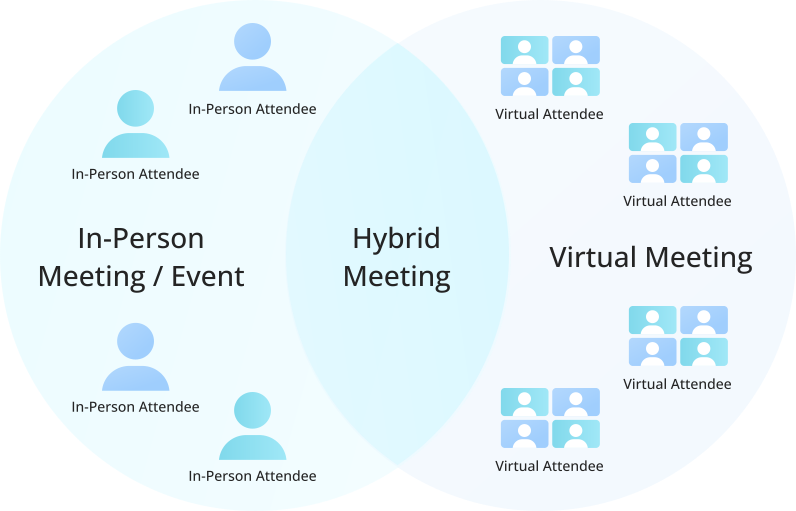
Hybrid meeting is an innovative form of collaboration that incorporates elements of both face-to-face and virtual experiences into one joint event, serving all audiences in a viewer-friendly way. This same approach is transforming corporate events, allowing companies to combine face-to-face interaction with digital participation. For a closer look at how this format is shaping the way businesses connect and collaborate, this guide explores the future of hybrid corporate events. This term implies any kind of conference, presentation, seminar or workshop, where attendees can participate either virtually or physically.
Providing up-to-date content delivery and communication options, it facilitates participation between live and online guests who are equally involved in the discussion and stay focused on the subject matter. Everything happens in real-time mode, as if everyone is sitting side by side.
|
Deployment Model |
Best For |
Key Considerations |
|---|---|---|
|
On-premises |
Government, finance, healthcare, defense |
Full data control, compliance with strict regulations, requires internal IT resources |
|
Cloud-hosted |
Startups, SMBs, distributed teams |
Fast setup, lower upfront cost, depends on vendor SLAs and internet reliability |
|
Hybrid deployment |
Enterprises with mixed security needs |
Flexibility to keep sensitive data on-prem while using cloud for external events |
Try TrueConf Server Free!
- 1,000 online users with the ability to chats and mske one-on-one video calls.
- 10 PRO users with the ability to participate in group video conferences.
- One SIP/H.323/RTSP connection for interoperability with corporate PBX and SIP/H.323 endpoints.
- One guest connection to invite a non-authenticated user via link to your meetings.

How Do Hybrid Meetings Work?
In order to understand how hybrid meetings work, imagine 10 people sitting together in the room, and another 30 people join them from remote locations using video-enabled devices. The speaker presents content to the mixed audience, and audio-visual speech is simultaneously streamed for online viewers. They may discuss the information while it is being presented without disturbing the speaker who can be addressed in text or video chat, or by digital hand-raising. This interactive feature allows virtual guests to contribute to the subject matter and get feedback by notifying the meeting host that they have a question or comment.
It is possible to distinguish two main formats of conferencing modes suitable for hybrid meetings:
- Symmetric. Local and remote teams interact with each other fully — everyone hears and sees each other, having the ability to communicate. It works well for small teams and roundtable discussions.
- Role-based. The virtual audience is divided into two groups — participants who hear and see presenters and those who, in addition, can be speakers. They are assigned by the host. This format is well suited for all-hands meetings.
As the hybrid combines the best features of both traditional and online meetings, it is commonly used to expand the reach and boost engagement, while ensuring safe experience by reducing physical attendance and still allowing the meeting to take place. It is able to unify multiple events that occur concurrently at different places, allowing remote attendees to participate alone or in groups from a comfortable location.
Insight #2: Audio quality is the silent dealbreaker in hybrid setups
Video gets the attention, but audio determines whether remote participants can actually contribute.
Echo, latency, or poor microphone pickup in the conference room creates a “glass wall” between in-person and remote attendees.
Investing in room acoustics, dedicated audio hardware, and echo cancellation is non-negotiable for professional hybrid experiences.
Benefits of Hybrid Meetings
Wide audience of virtual and live guests
Hybrid participants are not limited to a single room or venue — they can join online sessions right from the apartment, office meeting room, hotel and even while lying on the beach. Thus, this format contributes to a significant reduction of event costs, e.g. flights, lodging, meals, etc. Guests staying at hotels can even join sessions directly through the hotel TV system, making hybrid meetings more accessible and convenient.
Decision for semi-remote teams
Due to coronavirus restrictions, many companies have switched to semi-remote working, when some employees are in the office, and the rest work from home. For such a mixed team, hybrid meetings are the only opportunity to meet and communicate.
All opinions matter
The hybrid puts online and live audiences on the same level, enabling remote attendees to develop an opinion and contribute to the discussion in a natural and comfortable way.
Adding a digital element
With the help of their devices, online participants can talk to each other, like and share information. At the same time, the speaker can host polls for both virtual and in-person attendees.
Insight #3: Governance and admin control determine long-term scalability
A hybrid solution that works for a 10-person team may collapse at 500 users without proper user provisioning, license management, and monitoring.
Enterprise buyers should evaluate not just meeting features but also administrative tooling: SSO integration, role-based access, usage analytics, and audit trails.
These capabilities reduce IT overhead and ensure consistent policy enforcement across departments.
Hybrid Meeting Success Checklist
Use this practical checklist to evaluate or improve your hybrid setup:
- Room audio: Dedicated microphone array with echo cancellation and automatic gain control
- Camera framing: Wide-angle or PTZ camera that captures all in-room participants
- Network prep: QoS policies prioritizing video traffic; backup connectivity for critical events
- Inclusion tools: Digital hand-raising, chat moderation, and equal speaking time protocols
- Redundancy: Failover options for streaming, recording, and participant access
- Post-event access: Secure recording storage with permission-based sharing
|
Challenge |
Common Pitfall |
Proactive Solution |
|---|---|---|
|
Remote participants feel excluded |
Only in-room voices dominate discussion |
Assign a “remote advocate” moderator; use structured turn-taking |
|
Technical glitches disrupt flow |
No pre-meeting tech check |
Run a 5-minute connectivity test 15 minutes before start |
|
Content sharing is unclear |
Presenter shares screen without context |
Use dual-stream: speaker video + content; add verbal cues |
|
Follow-up actions get lost |
Notes scattered across chat and room |
Designate a single source of truth; share minutes via integrated platform |
|
Security concerns limit adoption |
Fear of data leakage in cloud |
Choose solutions with on-premises option and end-to-end encryption |
What is the minimum technical requirement for a reliable hybrid meeting? A stable broadband connection (minimum 5 Mbps upload/download), a dedicated microphone with echo cancellation, and a platform that supports adaptive bitrate streaming. TrueConf provides optimized media engines that maintain quality even on constrained networks, making it suitable for diverse infrastructure environments. Can hybrid meetings be secure enough for confidential business discussions? Yes, when deployed with end-to-end encryption, on-premises architecture, and strict access controls. TrueConf Server operates inside your closed network without requiring internet exposure, ensuring that sensitive discussions remain within your security perimeter while still enabling remote participation. How do I ensure remote participants aren’t treated as second-class attendees? Design meetings with inclusion in mind: use a single shared screen for content, enable digital hand-raising for all, and assign a moderator to monitor chat and remote questions. TrueConf includes unified participant management tools that give hosts visibility and control over both in-room and remote attendees in one interface. What deployment model is best for a regulated industry like finance or healthcare? On-premises or private cloud deployment is typically required to meet data residency and audit requirements. TrueConf Enterprise supports full on-premises installation with granular user roles, MFA, and comprehensive logging—aligning with strict governance frameworks without sacrificing hybrid collaboration capabilities. How can I scale hybrid meetings from team huddles to company-wide events? Choose a platform with modular scalability: start with a small deployment and expand licenses, MCU resources, or monitoring tools as needed. TrueConf’s architecture allows seamless scaling from 10 to 1,500+ participants within the same management console, avoiding disruptive platform migrations as your needs grow. Do hybrid meetings require specialized room hardware? Not always, but quality improves significantly with purpose-built equipment. For small rooms, a USB video bar may suffice; for larger spaces, dedicated endpoints with beamforming microphones and PTZ cameras are recommended. TrueConf Group and TrueConf Videobar are designed to integrate with the software platform for plug-and-play hybrid readiness. What’s the most overlooked factor when launching a hybrid meeting program? Change management and facilitator training. Technology alone won’t fix poor meeting design. TrueConf Academy offers free courses for administrators and end users to build hybrid facilitation skills, ensuring that your investment in tools translates into measurable collaboration outcomes.FAQ
About the Author
Nikita Dymenko is a technology writer and business development professional with more than six years of experience in the unified communications industry. Drawing on his background in product management, strategic growth, and business development at TrueConf, Nikita creates insightful articles and reviews about video conferencing platforms, collaboration tools, and enterprise messaging solutions.


Follow us on social networks