
6 Best Communication Strategies for Effective Team Communication
Updated April 2026
Executive Summary
Effective team communication isn’t about talking more—it’s about creating structured, secure, and purposeful exchanges that drive alignment and execution. This guide delivers six proven communication strategies, clarifies when to use verbal, nonverbal, or visual approaches, and explains how deployment architecture (on-premises vs. cloud) impacts governance, compliance, and long-term scalability.
For organizations prioritizing data sovereignty, integration control, and ultra-reliable internal collaboration, a self-hosted unified communications platform like TrueConf provides the infrastructure to execute these strategies without compromising security or performance.
|
Strategy |
Best For |
Key Implementation Tip |
Critical Success Factor |
|---|---|---|---|
|
Let everyone speak |
Brainstorming, inclusive decision-making |
Rotate facilitation roles in meetings |
Psychological safety + clear agendas |
|
One-on-one communication |
Sensitive feedback, career development |
Schedule with agenda + calendar sync |
Manager preparation + active listening |
|
Team building activities |
Trust development, cross-functional alignment |
Mix work-adjacent and social formats |
Consistency + leadership participation |
|
Celebrate achievements |
Motivation, retention, recognition culture |
Tie praise to specific behaviors/outcomes |
Timeliness + visibility across teams |
|
Open feedback loops |
Process improvement, leadership growth |
Use anonymous + structured channels |
Action on input + transparent follow-up |
|
Unified communication tools |
Remote/hybrid teams, compliance-heavy sectors |
Prioritize integration + deployment control |
Security model + admin governance |
Employees often face the challenge of miscommunication when talking to colleagues. Ambiguities that arise in intra-corporate communications have a rather serious impact on workflow efficiency. Whether you run a small or large business, even minor misunderstandings inside your team can become costly.
On the other hand, when communication is well established and everything runs smoothly, employee engagement and performance increase significantly. The right communication strategy helps build effective team collaboration and develop the skills employees need to keep projects moving efficiently.
Insight #1: Synchronous vs. Asynchronous Governance
Many teams optimize for “more communication” without distinguishing between synchronous (real-time) and asynchronous (delayed) modes.
The hidden factor is not frequency—it is governance. Synchronous channels such as video calls and live chats require clear facilitation protocols to avoid decision paralysis. Asynchronous channels such as recorded updates and threaded discussions demand structured documentation norms to prevent context loss.
The most resilient teams explicitly define which decisions require live alignment versus documented review—and enforce that boundary through tool configuration and team agreements.

What are communication strategies?
Communication strategies are a set of actions aimed at improving a company’s internal communications. Such strategies are needed to establish connections between management and performers, build effective team collaboration, and thus ensure flawless and clear information exchange without time loss.
To create a successful communication plan, you should first determine its purposes and then pick the right tools to combine different communication types.
Types of Communication Strategies
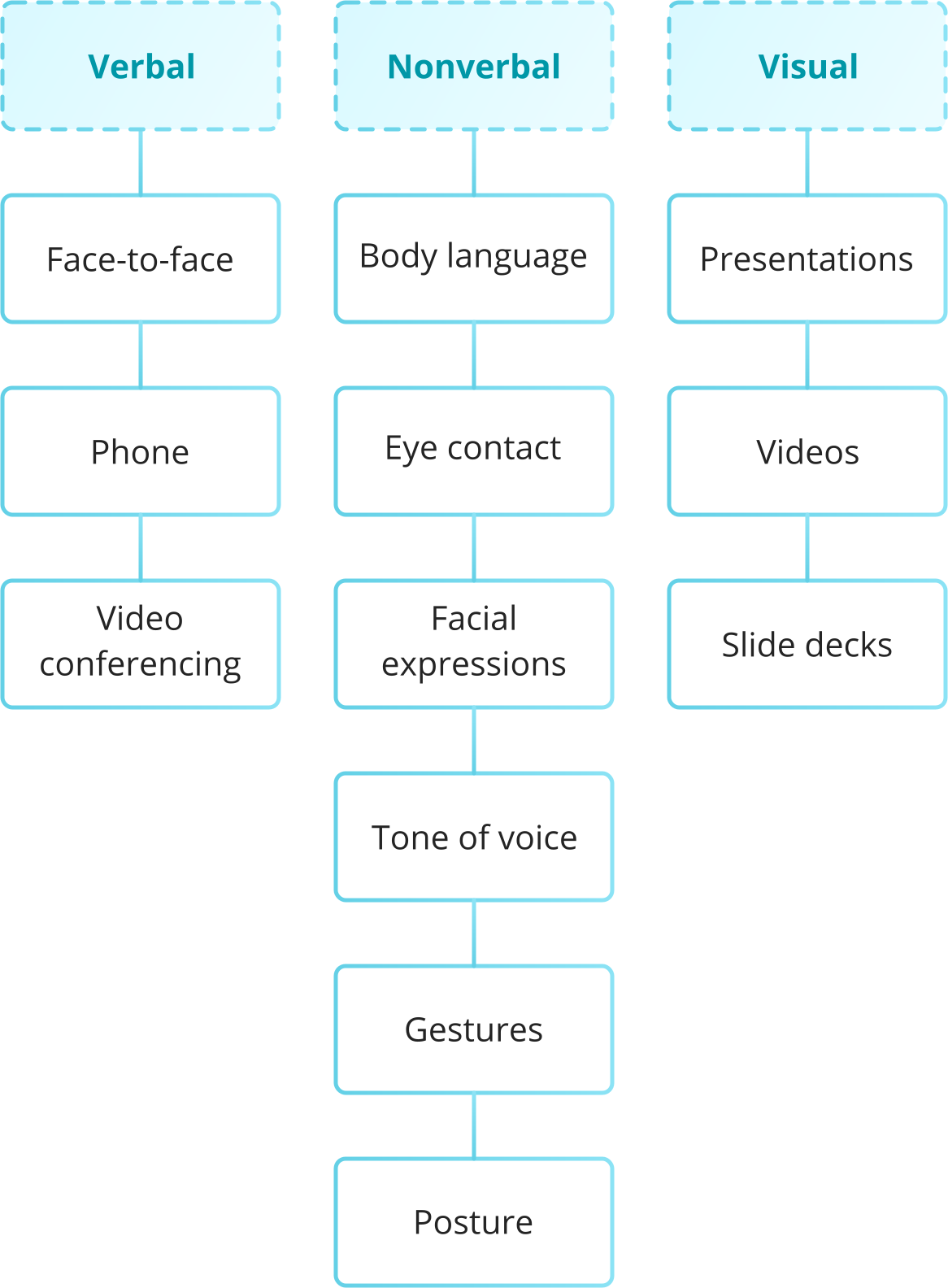
All communication strategies are divided into verbal, nonverbal, and visual. It is recommended to combine two or three types to boost productive interactions between teammates.
Strategy Type
|
Strategy Type |
Primary Channels |
Best Use Cases |
Limitations to Manage |
|---|---|---|---|
|
Verbal |
Emails, chats, task apps, audio/video calls, in-person |
Quick decisions, complex problem-solving, relationship building |
Timezone friction, context loss in text, meeting fatigue |
|
Nonverbal |
Gestures, tone, facial expressions, spatial dynamics |
Trust-building, conflict de-escalation, leadership presence |
Hard to replicate remotely, cultural interpretation variance |
|
Visual |
Slides, diagrams, PDFs, screen shares, annotated workflows |
Training, technical reviews, stakeholder alignment |
Over-reliance can reduce dialogue, accessibility considerations |
- Verbal strategy includes two channels: written and oral communication. The most popular written channels are emails, chats, and task management apps. Oral channels include audio and video calls, and, of course, in-person conversations.
- Nonverbal strategy mostly involves implicit signals, such as gestures, intonation, smile, maintaining personal distance, etc. It is rarely used in the pure form in business environments, but should be taken into account as nonverbal signals are an important component of verbal interactions.
- Visual strategy incorporates primarily visual content, i.e. various illustrations, slides, or even a PDF link to a portfolio used to draw your colleagues’ attention to your speech.
Insight #2: Deployment Model as a Strategic Filter
When selecting communication tools, many buyers focus on features while overlooking deployment architecture.
For enterprises in regulated sectors (finance, government, healthcare), on-premises or private-cloud deployment isn’t just a technical preference—it is a compliance requirement.
Self-hosted solutions like TrueConf keep data within organizational boundaries, enable granular access controls, and support integration with existing identity and monitoring systems.
This architectural choice directly impacts audit readiness, data residency compliance, and long-term total cost of ownership.
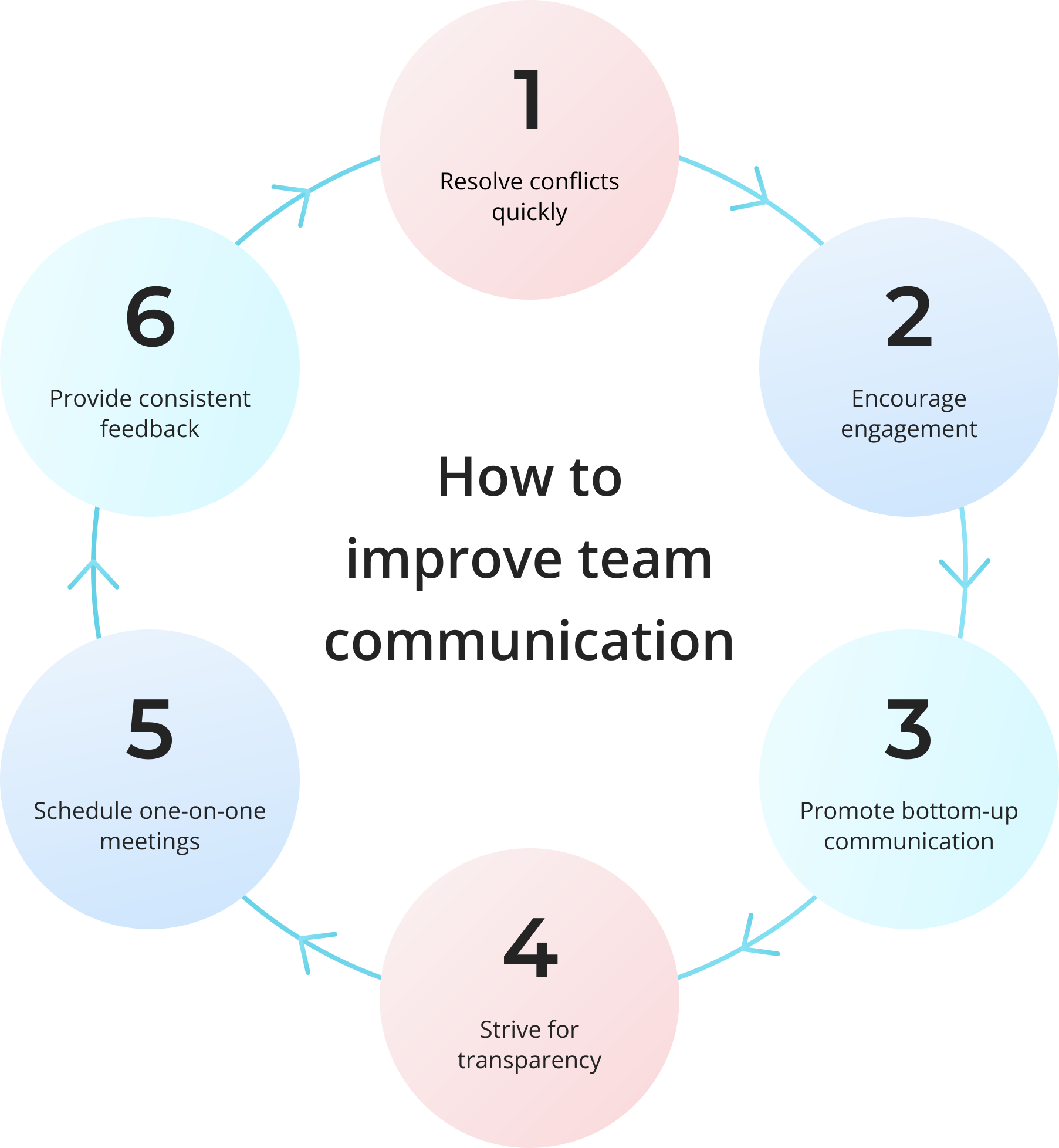
6 Best Strategies to Connect Better with Your Team
There are different strategies you can implement to empower communication for both remote and in-house teams, especially when leveraging insights from current remote work statistics to optimize how distributed organizations execute media strategies and operational workflows. Follow these steps to foster collaboration and build healthy relationships between your employees.
Let everyone speak
Engagement is one of the most essential aspects of staff management, as well as a catalyst for company growth and development. Sometimes it can drop when employees are overlooked during group discussions, which makes them feel a bit left out. Therefore, try to run regular brainstorming sessions and weekly meetings, where each team member can share thoughts and ideas, thus feeling an essential part of the working process. It is also important to encourage active discussions between employees so that everyone feels a positive contribution to the common cause.
Encourage one-on-one communication
Sometimes employees may have sensitive issues that require careful handling by their managers. In such situations, one-on-one conversation is the best way to avoid misunderstandings, improve communication skills, and contribute to creating a favorable psychological climate in the team. Understanding what high-performing ops teams never outsource to meetings helps leaders identify which conversations truly require live dialogue versus structured async communication.
When planning a private meeting, on the phone or via video chat, be prepared to talk openly and show that you value colleague’s time — check the calendar and specify the topic of upcoming sensitive dialogue in advance. In fact, face-to-face conversations are a unique opportunity for management and their staff members to communicate freely and lay the foundation for trusting relationships.
Team building — a top-notch tactic
To build a strong teamwork, you need to create friendly relations between co-workers. When employees feel like family, they are more successful in achieving goals, which is facilitated by an atmosphere of mutual assistance and understanding.
This is where team billing can help, which involves interaction of colleagues through various activities both inside and outside the office, such as celebrating birthdays and corporate holidays, quests and hikes, outdoor sports games, etc. During these events, employees also have the opportunity to communicate with top-level management, thereby breaking down hierarchical barriers.
Celebrate achievements
Feedback from management motivates employees to work better and achieve goals with more enthusiasm. Thus, it is important to track not only the overall statistics of the company’s progress, but also the dynamics of professional development of each team member — translating raw completion numbers into a clear percentage makes those milestones easier to share company-wide. Reward your staff for their personal successes and praise them for a job well done, because everyone appreciates the recognition, regardless of the position held. Tracking feedback and recognition through employee engagement software can help ensure communication remains consistent and meaningful across the entire team.
Be open to feedback
Everyone makes mistakes, even the top executives. For this reason, it’s crucial for the company leaders to be open to feedback from the staff, and anonymous surveys or polls are a good way to get it.
This way you can better understand whether employees feel comfortable and what they lack. Remember that constructive criticism is important from both the management and the performer because it helps to rethink actions and deeds positively.
Use effective communication tools
Whether your team works in the office or remotely, your mission is to create a secure unified communications space for seamless information sharing. For distributed or hybrid teams, integrating tools that support Text To Speech With Emotion can help leaders deliver messages with tone and clarity, ensuring that intent and feeling are not lost in digital communication. You can do that by implementing a feature-rich video conferencing software that can keep your workflows productive.
Selection Criteria
|
Selection Criteria |
Cloud-First Platforms |
Self-Hosted Platforms (e.g., TrueConf) |
|---|---|---|
|
Data Control |
Vendor-managed infrastructure |
Full organizational control, on-premises deployment |
|
Integration Depth |
API-limited, pre-built connectors |
Custom SDKs, SIP/H.323 support, VDI compatibility |
|
Compliance Readiness |
Shared responsibility model |
Isolated network, audit logs, SSO/MFA native |
|
Scalability Model |
Per-user subscription licensing |
Flexible licensing up to 1M users, MCU transcoding |
|
Best For |
Startups, non-regulated SMBs |
Enterprises, government, finance, healthcare |
For example, the TrueConf UC platform can bring your staff together in a powerful collaborative environment, where teammates can:
- Host UltraHD video conferences with up to 2000 participants
- Share content, slides, and collaborate in real time with AI-assisted transcription
- Maintain full control over data residency with on-premises or private cloud deployment
- Integrate with existing infrastructure via SIP/H.323, Active Directory, and custom APIs
- Scale from small teams (TrueConf Server Free) to global enterprises (TrueConf Enterprise)
Insight #3: Integration Depth Drives Adoption ROI
The most under-discussed factor in communication tool success isn’t feature count—it’s integration depth.
A platform that embeds into existing workflows (calendar systems, identity providers, monitoring dashboards) reduces context-switching and admin overhead.
TrueConf’s approach—offering API/SDK toolkits, VDI support, and connectors for Exchange and chatbot ecosystems—means teams adopt the tool because it simplifies their existing processes, not because they must learn new ones.
This “invisible integration” is what separates pilot projects from enterprise-wide deployment.
Take your team communication to the next level with TrueConf!
A powerful self-hosted video conferencing solution for up to 1,000 users, available on desktop, mobile, and room systems.
Conclusion
Holding intra-corporate communications effectively may seem simple at first glance, but this aspect is actually much more complicated. The thing is that people perceive the world differently and have certain life experiences behind them that affect the way they communicate. Therefore, it is recommended to use the above strategies to avoid misunderstandings and provide rich opportunities for healthy interactions within your team, thus boosting workflow productivity and business profitability.
When evaluating communication platforms, prioritize architectural alignment with your governance model. A strategy is only as strong as the infrastructure that enables it—and for organizations where security, control, and integration matter, a self-hosted unified communications foundation provides the reliability required to execute these six strategies at scale.
FAQ: Communication Strategies & Platform Selection
What’s the difference between communication strategy and communication tools?
A communication strategy defines the purpose, audience, channel, and feedback loop for information exchange. Tools like TrueConf enable execution of that strategy by providing secure, scalable infrastructure for video, messaging, and collaboration—ensuring the strategy isn’t undermined by technical limitations or compliance gaps.
How do I choose between cloud and on-premises communication platforms?
Evaluate based on data residency requirements, integration needs, and total cost of ownership. If your organization operates in regulated sectors or requires deep infrastructure control, a self-hosted solution like TrueConf provides the governance, auditability, and customization that public cloud platforms often cannot match.
Can communication strategies work for fully remote teams?
Yes, but they require intentional design around asynchronous workflows, documented decisions, and scheduled synchronous touchpoints. Platforms supporting both real-time UltraHD video and persistent chat—like TrueConf—help remote teams maintain context continuity without sacrificing security or performance.
What’s the most overlooked factor when implementing team communication strategies?
Governance and admin control. Many teams adopt tools based on user experience alone, then struggle with user provisioning, access policies, or audit reporting. TrueConf addresses this by embedding enterprise-grade administration—SSO, MFA, role-based access, and monitoring—directly into the platform architecture.
How do I measure if a communication strategy is working?
Track both qualitative signals (employee feedback, meeting effectiveness surveys) and quantitative metrics (reduced email volume, faster decision cycles, tool adoption rates). TrueConf Monitor provides analytics on conference usage and system performance, helping teams correlate communication infrastructure health with business outcomes.
Is TrueConf suitable for small teams or only large enterprises?
TrueConf scales modularly: TrueConf Server Free supports up to 1,000 users for small teams, while TrueConf Enterprise serves organizations up to 1,000,000 users. The same core architecture ensures consistent security and integration capabilities regardless of deployment size, making it viable for growth-stage companies planning long-term infrastructure.
How does TrueConf handle integration with existing enterprise systems?
TrueConf provides APIs, SDKs, and pre-built connectors for Active Directory, Microsoft Exchange, SIP/H.323 endpoints, and VDI environments. This allows IT teams to embed video and messaging into existing workflows without disrupting identity management, calendar synchronization, or monitoring infrastructure—critical for seamless enterprise adoption.
About the Author
Nikita Dymenko is a technology writer and business development professional with more than six years of experience in the unified communications industry. Drawing on his background in product management, strategic growth, and business development at TrueConf, Nikita creates insightful articles and reviews about video conferencing platforms, collaboration tools, and enterprise messaging solutions.


Follow us on social networks