
AI Automation: Benefits, Implementation Steps, Use Cases, and Platforms to Conside
AI automation is no longer a side project for innovation teams. AI automation has become a practical way to reduce manual work, speed up response times, improve consistency, and make better use of data that arrives as emails, documents, chat messages, meeting records, and support requests.
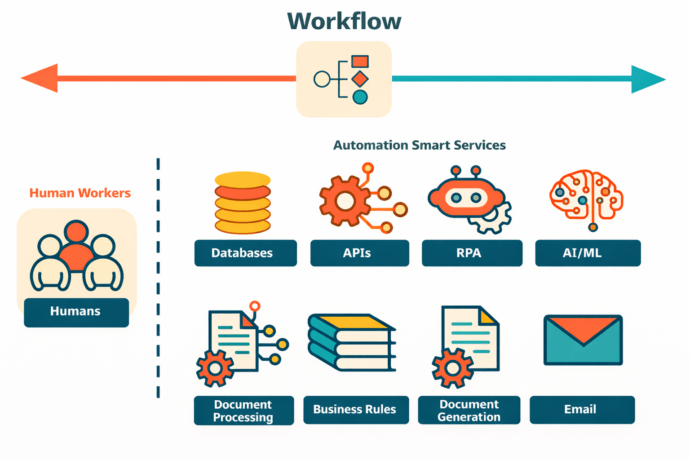
The fastest way to understand AI automation is this: it combines AI models with workflows, business rules, and connected systems so software can interpret input and then trigger real actions. AI automation is useful when work begins with messy information but should end in a clear result, such as routing a support ticket, extracting invoice data, creating a follow-up task, or preparing a meeting summary.
The biggest mistake companies make is treating AI automation like a chatbot experiment. AI automation works best when it is attached to a real process, a real owner, and a measurable outcome. If the team cannot define the trigger, the desired result, the exception path, and the systems involved, the project usually stays in demo mode.
The most important decision is not which model sounds smartest. Teams looking to strengthen AI-powered productivity can use advanced models like Claude Opus 4.7 to support faster analysis, clearer meeting summaries, and more efficient workflow automation. The most important decision is which process should be automated first, which actions must stay under human control, and which platform fits the company’s data, security, and deployment requirements.
Take your team communication to the next level with TrueConf!
A powerful self-hosted video conferencing solution for up to 1,000 users, available on desktop, mobile, and room systems.
The short answer: what readers usually want to know first
AI automation helps most when the input is variable but the output is predictable. A customer email may be written in different ways, an invoice may arrive in different formats, and a meeting may cover many topics, but the next business step is usually known in advance.
The best first AI automation project is often a high-volume queue. Support inboxes, onboarding forms, invoice generation, internal service requests, procurement intake, and meeting follow-ups are strong starting points because they have repeatable patterns and clear outcomes.
AI automation should not replace people in high-risk decisions. Legal review, financial approvals, pricing exceptions, compliance checks, and sensitive HR decisions still need visible human control even when most of the surrounding process is automated.
Platform choice matters because AI automation is not only about AI. AI automation depends on integration, orchestration, access control, process design, logging, and deployment. A company that uses Microsoft tools heavily may evaluate Power Automate first, while a CRM-driven team may look at Salesforce, and a security-sensitive organization may consider TrueConf for communication-related workflows.
AI automation at a glance
|
Question |
Clear answer |
|---|---|
|
What is AI automation? |
This comprehensive approach, often referred to as AI workflow automation, ensures that every step of a business process — from data capture to final execution — is handled with minimal manual intervention. |
|
When is it useful? |
AI automation is useful when work starts with unstructured input and ends with a defined business action. |
|
What is a good first use case? |
A high-volume queue such as support triage, invoice processing, onboarding, or meeting follow-up. |
|
What should stay human-led? |
Risk-sensitive approvals, legal judgments, compliance checks, and exceptions with business impact. |
|
What matters most in platform choice? |
Integrations, governance, deployment model, auditability, and fit with the company’s existing stack. |
What is AI automation?
AI automation is the use of AI models inside a business workflow so software can read, classify, extract, summarize, predict, or match information before moving work forward automatically. AI automation is different from basic automation because it can handle language, documents, images, transcripts, and other forms of unstructured input.
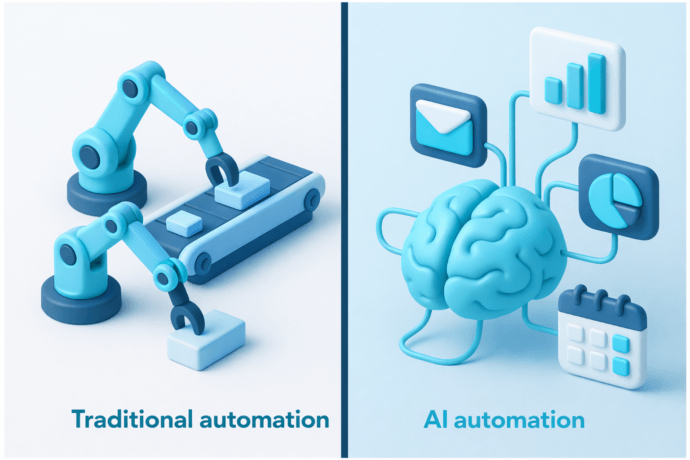
Traditional automation works best when every field is structured and every rule is known in advance. AI automation extends automation into areas where the software needs to interpret meaning before acting. That is why AI automation is often used in support operations, finance, HR, procurement, legal workflows, and meeting management.
AI automation should be viewed as an operating layer, not just a prompt layer. The model may write a summary or classify a request, but the real value appears when the system creates a task, updates a CRM record, routes a case, checks a policy, schedules a follow-up, or logs the result without manual copying. Businesses can implement AI automation solutions to connect these capabilities with existing systems and streamline complex workflows.As AI systems expand beyond text-based automation into creative workflows, structured prompt techniques are also used for generating visual content, where resources covering grok image prompts explain how prompt design can influence the quality and consistency of AI-generated images.
6 benefits of AI automation
1. AI automation turns messy input into usable work
Most business work does not arrive in clean rows and columns. It arrives as emails, PDFs, transcripts, forms, screenshots, voice notes, and ticket descriptions. AI automation makes that material operational by converting it into structured actions, priorities, categories, and follow-up tasks. Instead of building these intricate classification filters internally, many businesses use an agent-as-a-service delivery framework to deploy fully pre-configured virtual workers that ingest unstructured data and execute the tasks autonomously.
2. AI automation saves time on repetitive review
Teams lose hours every week opening the same kinds of requests, reading the same types of documents, and copying the same information into other systems. AI automation removes that repetitive review layer and lets people focus on exceptions, decisions, and relationship-driven work.
3. AI automation speeds up response times
A request can be read, classified, enriched, assigned, and pushed into the right system in seconds. AI automation is especially valuable in environments where speed matters, such as customer support, sales response, service desks, procurement approvals, and employee onboarding. An IT asset disposition company can also use AI automation to streamline equipment intake, asset tracking, and workflow management throughout the device lifecycle.
4. AI automation improves consistency
Humans are flexible, but they are not always consistent under pressure. AI automation helps standardize routing, extraction, formatting, record creation, and follow-up actions so teams get fewer skipped steps and fewer avoidable mistakes. AI proposal automation tools, for example, helps teams reduce manual work and keep brand guidelines consistent. AI automation enables professional to be more efficient.
5. AI automation helps teams use more of their own data
A large share of company knowledge sits in documents, tickets, call records, chat logs, contracts, and meeting notes with AI note taker app. AI automation helps turn that hidden operational data into searchable, actionable information instead of leaving it buried in disconnected systems. Businesses managing large amounts of digital information can also use content workflow tools to organize resources, maintain structured processes, and improve efficiency when handling online content across different platforms.
6. AI automation creates better visibility
A well-designed AI automation workflow leaves a trail. It can record what came in, what was detected, what action was taken, what required escalation, and where human review happened. That visibility matters for performance management, audits, and process improvement.
Insight 1: Process type -> language and document AI -> faster value
If a process starts with emails, PDFs, chats, tickets, or meeting notes, AI automation usually reaches value faster than rule-only automation because AI can normalize the input before the workflow handles the predictable steps.
How to implement AI automation in 7 steps
Step 1. Pick one workflow, not ten
The best starting point is one process with clear volume, clear ownership, and visible pain. Support triage, invoice handling, onboarding intake, procurement requests, and meeting follow-up are all better starting points than a vague idea like “AI for productivity.”
A strong first project is narrow enough to launch but important enough to matter. If the process already has a backlog, frequent delays, or repeated manual effort—which often signals the necessity for broader application modernization to upgrade legacy systems—it is a good candidate. For teams that want to test the workflow before committing to a larger build, an AI app builder like Rocket can help create quick internal apps or prototypes from simple prompts, making it easier to validate the process early. For teams that need technical support in building these workflows, partnering with a team experienced in AI development services can help accelerate implementation without overloading in-house engineers.
Step 2. Map the workflow from trigger to outcome
Write down what starts the process, what input arrives, what decisions need to be made, what systems are involved, what exceptions exist, and what the finished result should look like. This step sounds basic, but it prevents most rollout failures.
A workflow map created within a workflow management system should also include failure conditions. If the model is unsure, if a document is incomplete, or if a policy check fails, the system needs a clear fallback path instead of guessing.
Step 3. Separate AI tasks from deterministic tasks
AI should be used where interpretation is required. That includes classification, extraction, summarization, matching, prediction, and content generation within set boundaries. AI in software development can help teams apply these capabilities while keeping clearly defined boundaries between AI-driven tasks and deterministic processes. Deterministic workflow logic should handle routing, notifications, record updates, approvals, and logging. Combining AI with AI content marketing software helps teams automate content creation while maintaining structured workflows and consistent quality.
This division keeps the system easier to control. This separation is the foundation of well-designed agentic AI workflows, where autonomous AI reasoning handles interpretation while deterministic orchestration handles routing, approvals, and system updates. When these agents also need current information from public websites, a web scraping MCP server can provide a standardized way to retrieve web data as part of the workflow. It also makes it easier to test because teams can see whether the issue comes from the model or from workflow logic.
Step 4. Clean the data before optimizing the model
Many AI automation projects struggle because the source material is inconsistent, duplicated, outdated, or badly labeled. Clean templates, clear field names, trusted knowledge sources, and well-defined categories matter more than people expect.
A messy process cannot be rescued by a strong model alone. AI automation improves when the underlying workflow and source data are made simpler, clearer, and more consistent.
Step 5. Build human review into high-risk stages
Not every step should be fully automated. A contract clause exception, a payment discrepancy, a pricing override, or a compliance-related request should move to a named reviewer instead of closing automatically.
Human review should not be treated as failure. Human review is part of a healthy design because it protects the business where certainty matters more than speed.
Insight 2: Number of systems -> orchestration quality -> project success
If one workflow touches four or more systems, the biggest problem is often not model quality but handoff quality. Projects fail when the AI output is useful but the process breaks between CRM, ERP, ticketing, messaging, identity, and approval tools.
Step 6. Measure what matters
Choose a small set of practical metrics before launch. Time saved, touchless completion rate, exception rate, rework rate, and user satisfaction are better than abstract “AI success” measures.
Measurement also keeps the conversation honest. If the workflow is not faster, cleaner, or more reliable after deployment, the team can see where the process needs adjustment.
Step 7. Expand only after the first workflow is stable
After the first workflow works well, move into adjacent processes. A team that succeeds with support triage may expand into knowledge suggestions, post-call summaries, or renewal workflows. A team that succeeds with invoice capture may expand into payment exception routing or supplier onboarding.
Expansion works best when it follows operational logic. One working system is more valuable than five unfinished pilots.
Common implementation mistakes
The first common mistake is starting with the model instead of the process. Teams often ask which LLM to use before they define what the automation should actually do in production.
The second common mistake is hiding exceptions. Every real process has incomplete documents, unusual requests, special approvals, and edge cases. If the system has no visible exception path, users stop trusting it.
The third common mistake is treating AI automation like a content tool only. Summaries, replies, and suggestions are helpful, but the bigger value often comes from what happens next: record creation, task assignment, approval routing, notifications, and closed-loop execution.
12 AI automation use cases
1. Customer support triage and resolution
Customer support is one of the clearest AI automation use cases because incoming work already arrives in queues. By deploying smart solutions like a 24/7 virtual receptionist, AI automation can classify the issue, detect urgency, summarize the case, suggest a response, and route the request to the right agent or team before a person opens the ticket.
This matters most in support environments where volume is high and response speed affects satisfaction, retention, or service-level targets. A queue with hundreds of similar requests per day does not need more manual reading. It needs faster intake, better prioritization, and a clearer handoff from one stage to the next.
Customer support gets more value when AI automation is connected to actual outcomes. The system should not stop at writing a draft reply. The system should create or update the case, attach context, propose next actions, notify the right owner, and preserve the full support record. Most e-commerce brands now integrate agentic AI to automate FAQs, live chat, voice support, and customer troubleshooting workflows.
The strongest support workflows combine AI interpretation with clear service rules. AI can understand the request, but routing logic, escalation policy, refund limits, and compliance-sensitive actions should still follow defined business conditions. That balance helps teams move faster without losing control over customer-facing decisions. A common way to build that trust is to run AI customer support in draft mode first, where agents approve each suggested reply before it goes out, and only let it answer on its own once the drafts are consistently right.
2. Sales lead qualification and follow-up
Sales teams often lose momentum because form submissions, chat inquiries, and inbound emails sit unreviewed for too long. AI automation can score intent, identify company details, draft a first-touch response, assign the lead, and push all relevant information into CRM. Those company details usually come from public websites and business directories, which enrichment scripts often collect through cheap residential proxies so lookups keep running smoothly at volume. The same approach works for leads who expect a phone call rather than an email. An AI calling agent can call new enquiries within minutes, ask the questions a rep would ask, and log the answers before a person joins the conversation.
Fast response matters because the value of a lead drops when follow-up is delayed. A prospect who fills out a form expects a useful reply, not silence or a generic message hours later. AI automation helps teams move from passive collection to active response. For businesses where leads arrive through WhatsApp or Instagram DM rather than a website form, the same principle applies, tools that qualify leads with AI chatbots on those channels can score intent and route prospects automatically, keeping response time under 3 seconds regardless of when the message arrives.
Outbound sales automation works best when business logic stays visible. Territory rules, product fit, language, industry, and account tier should remain clear policies, while AI handles interpretation of the initial message and the preparation of the next step.
The most useful sales workflows do more than send a polite first email. They enrich the lead, log the interaction, assign ownership, create reminders, and prepare the rep with relevant context before the first real conversation begins. A platform like Skylead, a LinkedIn automation tool and cold email software for agencies and sales teams, can bring these steps together by combining prospecting and data enrichment with multichannel outreach and AI-powered reply handling. That makes the sales motion faster and more consistent without turning outreach into a generic sequence. You can also extend this workflow using AI employees such as Vendasta AI Workforce, which act as always-on digital team members. Instead of stopping at lead scoring or drafting replies, AI employees can automatically follow up with prospects, update CRM records, trigger multi-step engagement workflows, and ensure no opportunity goes cold. This turns AI automation from a single-step assist into a continuous, end-to-end sales execution layer.
3. Invoice processing and accounts payable
Invoice processing is a strong AI automation use case because the outcome is clear even when invoice formats vary. AI automation can extract key fields, identify suppliers, read totals, detect dates, and prepare data for matching and approval.
This use case becomes especially valuable when finance teams receive invoices from many vendors with different templates, languages, and document quality. Manual review slows down the payment cycle and increases the chance of data-entry mistakes. AI automation reduces that load by turning documents into structured records.
Invoice workflows become far more useful when they go beyond extraction. Duplicate checks, mismatch alerts, approval routing, payment status updates, and ERP synchronization are what turn a smart capture tool into a working finance process. For finance teams managing recurring obligations, automated lease accounting software adds structure to lease schedules, compliance, and reporting.
A strong accounts payable workflow also needs visible exception handling. If totals do not match, a purchase order is missing, or tax data looks incomplete, the system should escalate the issue instead of forcing a bad match. That is where finance teams gain trust in and avail from AP automation benefits, because the workflow knows when to stop and ask for review. For teams looking to apply AI more broadly across tax and finance workflows, AI tools for tax professionals can also help identify where automation can support tax-related research, analysis, and compliance tasks.
4. Employee onboarding
Onboarding includes many repeatable actions across HR, IT, identity tools, internal communications, and managers. AI automation can read the onboarding request, identify role and location, launch setup tasks, create reminders, schedule introductions, and track completion.
Employee onboarding often looks simple from the outside, but it depends on coordination across multiple systems and people. Delays in device setup, account creation, access approval, or training assignments create a poor first impression and reduce early productivity. AI automation helps bring those moving parts into one visible process.
Onboarding quality improves when communication is included alongside provisioning. A new employee needs documents, access, welcome information, training steps, meeting invites, and clear next actions. AI automation helps keep that experience consistent and well coordinated.
The best onboarding workflows also adapt to role type, department, location, and employment status. A remote engineer joining a distributed team, an office-based recruiter, and a contractor may all need different access, tools, and steps. AI automation helps interpret the request and launch the right onboarding path without making HR or IT rebuild the process manually each time.
5. IT service desk requests
IT service desks deal with a large volume of requests that are repetitive in structure but variable in wording. AI automation can read the issue, identify the category, pull likely knowledge articles, attach device or user context, and route the request into the correct service path.
This is useful because users rarely describe technical issues in a standard format. One person writes that the laptop is slow, another says the VPN is broken, and another submits a screenshot with almost no explanation. AI automation helps convert those inconsistent descriptions into clear, actionable service requests.
IT teams gain more value when case enrichment happens before handoff, following an incident workflow in ITSM that gives engineers the right context from the start. The first engineer should see history, environment, urgency, likely root causes, and user details instead of starting with a raw message and having to reconstruct the problem manually.
A mature IT workflow can also automate common next steps. Password resets, access requests, device provisioning tasks, software approvals, and known issue responses can move forward automatically when the request is clear and policy rules are already defined.
6. Procurement intake and vendor onboarding
Procurement requests often begin with scattered emails, attached forms, incomplete details, and unclear urgency. AI automation can classify the request, collect missing fields, identify category, trigger risk checks, and route the request to the right approval flow.
Procurement teams often spend too much time just clarifying what is being requested. The issue is not only approval speed, but request quality. AI automation helps standardize intake so the team receives cleaner, more complete requests before the approval process even begins.
Vendor onboarding also benefits because many departments need to be involved. Legal, procurement, finance, compliance, and IT often work in sequence, and AI automation helps turn fragmented intake into a visible workflow with fewer handoff errors. In early-stage vendor relationships, companies often formalize intent and expectations before final contracts are signed, sometimes using a structured letter of intent template to align scope, timelines, and responsibilities before moving into full procurement workflows.
This kind of automation becomes even more valuable when vendor risk and documentation requirements vary by supplier type. A software vendor, logistics provider, and marketing agency may need different checks, forms, and approvals. AI automation helps launch the right path early instead of forcing teams to sort everything out through long email threads.
7. Contract review and legal operations
Legal teams spend significant time scanning contracts for dates, clauses, obligations, unusual language, and missing components. AI automation can extract the main structure of a contract, summarize deviations, flag missing terms, and route the document for review—capabilities commonly found in the best ai contract review software.
This reduces the time spent on repetitive first-pass review, especially when teams process large volumes of sales agreements, procurement contracts, NDAs, and renewals. Legal professionals should spend more time on risk, negotiation, and judgment, not on locating the same clause types again and again.
Contract automation should stay bounded. AI is useful for review preparation, issue spotting, and summarization, but final legal interpretation and approval should remain assigned to qualified people with a clear audit trail. Teams can also use AI contract analysis software to speed up document review, identify important clauses, and organize contract insights before human approval.
The most effective legal workflows also connect contract review to the rest of the business process. A flagged renewal date can trigger a reminder, an approval can update procurement or sales systems, and missing terms can return the document for revision. That turns AI automation into part of legal operations rather than just a document-reading tool.
8. Marketing operations and content repurposing
Marketing teams often produce a single source asset that must become many smaller outputs. AI automation can turn a webinar transcript, product brief, or campaign note into email drafts, social copy, metadata, content outlines, and review tasks, while also helping repurpose explainer videos into short clips for social media distribution with auto-generated subtitles. An AI visibility tracking tool can monitor which content assets are being surfaced inAI-generated search exp eriences, helping teams prioritize future content efforts.
This saves time because marketing work often breaks down not at the strategy stage, but at the execution stage. Teams know what they want to publish, but they lose speed while repackaging one message into many formats for different channels, markets, and stakeholders.
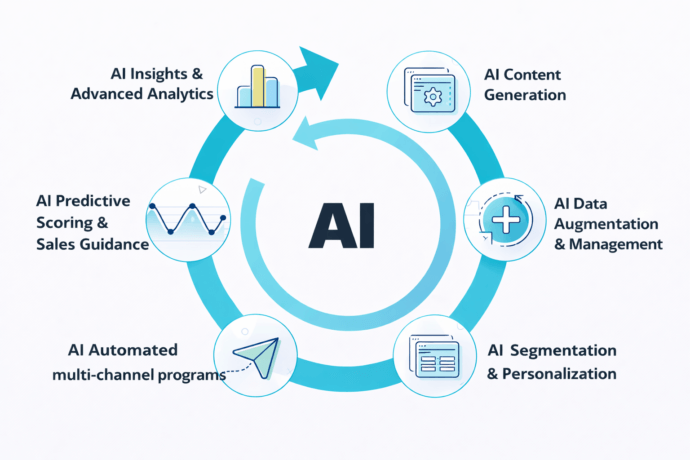
Marketing teams get the best results when brand control is built into the workflow. Review steps, asset naming, publishing approvals, and version control are just as important as the generated text—something a marketing automation consultant can help structure effectively—because content operations break down when nobody knows which draft is approved. As AI automation makes it easier to produce and repurpose content at scale, quality control becomes an important part of the workflow. Teams can add a plagiarism checker to the review process to verify that AI-assisted or repurposed content is original before it moves to publication. This adds another layer of oversight without requiring every piece to be checked manually from the start.
The best marketing automation workflows treat AI as a content engine inside a controlled system. The workflow should know which claims are approved, which assets are final, which channels need review, and which outputs are ready for publication. That makes AI automation useful for production, not just for ideation.
9. Meeting summaries and action tracking
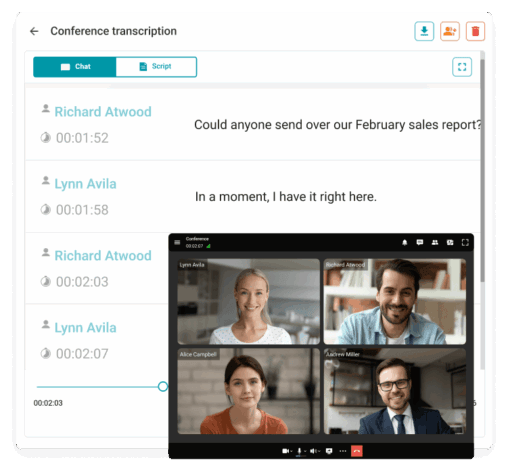
Meetings create useful decisions, but teams often lose those decisions because follow-up is inconsistent. AI automation can transcribe the discussion, separate speakers, summarize the conversation, extract action items, and save the result in a searchable workspace.
This matters because meetings often generate tasks without generating accountability. People leave with different interpretations of what was agreed, who owns the next step, and when something should be completed. AI automation helps turn conversation into a documented outcome.
Meeting workflows become much more valuable when the outputs move into operational systems. Action items can be turned into tasks, customer requests can be logged in CRM, internal decisions can update project boards, and unresolved issues can trigger reminders.
A useful meeting workflow should also preserve context, not just a short summary. Teams may need speaker attribution, timestamps, follow-up questions, shared decisions, and open items that carry over into the next discussion. This is the same gap tools like Kai, an AI executive assistant, are designed to close by carrying action items from the meeting straight into a task list. AI automation improves meetings most when it reduces memory gaps, not just note-taking effort.
10. Secure internal communications and regulated meetings
Some organizations cannot rely on public cloud meeting assistants for every discussion. AI automation in secure communications environments can support transcription, summaries, action tracking, and searchable meeting records without forcing the team to move sensitive content into tools that do not match internal policy.
This use case is particularly relevant in public sector, healthcare, finance, legal, and industrial settings where AI support platforms for compliance officers must meet strict governance and audit requirements before deployment. A controlled environment can make the difference between “AI is interesting” and “AI is actually approved for real work.”
Security-sensitive teams need more than convenience. They need confidence that communication records, meeting data, and AI-generated outputs stay within approved infrastructure, follow internal retention rules, and remain accessible for audit or internal review when needed.
That is why communication platforms such as TrueConf matter in this context. When meetings are part of the operational record, the platform is not just a place to talk. The platform becomes part of how the organization documents decisions, tracks follow-up, and applies AI in a way that aligns with internal governance. The NLP feature is especially important for users who often use video conferencing during business trips. Increasing the sharpness of the speaker’s voice significantly improves the quality of communication, even in noisy or crowded environments, which is very important for elevating customer service.
Companies that want to apply similar technologies beyond video conferencing can work with Addepto for AI solutions to build custom AI systems for automation, data processing, and intelligent business workflows.
11. Finance close and reconciliation support
Finance close requires repeated comparisons, exception handling, supporting document checks, and status follow-up across teams. AI automation can summarize discrepancies, collect evidence, compare supporting data, and escalate unresolved issues.
Close processes often slow down because different teams hold different parts of the evidence. Finance needs explanations, business units need to respond, and supporting records may sit across multiple systems. AI automation helps reduce that coordination burden by gathering context before manual review begins. Bank reconciliation software helps ensure transaction records stay aligned across systems.
Finance teams get the best results when AI automation supports analysis and routing instead of making final decisions on sensitive records. The system should help assemble facts and reduce manual review time while keeping accountable approvals visible.
A strong reconciliation workflow should also create a clear trail of what was checked, what was flagged, and what was resolved. That record matters for internal controls, audit readiness, and post-close improvement. AI automation adds value when it helps finance teams move faster without reducing the visibility of key decisions.
12. Quality control and visual inspection
Quality control teams often spend long hours reviewing outputs for defects, mismatches, or missing elements. AI automation can inspect images, compare outputs to known patterns, and flag anomalies for human review.
This is especially useful in environments where visual review is repetitive, time-sensitive, or difficult to scale. A human reviewer may miss subtle inconsistencies over time, especially when inspection volume is high. AI automation adds another layer of consistency to the process.
Visual inspection becomes valuable when it is attached to real business actions. A detected issue should create a traceable next step, whether that is a rework task, a production alert, a supplier issue, or a quality record update.
The best quality workflows combine automated detection with process discipline. A model may identify an anomaly, but the system should also record batch details, link the issue to the right workflow, assign responsibility, and track resolution. That is what turns AI inspection from a technical feature into a useful operating process.
Vendor roundup: platforms and products to consider
Choosing an AI automation platform should start with the kind of work being automated. Different platforms are stronger in different areas, and product fit matters more than brand familiarity. Before choosing a platform, teams may also want to review AI agent comparison tools that evaluate workflow fit, automation capabilities, integrations, and support for real business processes.
|
Category |
Product |
Brand |
Main role |
Best fit |
|---|---|---|---|---|
|
Enterprise automation |
UiPath Platform |
UiPath |
Combines automation, document handling, AI, and orchestration |
Large operations with complex workflows |
|
Low-code automation |
Power Automate + AI Builder |
Microsoft |
Workflow automation with AI features inside the Microsoft ecosystem |
Companies already using Microsoft tools heavily |
|
Integration-led orchestration |
Workato |
Workato |
Connects apps and automates cross-system workflows |
Teams with many SaaS and business systems |
|
No-code AI automation |
Zapier |
Zapier |
Quick automation across many apps and business tools |
SMB and mid-market teams that need fast setup |
|
CRM-centered automation |
Agentforce + Salesforce Flow |
Salesforce |
AI-driven actions tied to CRM and service workflows |
Sales and service operations |
|
On-prem communications and meeting intelligence |
TrueConf Server + TrueConf AI Server |
TrueConf |
Secure video collaboration, internal deployment, transcription, summaries |
Security-sensitive and infrastructure-driven teams |
Where TrueConf fits
TrueConf belongs in the shortlist when AI automation intersects with internal communications, on-prem deployment, meeting intelligence, and regulated environments. TrueConf Server and TrueConf AI Server are especially relevant when a company needs transcription, summaries, and meeting-derived workflows while keeping infrastructure under tighter control.
TrueConf is a strong fit when the meeting record matters as much as the meeting itself. A company that wants internal communications, secure video collaboration, and AI-generated meeting outputs inside an approved environment should evaluate TrueConf as part of the broader automation stack.
Try TrueConf Server Free!
- 1,000 online users with the ability to chats and mske one-on-one video calls.
- 10 PRO users with the ability to participate in group video conferences.
- One SIP/H.323/RTSP connection for interoperability with corporate PBX and SIP/H.323 endpoints.
- One guest connection to invite a non-authenticated user via link to your meetings.

When AI automation is not the right answer
AI automation is not the right answer when the process itself is broken and nobody agrees on the desired result. If the business rules change every week or depend entirely on personal judgment, automation should wait.
AI automation is also a weak fit when source data is inaccessible, unreliable, or politically contested. If teams do not trust the records or cannot agree on which system is authoritative, the rollout will stall.
AI automation should also be approached carefully when the legal, compliance, or reputational cost of a wrong action is high. In those cases, AI can support review, but not replace accountable decision-making.
Final takeaways
AI automation improves efficiency, but combining it with Graphic Design Services helps businesses create professional visuals that strengthen branding, marketing, and customer engagement. AI automation is useful because it connects interpretation to action. A model alone may generate a response, but a working automation system reads the input, applies business logic, updates systems, alerts people, logs the result, and handles exceptions.
The best AI automation projects are narrow at the start, measurable from day one, and designed with both trust and control in mind. The strongest teams do not chase the most impressive demo. The strongest teams choose one painful workflow and make it reliably better.
The right platform depends on the company’s stack, security model, operating complexity, and use case. In document-heavy environments, one type of platform may lead. In CRM-centered environments, another may lead. In secure communication environments, products like TrueConf become especially relevant.
FAQ
What is AI automation?
AI automation combines AI with workflow logic, integrations, and business rules so software can understand input and then take action automatically. AI automation is most useful when the input is unstructured but the desired outcome is clear.
What is the difference between AI automation and traditional automation?
Traditional automation works best with structured data and fixed rules. AI automation adds the ability to interpret language, documents, images, and context before the process continues.
What is the best first use case for AI automation?
A high-volume operational queue is usually the best starting point. Support triage, invoice handling, onboarding requests, and meeting follow-up are strong examples because they are repetitive and measurable.
Does AI automation replace people?
AI automation replaces repetitive work faster than it replaces accountable roles. People still need to approve high-risk decisions, handle unusual cases, and improve the process over time.
Which departments benefit most from AI automation?
Support, finance, HR, procurement, legal operations, IT, sales, and marketing operations often benefit early. Any department that handles recurring requests, documents, or cross-system workflows is a good candidate.
What are the main risks of AI automation?
The main risks are poor source data, weak process design, missing exception handling, unclear ownership, and too much automation in high-risk decisions. Most failed projects break because the workflow is not thought through, not because the model is weak.
How do I know if a workflow is ready for AI automation?
A workflow is usually ready when the trigger is clear, the desired result is clear, the volume is meaningful, and the exceptions can be defined. If the team cannot explain how work should move from start to finish, it is too early.
Which platform should a Microsoft-centric company consider first?
A Microsoft-centric company often starts with Power Automate and AI Builder because those tools sit naturally inside the Microsoft ecosystem. That fit is strongest when the team already relies on Microsoft business applications.
Where does TrueConf fit in AI automation?
TrueConf is relevant when communication and meetings are part of the workflow, especially in environments that care about internal deployment, controlled infrastructure, and protected collaboration records. They are especially useful when AI automation is tied to transcription, summaries, follow-up, and secure communications.
How should success be measured?
Success should be measured through time saved, touchless completion rate, exception rate, rework rate, and user satisfaction. A useful AI automation project should also have a clear fallback path and a visible owner.
About the Author
Olga Afonina is a technology writer and industry expert specializing in video conferencing solutions and collaboration software. At TrueConf, she focuses on exploring the latest trends in collaboration technologies and providing businesses with practical insights into effective workplace communication. Drawing on her background in content development and industry research, Olga writes articles and reviews that help readers better understand the benefits of enterprise-grade communication.


Follow us on social networks