
Top Microsoft Teams Competitor Platforms for Secure Business Communication
Executive Summary
Microsoft Teams dominates enterprise collaboration, but it is not the right fit for every organization. Companies with strict data sovereignty requirements, private network mandates, regulated industry compliance needs, or a primary focus on high-definition video conferencing consistently seek capable alternatives. This guide covers the leading Microsoft Teams competitor platforms, explains what differentiates them, and provides a structured framework for choosing the right solution based on your deployment model, security posture, and communication priorities.
Bottom line: The best Teams alternative is not the one with the most features — it is the one that aligns with your infrastructure strategy, workflow, and long-term control requirements.
Quick Comparison: Top Microsoft Teams Competitors at a Glance
|
PLATFORM |
BEST FOR |
DEPLOYMENT |
VIDEO-FIRST |
SELF-HOSTED OPTION |
REGULATED INDUSTRIES |
|---|---|---|---|---|---|
|
TrueConf Server |
Secure enterprise video + private deployment |
On-premises / Private cloud |
Yes |
Yes |
Strong fit |
|
Slack |
Chat-centric team collaboration |
Cloud |
No |
No |
Limited |
|
Zoom |
Meeting-first communication |
Cloud / On-prem (enterprise) |
Yes |
Limited |
Moderate |
|
Google Workspace |
Google-ecosystem teams |
Cloud |
Partial |
No |
Limited |
|
Webex |
Enterprise-scale conferencing |
Cloud / Hybrid |
Yes |
Limited |
Strong fit |
|
Mattermost |
Developer / IT self-hosted messaging |
On-premises / Cloud |
No |
Yes |
Strong fit |
|
Rocket.Chat |
Open architecture + customization |
On-premises / Cloud |
No |
Yes |
Strong fit |
Why Organizations Seek Microsoft Teams Alternatives?
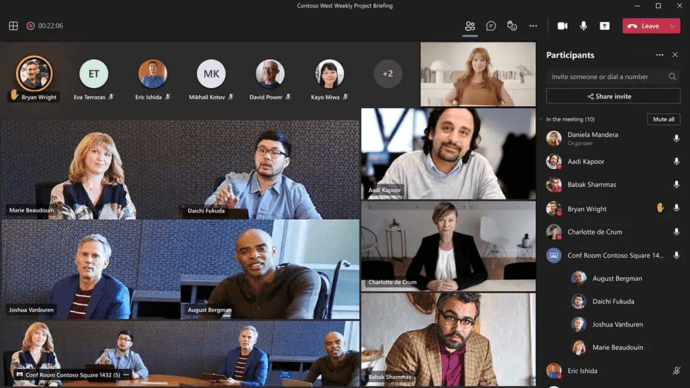
Companies migrate away from Teams for various reasons, though the underlying motivation is usually consistent, they require a tool that aligns more closely with their operational reality:
Complexity is a frequent pain point.Teams are deeply integrated into the Microsoft ecosystem. While beneficial for some, this can feel cumbersome for organizations that don’t utilize Microsoft 365 universally. For smaller groups or those with heterogeneous IT setups, the platform can appear overly complex.
Control over deployment is another critical factor. Many entities demand autonomy regarding data residency, system management, and administrative access. This is vital for sectors governed by internal compliance mandates, private infrastructure, or rigorous security standards.
Video communication priorities also play a role. Some businesses need a platform where conferencing and video collaboration are primary features, not secondary add-ons. In such instances, they may evaluate Teams against video-first enterprise platforms offering a distinct user experience.
Additionally, companies explore alternatives when external collaboration proves cumbersome, licensing costs escalate with scale, or internal adoption rates lag. A tool might be feature-rich theoretically, but if it hinders communication or creates friction for staff, businesses will look elsewhere.
Ultimately, finding a Microsoft Teams competitor boils down to one core question: which platform offers the optimal mix of features, security, usability, and infrastructure control for the organization?
Insight #1 — The Ecosystem Lock-In Problem Most Reviews Ignore
Microsoft Teams is not just a collaboration tool — it is a gateway into a deeply interdependent Microsoft ecosystem. Organizations that evaluate Teams vs. alternatives purely on feature checklists miss the more consequential factor: how much operational control they are prepared to hand to a single vendor. For enterprises in government, defense, healthcare, or critical infrastructure, this is not a preference — it is a compliance requirement. Platforms like TrueConf Server are explicitly built for environments where infrastructure sovereignty is non-negotiable.
For teams on a budget, consider free Microsoft Teams alternatives that deliver enterprise collaboration without the subscription.
Key Factors When Choosing a Teams Alternative?

The ideal substitute depends on your specific business requirements. For organizations working across multilingual teams or international clients, tools like a language translator can help make communication and collaboration smoother by reducing language barriers. Before evaluating vendors, clearly define your priorities and the problems you want the platform to solve.
The best choice is not always the one with the most features, but the one that matches your workflows, security expectations, and growth plans. A clear understanding of these factors will make it much easier to compare vendors and select a solution that delivers long-term value.
- Deployment Model: Determine if you prefer cloud services for rapid rollout, private cloud or on-premises solutions for enhanced data control and internal access management.
- Communication Style: Identify whether your workflow centers on chat channels, video meetings, webinars, or a hybrid of messaging and file sharing. A messaging-heavy culture will choose differently than one reliant on constant video interaction.
- Security and Compliance: For sectors like healthcare, finance, government, and education, standard cloud convenience is often insufficient. Requirements may include private deployment, role-based access, and guaranteed data handling protocols.
- Integration Capabilities: The platform must interoperate with existing systems, such as directory services, email, calendars, CRMs, or internal portals.
- Scalability: A solution suitable for a small team might struggle across multiple regions or departments. Consider future growth potential.
- Total Cost of Ownership (TCO): Look beyond subscription fees. Factor in onboarding, support, administration, training, infrastructure costs, and the long-term implications of vendor lock-in.
Detailed Breakdown of Top Alternatives
TrueConf Server

TrueConf Server is a robust alternative for organizations requiring more than standard cloud collaboration. It suits businesses prioritizing secure communication, high-quality video conferencing, and infrastructure sovereignty.
Designed around professional scenarios where reliability and video matter, it fits enterprises, public sector bodies, healthcare, education, and private networks. For those aiming to minimize reliance on third-party clouds, TrueConf Server offers a controlled communication model, making it highly relevant for compliance-heavy industries.
Empower your video conferencing experience with TrueConf!
Slack

Slack remains a recognizable alternative due to its clean, channel-based interface that organizes conversations across projects and departments. It excels in speed, informal collaboration, and integrations, making it perfect for fast-paced environments where coordination happens via chat. Its clarity in messaging offers a focused choice for teams overwhelmed by bulky enterprise suites.
Zoom

Zoom is primarily a meeting-first solution. Though it has expanded into broader collaboration, its reputation rests on virtual meetings. Businesses reliant on internal calls, webinars, or distributed teamwork often choose Zoom for its familiarity and ease of adoption. When comparing Zoom vs. Teams, the distinction often lies in workflow: Teams sit within a productivity suite, while Zoom focuses on communication simplicity.
Google Workspace
This is a natural fit for businesses using Gmail, Drive, and Meet. It appeals to companies wanting lightweight cloud collaboration without the Microsoft stack. Its strength is ecosystem consistency; teams already using Google tools may find efficiency in keeping files, meetings, and chat in one environment. It is particularly practical for smaller companies seeking fast onboarding.
Webex

Webex competes strongly in enterprise conferencing. It is chosen by organizations needing mature platforms for large-scale meetings and structured collaboration. Its value shines in environments where reliability and professional meeting capabilities are paramount. Companies comparing Teams and Webex are often focusing on the conferencing aspect rather than simple chat.
Mattermost

Mattermost attracts organizations seeking self-hosted messaging and strong administrative control. Popular with IT and development teams, it supports an infrastructure-driven approach. For businesses where security and internal ownership outweigh consumer-style features, Mattermost is a strong contender.
Rocket.Chat

Rocket.Chat offers flexibility and deployment choice, often discussed regarding open architecture and customization. It appeals to businesses needing to shape the platform around their own policies. Like Mattermost, it is relevant when control and privacy drive the decision rather than convenience.
Why TrueConf Stands Out as a Competitor?
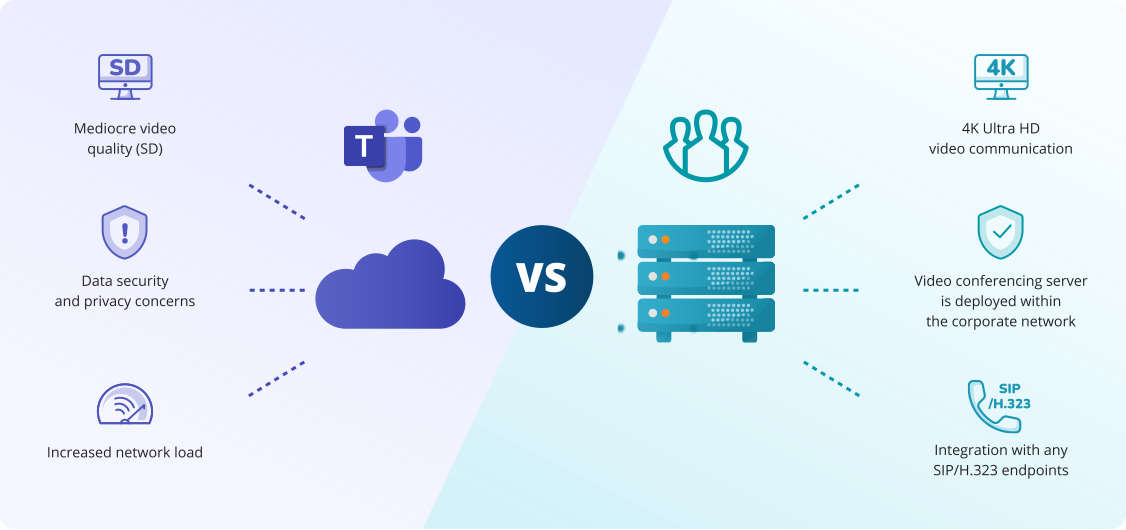
TrueConf Server addresses priorities often overlooked by cloud-first tools. Instead of focusing solely on messaging bundles, it targets organizations needing secure, reliable, business-grade communication under their own control:
- Deployment Flexibility: For companies requiring infrastructure within a private environment, this is crucial. It aligns with internal security policies, giving organizations confidence in system management.
- Video Collaboration Focus: Many businesses seeking a Teams alternative need a platform supporting meetings and video interaction as core functions. TrueConf is well-positioned here.
- Suitability for Sensitive Environments: Government, healthcare, finance, and critical infrastructure sectors often need solutions operating within controlled networks. TrueConf offers a more suitable approach than general-purpose cloud tools in these scenarios.
- Independence from Ecosystems: Not every company wants workflows tied to a single global vendor’s suite. For those seeking independence, TrueConf is a credible alternative.
Best Competitors by Use Case
The optimal choice depends on your communication habits and the way your teams interact on a daily basis. Some organizations rely heavily on chat and asynchronous collaboration, while others need high-quality video meetings, webinars, or secure internal communication.
The right platform should reflect your workflow, technical requirements, and the level of control your business expects. Defining these needs in advance will make it easier to identify the most suitable solution:
- Enterprise Communication: TrueConf and Webex align well with large structures and business-critical meetings.
- Secure Internal Collaboration: TrueConf, Mattermost, and Rocket.Chat suit businesses prioritizing deployment control and private environments.
- Video Conferencing: TrueConf, Zoom, and Webex are top alternatives when meeting quality matters more than chat.
- SMBs: Slack, Zoom, and Google Workspace offer easier adoption and lower barriers to entry.
- Self-Hosted Needs: TrueConf, Mattermost, and Rocket.Chat are the primary candidates for infrastructure control.
- Regulated Industries: TrueConf is particularly notable for sectors with stricter security expectations.
How to Select the Right Alternative?

Start by analyzing your communication model and identifying how employees collaborate throughout the workday. Some teams rely mostly on fast chat exchanges and channel-based coordination, while others depend on frequent meetings, presentations, and real-time discussions.
It is also important to consider how much control your organization needs over data, infrastructure, and administration. Once these priorities are clear, it becomes much easier to choose a platform that supports your workflow instead of disrupting it:
- Chat-Centric: If teams coordinate via channels and quick messages, Slack may be the best fit.
- Meeting-Centric: If business depends on calls and video interaction, Zoom or Webex are more suitable.
- Control-Centric: If data handling and infrastructure are priorities, self-hosted platforms like Mattermost, Rocket.Chat, or TrueConf should be top of the list.
- Security-Centric: In regulated or private environments, convenience shouldn’t drive the decision. The right competitor offers stronger control and administration under your policies.
For many, the question isn’t “which app is popular?” but “which platform fits our security and infrastructure strategy?” When those factors matter, TrueConf becomes a compelling option.
FAQ
What is the best Microsoft Teams competitor for business?
There is no universal answer. Slack excels in chat, Zoom in meetings, Google Workspace for Google-centric teams, and Webex for enterprise conferencing. TrueConf Server is ideal for businesses prioritizing security, video quality, and deployment control.
Which alternative is best for secure communication?
For stronger infrastructure control, TrueConf Server, Mattermost, and Rocket.Chat are highly relevant. They are chosen when privacy and internal ownership outweigh standard cloud convenience.
Is there a self-hosted alternative to Microsoft Teams?
Yes, organizations seeking self-hosted options often compare TrueConf Server, Mattermost, and Rocket.Chat. These align better with companies wanting direct management of communication infrastructure.
What is the best competitor for video conferencing?
If video is the priority, TrueConf Server, Zoom, and Webex are strong alternatives. The choice depends on whether you prefer cloud convenience, enterprise features, or deployment control.
Which competitor suits regulated industries?
Regulated sectors typically require stricter security and administration. In these cases, TrueConf Server is often one of the most suitable options.
Is TrueConf Server good for private deployment?
Yes, TrueConf Server is particularly relevant for institutions needing secure communication within private infrastructure, making it a strong competitor for organizations that cannot rely solely on public cloud tools.
About the Author
Diana Shtapova is a product specialist and technology writer with three years of experience in the unified communications industry. At TrueConf, she leverages her deep product expertise to create clear and practical content on video conferencing platforms, collaboration tools, and enterprise communication solutions. With a strong background in product research and user-focused content development, Diana helps professionals and businesses understand core product features, adopt new technologies, and unlock the full potential of modern collaboration software.


Follow us on social networks