
Enterprise Intranet Platform: Features, Architecture and Leading Options
An enterprise intranet platform is a private digital workplace that gives employees a central place to find company information, access services, connect with colleagues and navigate the tools they use to get work done.
Modern intranets are no longer just internal websites for company news.
At enterprise scale, they often sit between employees and a wider technology environment:
employee → intranet → information + people + services + business systems
The intranet may not replace every application behind that workflow.
Its role is to make the organization easier to navigate.
That distinction matters because a company can have excellent chat, document and meeting tools and still have a poor intranet if employees cannot reliably answer basic questions such as:
- Where is the current policy?
- Which system should I use for this task?
- Who owns this process?
- Where can I find a colleague or expert?
- Which company announcement applies to me?
For enterprise buyers, the key question is:
Can the intranet become a reliable front door to the organization without creating another information silo?
What Is an Enterprise Intranet Platform?
An enterprise intranet is a private platform designed to organize internal information, communication and employee access across large or complex organizations.
Typical capabilities include:
- company news and announcements;
- enterprise search;
- employee directories;
- policies and knowledge;
- document access;
- department and location pages;
- personalization;
- mobile access;
- integrations with business systems;
- analytics and governance.
Modern platforms increasingly overlap with the broader employee experience and digital workplace categories.
Forrester’s 2026 intranet-platform evaluation also highlights areas such as AI-enabled search, AI assistants, content governance and process automation as growing parts of the category.
But an intranet should still solve one fundamental problem:
Help employees find the right information, person or action with as little organizational friction as possible.
What Makes an Intranet Enterprise-Ready?
A small company can often manage internal information with a shared drive, chat channels and a few documentation pages.
Large organizations have different problems.
Scale introduces:
- multiple departments;
- countries and languages;
- subsidiaries;
- frontline and desk-based employees;
- complex permissions;
- large volumes of content;
- multiple business systems;
- delegated publishing;
- regulatory requirements.
That changes what an intranet needs to do.
|
Requirement |
Basic intranet |
Enterprise intranet |
|---|---|---|
|
Audience |
One relatively uniform workforce |
Multiple roles, regions and business units |
|
Content |
Basic pages and documents |
Large governed information estate |
|
Publishing |
Few editors |
Distributed publishing with ownership and approval |
|
Search |
Site search |
Search across intranet and connected sources |
|
Personalization |
Limited |
Role, location, department or profile-based |
|
Integrations |
A few links |
HR, productivity suites, service portals and business apps |
|
Governance |
Informal |
Ownership, lifecycle, permissions and auditability |
|
Mobile/frontline |
Optional |
Often a core requirement |
|
Analytics |
Traffic metrics |
Findability, reach, engagement and adoption |
|
Administration |
One team |
Shared governance across IT, HR and Internal Communications |
The enterprise challenge is therefore not just user volume.
It is organizational complexity.
The Four Jobs of an Enterprise Intranet
Instead of evaluating an intranet by dozens of isolated features, it is more useful to ask what jobs the platform performs for employees.
1. Help Employees Find Information
Employees need access to:
- policies;
- procedures;
- forms;
- benefits information;
- organizational knowledge;
- department resources;
- current documents.
This makes search and information architecture central intranet capabilities.
A strong intranet should reduce the common problem of employees knowing that information exists but not knowing where it lives.
AI and semantic search can improve discovery, but they do not remove the need for clear content ownership and lifecycle management.
2. Help the Organization Reach Employees
An intranet also provides a controlled publishing channel for:
- company announcements;
- leadership communication;
- operational notices;
- departmental updates;
- policy changes.
Enterprise environments often need targeting by:
- country;
- location;
- department;
- role;
- language;
- employee type.
For frontline-heavy organizations, communication may also extend to mobile applications, push notifications, email or digital signage.
3. Connect Employees to People and Services
Employees use intranets to locate:
- colleagues;
- expertise;
- HR services;
- IT support;
- forms;
- applications;
- internal communities.
The intranet can act as a navigation layer across the organization rather than duplicating those systems.

For example:
employee → intranet → HR portal
or:
employee → intranet → colleague profile → communication
This is one of the main differences between an intranet and a standalone collaboration tool.
4. Provide a Front Door to Work
The strongest enterprise intranets increasingly act as a digital workplace entry point.
Employees may start with the intranet and move into:
- Microsoft 365;
- Google Workspace;
- HR systems;
- CRM;
- project platforms;
- communication systems;
- service portals;
- knowledge bases.
The intranet does not necessarily replace those tools.
It organizes access to them.
A useful model is:
information → people → services → action
Enterprise Intranet vs Digital Workplace vs Collaboration Platform
These categories overlap, but they are not identical.
|
Category |
Primary role |
|---|---|
|
Enterprise intranet |
Information, communication and employee-access hub |
|
Digital workplace |
Wider environment containing the systems employees use |
|
Collaboration platform |
Direct teamwork through messaging, meetings, documents or projects |
|
Employee communication platform |
Publishing and distributing internal communications |
|
Employee experience platform |
Broader employee-facing layer combining communication, services and personalization |
An intranet can contain collaboration features.
It can also integrate with collaboration platforms.
But chat or video conferencing alone does not make a product an enterprise intranet.
Similarly, an intranet does not need to replace messaging, video conferencing, document editing or project management.
For enterprise architecture, a more useful question is:
Which system should be authoritative for each employee need?
Core Enterprise Intranet Capabilities
Most large organizations should evaluate at least five areas.
Enterprise Search
Search should help employees find relevant content even when they do not know which department or system owns it.
Important questions include:
- What sources can search cover?
- Does it respect permissions?
- Can employees search connected applications?
- How are stale and duplicate results handled?
- Can search understand natural-language queries?
AI-powered search has become a major competitive area in the intranet market, but buyers should evaluate actual findability rather than simply checking whether a platform includes an AI assistant.
Content and Knowledge Governance
Every important page should have an answer to:
Who owns this information?
Enterprise content requires:
- ownership;
- publishing permissions;
- approval where necessary;
- review dates;
- archival rules;
- version control.
Without governance, an intranet gradually becomes another collection of outdated pages.
Internal Communications
Organizations need tools to publish and target information at scale.
Useful capabilities may include:
- news;
- announcements;
- campaigns;
- notifications;
- newsletters;
- mobile delivery;
- engagement analytics.
The required depth depends heavily on the workforce.
A multinational manufacturer with thousands of frontline employees has different requirements from a software company where almost everyone works at a computer.
Integrations
Enterprise intranets rarely operate alone.
Common integration targets include:
- Microsoft 365;
- SharePoint;
- Google Workspace;
- HRIS;
- service management;
- CRM;
- messaging;
- video conferencing;
- project systems.
- time tracking.
The relevant question is not how many integrations appear in a marketplace.
It is whether the platform connects deeply with the systems employees actually use.
Mobile and Frontline Access
Employees without permanent desktop access should not become second-class intranet users.
For frontline-heavy organizations, evaluate:
- mobile UX;
- authentication;
- notifications;
- language support;
- targeted content;
- connection to workforce systems.
Directory, personalization, administration and analytics also matter, but they should be evaluated in the context of these core jobs rather than as isolated feature categories.
Common Enterprise Intranet Approaches
Different products emphasize different operating models.
|
Approach |
Typical fit |
|---|---|
|
Communications-led intranet |
Internal communications and frontline reach |
|
Digital workplace intranet |
Broad employee hub across information, services and business apps |
|
Ecosystem-based intranet |
Organizations centered on Microsoft 365 or Google Workspace |
A communications-led intranet is strongest when reach, campaigns and frontline access dominate the requirement.
A digital workplace intranet is broader, connecting employees to information, services and multiple enterprise systems.
An ecosystem-based intranet is often attractive when the organization already stores most content and identity inside one productivity suite.
None of these approaches is universally better.
The right fit depends on where the organization already keeps authoritative information and how employees access work.
Enterprise Intranet Platforms to Consider
There is no meaningful universal ranking because enterprise requirements differ substantially.
A useful shortlist should represent different operating models.
|
Platform |
Best fit |
Main intranet orientation |
|---|---|---|
|
Microsoft SharePoint |
Microsoft 365-centered enterprises |
Content, sites, documents and extensibility |
|
Unily |
Complex global digital workplaces |
Broad intranet and employee experience |
|
Simpplr |
Enterprises prioritizing usability and information discovery |
Modern intranet and employee services |
|
Staffbase |
Internal communications and frontline reach |
Communications-first intranet |
|
LumApps |
Microsoft/Google-connected workplaces |
Employee hub and personalization |
|
Interact |
Structured enterprise intranet deployments |
Content, search and governance |
|
Happeo |
Google Workspace-oriented organizations |
Intranet and employee communities |
Best for: Organizations already standardized on Microsoft 365.
SharePoint provides a strong foundation for:
- internal sites;
- pages;
- document libraries;
- permissions;
- enterprise content.
Its biggest advantage is integration with the wider Microsoft environment.
However, SharePoint is often a foundation rather than a complete out-of-the-box employee experience. Organizations may need additional design, governance, Microsoft Viva or third-party intranet layers.
Unily
Best for: Large enterprises with complex structures and digital workplace requirements.
Unily focuses on combining:
- internal communications;
- knowledge;
- search;
- personalization;
- integrations;
- workflows.
It fits organizations where the intranet needs to act as a broad employee hub across multiple business systems.
Simpplr
Best for: Enterprises prioritizing usability, employee services and AI-assisted information discovery.
Simpplr positions its intranet around employee experience, communications, search and service access.
Its fit is strongest where reducing the effort required to find information and complete common internal tasks is a major objective.
Staffbase
Best for: Organizations where communication reach is the dominant requirement.
Staffbase is particularly relevant for:
- targeted internal communication;
- employee campaigns;
- mobile workers;
- frontline communication;
- multi-channel delivery.
Its role may be more complementary where document management and broader knowledge workflows remain in systems such as SharePoint or Microsoft 365.
LumApps, Interact and Happeo remain useful shortlist options for organizations with specific ecosystem, governance or community requirements, but they do not need separate long vendor profiles here.
Where TrueConf Fits
TrueConf should not be treated as a direct replacement for SharePoint, Unily, Simpplr or Staffbase.
Its role is different.
TrueConf Server provides an enterprise communication layer that can connect to a broader intranet and digital workplace architecture.
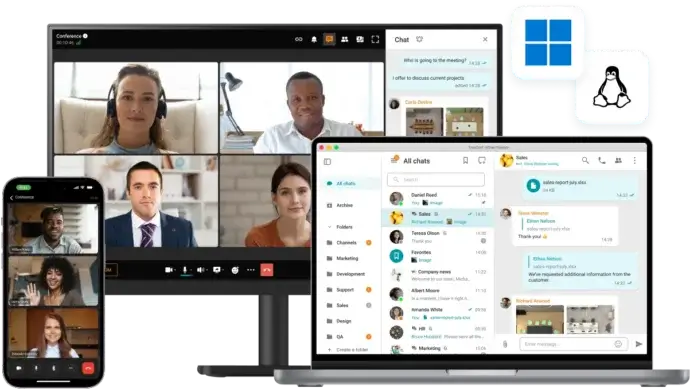
It combines persistent messaging, voice and video calls, meetings, channels, file exchange and presence in a customer-operated environment.
This is particularly relevant when employees need to move from:
information discovery
to:
direct communication
without making the intranet itself responsible for all messaging and meeting functions.
TrueConf can therefore complement an enterprise intranet while the intranet remains authoritative for:
- company information;
- policies;
- knowledge;
- employee services;
- navigation.
That distinction is important because a modern intranet is often a front door to multiple systems, not a replacement for all of them.
Try TrueConf Server Free!
- 1,000 online users with the ability to chats and mske one-on-one video calls.
- 10 PRO users with the ability to participate in group video conferences.
- One SIP/H.323/RTSP connection for interoperability with corporate PBX and SIP/H.323 endpoints.
- One guest connection to invite a non-authenticated user via link to your meetings.

Where Enterprise Intranets Commonly Fail
Enterprise intranets often fail for reasons that have little to do with missing features.
Employees Do Not Know Which Information Is Authoritative
If the same policy appears in:
- the intranet;
- SharePoint;
- a shared drive;
- email;
- a chat attachment;
employees cannot easily know which version is current.
The solution is not better search alone.
The organization needs clear content ownership.
Search Finds Content but Not Answers
An intranet can contain thousands of pages and still be difficult to use.
Evaluate whether employees can complete real information tasks, such as:
Find the current travel policy.
not just whether the search box returns results.
The Intranet Becomes Another Destination
If employees need to remember:
“I should check the intranet too”
the platform may not be sufficiently connected to everyday work.
The strongest intranets connect employees to existing services rather than adding another disconnected layer.
Everyone Receives Everything
Enterprise scale creates communication noise.
Personalization and targeting should help employees distinguish:
what affects me
from:
what is happening elsewhere in the organization.
Nobody Owns Old Content
Without review and archival processes, the information estate deteriorates.
Every critical content area should have:
- an owner;
- a review process;
- an expected lifecycle.
How to Choose an Enterprise Intranet Platform
Start with employee problems rather than vendor demonstrations.
1. Define What the Intranet Should Own
Decide whether it should be authoritative for:
- company communication;
- knowledge;
- policies;
- employee services;
- directory;
- navigation to applications.
Do not assume it must own everything.
2. Map the Workforce
Identify who must use the platform:
- desk employees;
- frontline employees;
- contractors;
- remote teams;
- international offices;
- subsidiaries.
Different workforce models produce different mobile, authentication and personalization requirements.
3. Test Real Information Tasks
Choose tasks employees actually perform.
For example:
- find a policy;
- locate a subject-matter expert;
- find a form;
- access an HR service;
- identify the latest company announcement.
This tests the platform more effectively than reviewing a feature list.
4. Map Required Integrations
Create an inventory of the systems that should sit behind the employee experience.
Examples:
- HRIS;
- Microsoft 365;
- Google Workspace;
- communication tools;
- service desk;
- CRM;
- document systems;
- project management.
The intranet should reduce fragmentation rather than hide it behind a homepage.
5. Define Governance Before Migration
Decide:
- who can publish;
- who approves;
- who owns each content area;
- how often content is reviewed;
- when outdated material is removed.
Enterprise intranets are publishing systems as much as software products.
6. Define Success Metrics
Avoid relying only on page views.
Useful measures include:
- successful and failed searches;
- content freshness;
- reach of critical communications;
- adoption by employee segment;
- completion of common tasks.
The ultimate test is whether the intranet makes the organization easier to navigate.
A compact evaluation checklist can then be used during vendor selection:
|
Area |
What to verify |
|---|---|
|
Search |
Can employees find information across required sources? |
|
Knowledge |
Can content ownership and lifecycle be governed? |
|
Communication |
Can messages reach the correct audiences? |
|
Personalization |
Can experiences differ by role, location and business unit? |
|
Integrations |
Does the platform connect to the existing digital workplace? |
|
Mobile |
Can frontline and mobile employees use core functions effectively? |
|
Identity |
Does it integrate with enterprise IAM and permissions? |
|
Administration |
Can ownership and publishing be distributed safely? |
|
Analytics |
Can teams measure findability, reach and adoption? |
|
Architecture |
Does the deployment model meet enterprise IT requirements? |
The checklist should be weighted according to the organization’s operating model.
A manufacturing company with thousands of frontline workers should not evaluate mobile communication the same way as a professional-services firm where nearly everyone works at a desk.
FAQ
What is an enterprise intranet platform?
An enterprise intranet platform is a private digital workplace that helps employees access company information, communications, people, services and connected business systems across a large organization.
What are the main features of an enterprise intranet?
Typical features include enterprise search, company news, knowledge pages, employee directories, personalization, mobile access, integrations, analytics and content governance.
What is the difference between an intranet and a collaboration platform?
An intranet primarily acts as an information, communication and employee-access hub. A collaboration platform primarily supports direct teamwork through messaging, meetings, shared documents or projects. The two categories can overlap and are often integrated.
What is the difference between an enterprise intranet and a digital workplace?
The intranet is usually one layer of the digital workplace. The digital workplace includes the wider collection of systems employees use, such as communication, productivity, HR, project, document and business applications. The intranet can provide a common front door into those systems.
How do you choose an enterprise intranet platform?
Start by defining what the intranet should be authoritative for, which employees it must serve, what information they need to find and which existing systems must remain in use. Then evaluate search, governance, communication reach, integrations, mobile access and administration against real employee workflows.
Conclusion
An enterprise intranet platform should make a large organization easier to navigate.
Its most important job is not to collect the maximum number of features in one interface.
It is to connect employees with:
information → people → services → action
For some organizations, that means a communications-led intranet.
For others, it means a broad digital workplace hub or an intranet deeply integrated with Microsoft 365 or Google Workspace.
The strongest choice is the platform whose operating model matches the way the enterprise actually publishes information, governs knowledge, reaches employees and connects them to work.
About the Author
Olga Afonina is a technology writer and industry expert specializing in video conferencing solutions and collaboration software. At TrueConf, she focuses on exploring the latest trends in collaboration technologies and providing businesses with practical insights into effective workplace communication. Drawing on her background in content development and industry research, Olga writes articles and reviews that help readers better understand the benefits of enterprise-grade communication.


Follow us on social networks