
Mattermost Alternatives: 6 Options for Self-Hosted and Enterprise Communication
Mattermost is a capable platform for organizations that need self-hosted team messaging, channels, workflow automation, integrations, access controls, and deployment inside private or isolated infrastructure.
But looking for a Mattermost alternative usually means that one part of this model no longer fits.
Some organizations need stronger native video conferencing. Others want federation between independently operated servers, a different way to organize long discussions, tighter integration with an existing productivity suite, or a move away from self-hosting altogether.
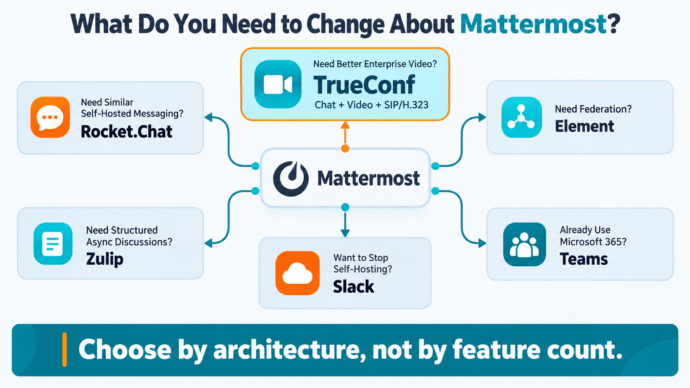
That means the best Mattermost alternative depends less on feature count and more on what you want to change about your current communication architecture.
|
Alternative |
Best for |
Self-hosted |
Main difference from Mattermost |
|---|---|---|---|
|
Private messaging + enterprise video communication |
Yes |
Combines chat with large-scale video conferencing, SIP/H.323 and isolated-network operation |
|
|
Security-focused team messaging |
Yes |
Similar self-managed messaging model with interoperability options |
|
|
Federated communications |
Yes |
Matrix-based decentralized architecture |
|
|
Long-running asynchronous discussions |
Yes |
Topic-based conversation model |
|
|
Microsoft 365 organizations |
Primarily cloud |
Deep Microsoft ecosystem integration |
|
|
Cloud-first collaboration |
No |
Large SaaS integration ecosystem and low infrastructure overhead |
The first question should not be: Which product has more features than Mattermost?
It should be: Which Mattermost limitation are you actually trying to remove?
Why Replace Mattermost?
Mattermost already covers many enterprise requirements. It provides team messaging, channels, calls, workflow automation, integrations, access controls, federation options, self-hosted deployment, and support for isolated environments in appropriate editions.
Replacing it makes sense when another architecture better matches the organization.
Typical reasons include:
- Video meetings are as important as chat
- The organization wants one system for messaging, calls, meetings and conference rooms
- Existing SIP, H.323, PBX or video endpoints must remain in use
- Communications must continue inside an isolated corporate network
- Separate organizations need to communicate without sharing one central server
- Long-running discussions are difficult to manage in traditional channels
- The organization wants to stop maintaining collaboration infrastructure
- The company already works primarily inside Microsoft 365
This distinction prevents a common migration mistake: replacing Mattermost with another channel-based messenger without solving the underlying problem.
1. TrueConf Server — Best for Unified Private Communications
TrueConf Server is the most relevant Mattermost alternative when an organization needs more than corporate messaging.
Both products can be deployed on customer infrastructure, but they are built around different communication models.
Mattermost is primarily centered on channels, messaging and collaboration workflows.
TrueConf Server combines corporate messaging with a full video communication platform.
Users can work with:
- Personal chats
- Group chats
- Channels
- File sharing
- Audio calls
- Video meetings
- Large conferences
- Screen and content sharing
- Conference recording
- Browser-based meeting access
The main difference
The choice is not simply Mattermost versus another messenger.
It is chat-centered collaboration versus a unified private communication platform.
Why TrueConf Is a Strong Mattermost Alternative
Messaging and Video Use the Same Infrastructure
Organizations often deploy one platform for corporate chat and another for video meetings.
TrueConf can combine both within the same server environment.
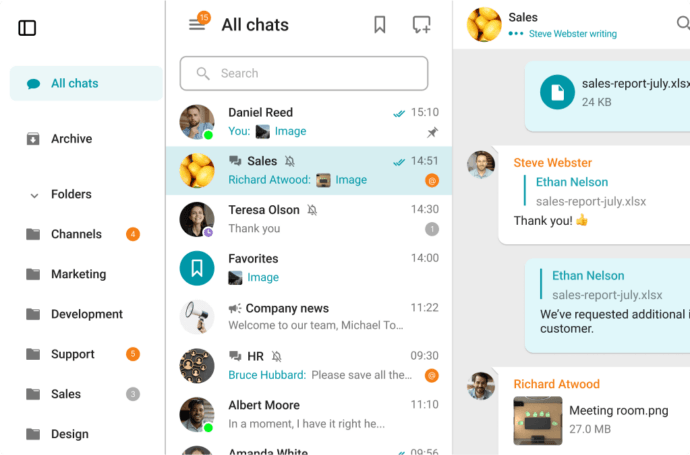
Employees can move from a chat to a call or video meeting without introducing a separate meeting service and another communication stack.
This becomes especially valuable when meetings are a daily operational tool rather than an occasional extension of messaging.
Conferences Can Scale to 2,000 Participants
TrueConf Server supports conferences with up to 2,000 participants in the full version.
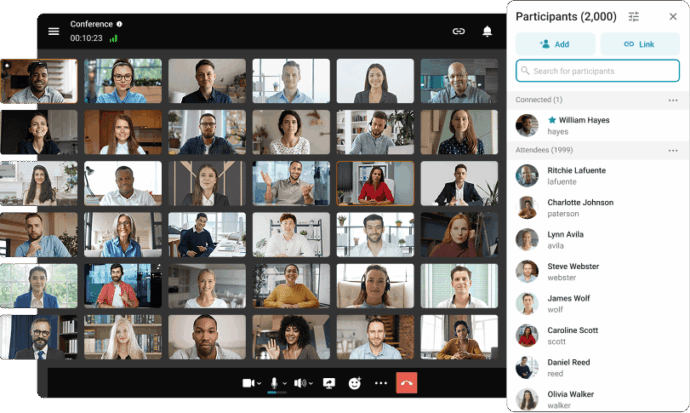
This allows the same infrastructure to cover very different scenarios:
- One-to-one calls
- Team meetings
- Departmental conferences
- Training
- Company-wide sessions
- Webinars
- Large internal events
Mattermost Calls is better aligned with collaboration around channels and smaller real-time sessions.
For organizations that need a dedicated enterprise video layer, TrueConf covers a wider range of meeting scenarios.
SIP and H.323 Are Built into the Platform
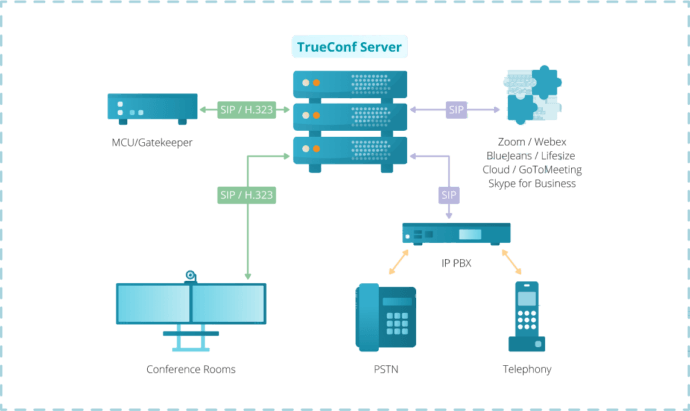
This is one of the biggest architectural differences between TrueConf and most Mattermost alternatives.
TrueConf Server includes support for SIP and H.323 integration.
That makes it possible to connect the communication platform with existing:
- Conference room systems
- Video endpoints
- PBXs
- IP telephony
- MCUs
- Standards-based conferencing infrastructure
This matters because replacing Mattermost does not necessarily mean replacing the organization’s existing telephony and video hardware.
A platform that can reuse that infrastructure may reduce migration complexity significantly.
Chats and Video Can Work Without Internet Access
TrueConf Server can operate autonomously inside a private corporate network.
Organizations can keep messaging, files, calls and video conferencing inside their own infrastructure without requiring an external communication service for everyday operation.
Mattermost can also be deployed in isolated environments.
The important difference is that TrueConf extends this model to a communication stack where messaging and enterprise video remain available inside the same isolated infrastructure.
LDAP and Active Directory Integration
TrueConf Server can integrate with existing directory infrastructure such as Active Directory and LDAP.
This lets organizations keep account management connected to existing corporate identity systems rather than creating an independent user directory for communications.
TrueConf vs Mattermost
|
Criterion |
TrueConf Server |
Mattermost |
|---|---|---|
|
Self-hosted deployment |
Yes |
Yes |
|
Isolated network operation |
Yes |
Yes, depending on deployment and edition |
|
Personal and group chats |
Yes |
Yes |
|
Channels |
Yes |
Yes |
|
File sharing |
Yes |
Yes |
|
Audio communication |
Yes |
Yes |
|
Native video conferencing |
Core platform capability |
Mattermost Calls |
|
Conference size |
Up to 2,000 participants |
Primarily smaller collaborative calling scenarios |
|
SIP/H.323 |
Built in |
Not a core platform capability |
|
PBX integration |
Yes |
Not a primary use case |
|
Video endpoint integration |
Yes |
Not a primary use case |
|
LDAP/AD |
Yes |
Yes |
|
Main architecture |
Messaging + enterprise video |
Messaging + collaboration workflows |
When TrueConf Is the Better Fit
TrueConf becomes particularly attractive when the goal is to reduce the number of separate corporate communication systems.
Instead of maintaining:
messenger + meeting platform + video conferencing infrastructure + gateways
the organization can use one private environment for:
chat + files + calls + video conferences + SIP/H.323 integration
That is the strongest reason to consider TrueConf instead of simply replacing Mattermost with another messenger.
2. Rocket.Chat — Best for a Similar Self-Hosted Messaging Model

Rocket.Chat is one of the closest alternatives to Mattermost.
Both platforms focus heavily on private team messaging and can be deployed on customer-controlled infrastructure.
Rocket.Chat supports:
- Direct and group messaging
- Channels
- Self-managed deployment
- LDAP and Active Directory
- SSO
- Role-based access
- Integrations
- Enterprise security controls
- Isolated deployment options
This makes migration conceptually simpler for organizations that still want a messaging-first architecture.
Where Rocket.Chat Makes Sense
- Mattermost’s overall model still works
- Self-hosted messaging remains the primary requirement
- Interoperability with other messaging systems matters
- You need different enterprise licensing or deployment options
- Changing employee workflows as little as possible is important
The limitation is also clear.
If the reason for replacing Mattermost is that chat is no longer enough, moving to another messaging-centric platform may not solve the original problem.
For organizations that need stronger video communication, conference room integration or standards-based conferencing, TrueConf represents a more substantial architectural change.
3. Element — Best for Federated Communication

Element is based on Matrix and approaches enterprise messaging differently from both Mattermost and TrueConf.
Its strongest distinguishing feature is federation.
Different organizations can operate their own communication servers while still exchanging messages through a common protocol.
This model is useful when organizational boundaries must remain separate.
Typical scenarios include:
- Government agencies
- Universities
- Multinational organizations
- Partner networks
- Consortiums
- Separate institutions that cannot use one central server
Element vs TrueConf
The right choice depends on what kind of control matters.
Choose an Element-style architecture when:
Multiple independent organizations must operate their own servers and communicate through federation.
A TrueConf-style architecture is more suitable when:
One organization needs centrally managed messaging, video meetings and conferencing infrastructure under its own control.
Element therefore competes primarily on decentralized communication architecture rather than on enterprise video depth.
4. Zulip — Best for Structured Asynchronous Discussions
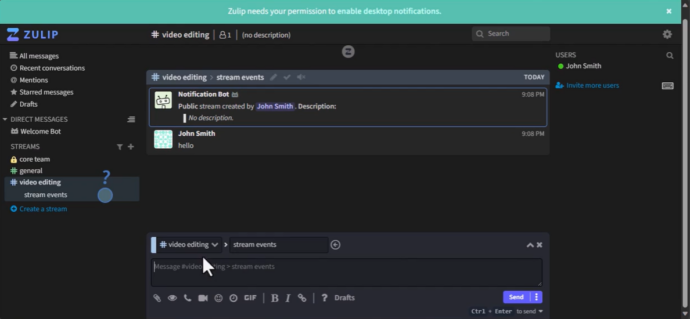
Zulip is worth considering when the main problem is not deployment but conversation structure.
Traditional corporate messengers organize discussions primarily around channels and chronological message streams.
Zulip adds another level: topics.
A channel such as Development can contain separate conversations about:
- Authentication
- Database migration
- Mobile bugs
- Release planning
- Infrastructure costs
Users can follow the relevant topic without reconstructing context from one long channel history.
This makes Zulip useful for:
- Engineering teams
- Open-source projects
- Distributed teams
- Technical organizations
- Groups where conversations continue over long periods
Important Architectural Difference
Video communication is not Zulip’s main platform layer.
Calls can be connected through external meeting providers.
This creates a different stack:
Zulip + external video system
compared with:
TrueConf messaging + native video communication
Zulip is therefore a strong alternative when conversation organization is the central problem.
TrueConf is stronger when the organization wants to consolidate messaging and real-time communication.
5. Microsoft Teams — Best for Microsoft 365 Organizations

Microsoft Teams makes the most sense when communication is already part of a broader Microsoft environment.
Teams combines:
- Workplace messaging
- Meetings
- Calling
- Calendars
- Office applications
- OneDrive
- SharePoint
- Identity services
- Microsoft AI tools
Its biggest advantage is not one communication feature.
It is ecosystem integration.
If employees already use Outlook, Microsoft 365 applications, SharePoint, OneDrive and Microsoft identity services, Teams can reduce the number of separate workplace platforms.
Where the Choice Differs from TrueConf
Teams is primarily a cloud ecosystem decision.
TrueConf is more relevant when communication infrastructure itself must remain under organizational control.
Choose TrueConf when requirements include:
- On-premises deployment
- Operation without Internet access
- SIP/H.323 support
- Existing video equipment
- Private conferencing infrastructure
Choose Teams when the priority is integration with the Microsoft 365 cloud environment.
6. Slack — Best for Moving Away from Self-Hosting
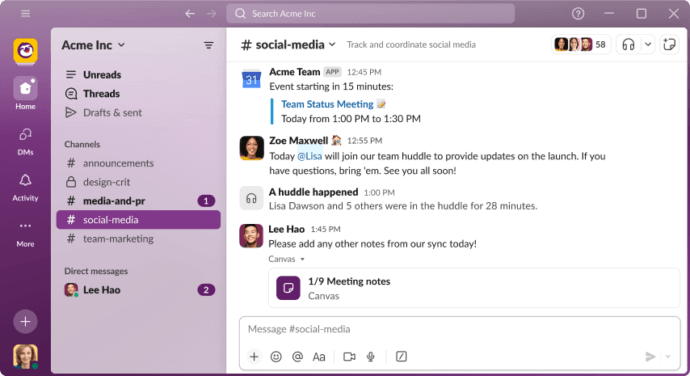
Slack is the opposite direction from most alternatives in this comparison.
Instead of giving the organization more control over infrastructure, it removes the need to operate collaboration servers.
Its strengths include:
- Mature channel-based messaging
- A large application ecosystem
- Workflows
- Integrations
- Easy onboarding
- Low server administration overhead
Slack becomes attractive when the reason for leaving Mattermost is operational rather than functional.
A valid migration goal
“We no longer want to manage the collaboration infrastructure ourselves.”
But Slack is a poor architectural replacement when Mattermost was originally chosen specifically for:
- Private deployment
- Isolated operation
- Infrastructure ownership
- Data sovereignty
- Local server administration
In those cases, TrueConf, Rocket.Chat, Element or another self-hosted platform is usually a more relevant shortlist.
Mattermost Alternatives Compared by Architecture
A normal feature comparison can hide the most important differences because nearly every modern collaboration platform supports chats, files and group spaces.
Architecture provides a more useful comparison.
|
Capability |
TrueConf |
Rocket.Chat |
Element |
Zulip |
Microsoft Teams |
Slack |
|---|---|---|---|---|---|---|
|
Self-hosted |
Yes |
Yes |
Yes |
Yes |
Primarily cloud |
No |
|
Private / isolated deployment |
Yes |
Available |
Available |
Possible |
Cloud-dependent |
Cloud-dependent |
|
Team messaging |
Yes |
Yes |
Yes |
Yes |
Yes |
Yes |
|
Native enterprise video platform |
Yes |
Messaging-focused |
Video available |
External provider model |
Yes |
Limited compared with dedicated VC |
|
Large private conferences |
Up to 2,000 |
Not primary focus |
Not primary focus |
External provider |
Available depending on plan |
Not primary focus |
|
SIP/H.323 |
Built in |
Not core |
Not core |
External |
Separate interoperability ecosystem |
No |
|
Existing video equipment integration |
Yes |
Not primary focus |
Not primary focus |
External |
Possible through broader ecosystem |
No |
|
LDAP / directory integration |
Yes |
Yes |
Available |
Available |
Microsoft identity ecosystem |
Enterprise identity options |
|
Federation |
Available within TrueConf architecture |
Interoperability options |
Core Matrix capability |
Not primary architecture |
External collaboration |
Slack Connect |
|
Offline corporate network communication |
Yes |
Deployment-dependent |
Available in appropriate deployment |
Self-hosted deployment possible |
Cloud-dependent |
Cloud-dependent |
|
Main strength |
Unified private communications |
Secure messaging |
Federation |
Structured discussions |
Microsoft ecosystem |
SaaS simplicity |
Choose by the Problem You Need to Solve
The fastest way to create a shortlist is to ignore minor feature differences and identify the architectural requirement.
You Need Messaging and Enterprise Video on the Same Private Infrastructure
Choose TrueConf Server.
This is the clearest scenario where TrueConf differs from Mattermost and most alternatives.
It combines:
- Corporate chat
- File exchange
- Audio calls
- Video meetings
- Large conferences
- SIP/H.323
- PBX integration
- Video endpoints
- LDAP/AD
- Isolated-network operation
The value is not one individual feature.
It is the ability to consolidate several communication layers into the same private infrastructure.
You Want a Close Mattermost-Style Replacement
Consider Rocket.Chat.
The communication model remains messaging-centered, which reduces conceptual migration complexity.
You Need Independent Servers to Communicate with One Another
Consider Element.
Its Matrix foundation makes federation the central architectural feature.
Your Problem Is Chaotic Channel Discussions
Consider Zulip.
Topic-based conversations can be more valuable than additional real-time communication features.
Your Organization Already Runs on Microsoft 365
Consider Microsoft Teams.
The main advantage comes from its surrounding workplace ecosystem.
You Want to Stop Managing Communication Servers
Consider Slack.
It represents a move from self-managed infrastructure toward SaaS.
What to Check Before Migrating from Mattermost
Product selection is only half of the migration problem.
A new platform can look better in a feature table and still be the wrong choice if one critical workflow cannot be moved.
Before migration, inventory the current Mattermost environment.
Identity
Check:
- Local accounts
- LDAP/Active Directory
- SSO
- Guest users
- Service accounts
- Authentication policies
The replacement should fit the existing identity architecture before user migration begins.
Communication History
Determine what needs to be retained:
- Public channels
- Private channels
- Direct messages
- Threads
- Attachments
- Archived conversations
- Compliance records
Not every platform maps Mattermost’s objects one-to-one.
Decide in advance whether historical content must be migrated, archived externally or left read-only.
Bots and Integrations
Inventory:
- Webhooks
- Bots
- Slash commands
- Monitoring alerts
- CI/CD notifications
- Issue trackers
- Git repositories
- Incident-response workflows
This is one of the areas where migration costs are most often underestimated.
A feature-equivalent messenger is not equivalent if critical automation stops working.
Calls and Meetings
Measure actual communication patterns:
- Number of daily calls
- Typical meeting size
- Largest meeting size
- Screen-sharing requirements
- Recording requirements
- External participants
- Room systems
- PBX or SIP infrastructure
This step is particularly important when evaluating TrueConf.
A migration can also be a consolidation project
If video communication already exists as a separate infrastructure layer, replacing Mattermost may be an opportunity to consolidate both systems rather than migrate chat alone.
Infrastructure
Review:
- Operating systems
- Kubernetes or container infrastructure
- Database dependencies
- Object storage
- Backup systems
- High availability
- Disaster recovery
- Monitoring
- Network segmentation
The cheapest license can become the most expensive migration if it creates unfamiliar operational dependencies.
Migration Cost Matters More Than Subscription Price
Comparisons often focus on per-user price.
For self-hosted enterprise systems, this is incomplete.
The real migration cost can include:
software licenses + infrastructure + administration + data migration + integration replacement + retraining + downtime risk
A product with a lower subscription price can still cost more if it requires:
- Rebuilding dozens of integrations
- Operating another video platform
- Replacing conference room equipment
- Maintaining separate user directories
- Migrating large message archives
This is another area where TrueConf can be advantageous for organizations with broader communication requirements.
If the migration replaces both:
Mattermost + separate conferencing infrastructure
with:
TrueConf Server
the comparison should consider the cost of both existing systems, not messaging licenses alone.
When Keeping Mattermost Is the Better Decision
Switching platforms is not automatically an improvement.
Keeping Mattermost may be the better choice when:
- The deployment is stable
- Users are comfortable with existing workflows
- Important custom integrations already exist
- DevOps workflows depend heavily on Mattermost
- Current calling capabilities are sufficient
- No infrastructure requirement has changed
- Migration would solve only minor usability complaints
This is especially important for mature installations.
The cost of rebuilding a working communication environment can exceed the benefit of switching to a platform with marginally better feature coverage.
A migration becomes more justified when the communication architecture itself needs to change.
Which Mattermost Alternative Is Best?
There is no single winner because these products solve different problems.
Rocket.Chat is one of the closest options if you want to preserve a self-hosted, messaging-first model.
Element is the strongest candidate when federation between independently managed servers is central.
Zulip is differentiated by topic-based asynchronous communication.
Microsoft Teams fits organizations already centered on Microsoft 365.
Slack makes sense when the goal is to leave self-managed infrastructure behind.
TrueConf Server stands out when Mattermost is being replaced because messaging alone is no longer enough.
TrueConf combines corporate messaging with enterprise video conferencing, large meetings, SIP/H.323 interoperability, directory integration and operation inside private networks.
The migration question changes from:
“Which messenger should replace Mattermost?”
to:
“Do we still need separate systems for messaging and enterprise video communication?”
For organizations that want both capabilities under the same privately controlled infrastructure, TrueConf provides one of the clearest architectural alternatives to Mattermost.
About the Author
Olga Afonina is a technology writer and industry expert specializing in video conferencing solutions and collaboration software. At TrueConf, she focuses on exploring the latest trends in collaboration technologies and providing businesses with practical insights into effective workplace communication. Drawing on her background in content development and industry research, Olga writes articles and reviews that help readers better understand the benefits of enterprise-grade communication.


Follow us on social networks