
Is Teams Part of Microsoft Office or Microsoft 365? Plans Explained
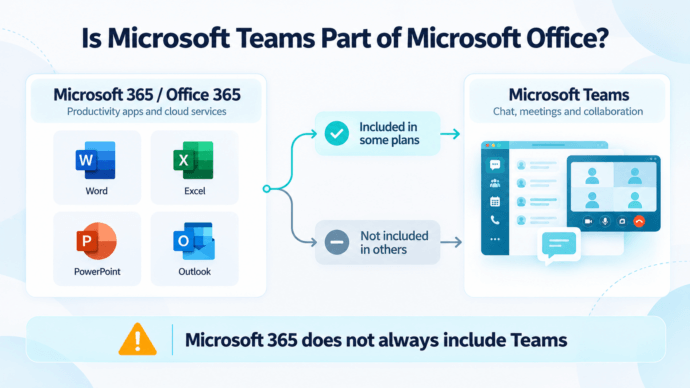
Microsoft Teams can be included with Microsoft 365 and Office 365, but it is not included with every plan. Microsoft offers commercial Microsoft 365 and Office 365 subscriptions both with Teams and without Teams, while Teams can also be licensed separately.
That makes the question “Does Microsoft Office include Teams?” more complicated than a simple yes or no.
A company can use Word, Excel, PowerPoint, Outlook, and other Microsoft 365 applications without using Teams as its primary messaging and video conferencing platform.
Is Microsoft Teams Part of Microsoft Office?
Not exactly.
Microsoft Teams is not an Office application in the same sense as Word, Excel, or PowerPoint. It is a communication and collaboration service that can be bundled with some Microsoft 365 or Office 365 subscriptions or licensed separately.
The confusion comes from three different things:
- some Microsoft 365 and Office 365 plans include Teams;
- other plans are sold without Teams;
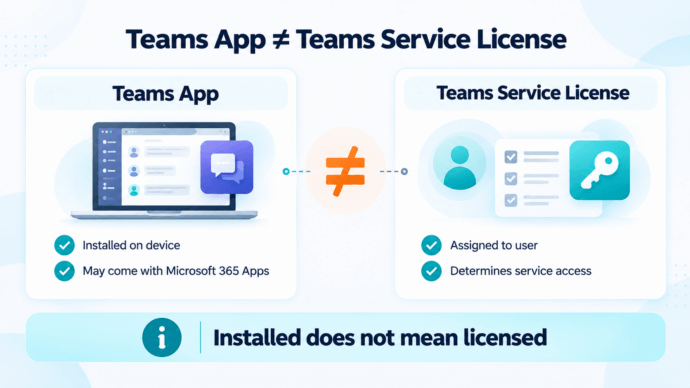
- the Teams desktop application may be installed even when a particular subscription does not provide a Teams service entitlement.
This means that simply seeing Teams installed on a computer does not prove that the account has a Teams license.
Is Teams Included With Microsoft 365?
Sometimes.
Microsoft currently offers Microsoft 365 and Office 365 subscriptions both with Teams and without Teams.
A simplified view looks like this:
|
Subscription Type |
Microsoft Teams |
|---|---|
|
Microsoft 365 / Office 365 suite with Teams |
Included |
|
Microsoft 365 / Office 365 suite without Teams |
Not included |
|
Microsoft 365 Apps |
Teams service is not automatically included |
|
Standalone Microsoft Teams |
Licensed separately |
The important distinction is between the Teams application installed on a device and the Teams service license assigned to the user.
Why Is Teams Installed If My Plan Does Not Include It?
Because installation and licensing are separate.
The Teams client can be deployed alongside Microsoft 365 Apps even in some environments where the user’s subscription does not include access to the Teams service.
Administrators can also control whether Teams is installed as part of a Microsoft 365 Apps deployment.
A useful rule is:
The Teams app and a Teams service license are not the same thing.
If Teams appears on a computer but the user cannot access the expected business functions, check the license assigned to the Microsoft account rather than relying on the installed application.
Why Did Microsoft Separate Teams From Microsoft 365?
Microsoft changed the packaging of Teams after competition concerns in Europe.
Enterprise suites with Teams stopped being sold to new customers in the European Economic Area and Switzerland in 2023. In April 2024, Microsoft expanded the separation globally for new Enterprise customers.
The model changed again from November 1, 2025. New customers worldwide could once again purchase Microsoft 365 and Office 365 Enterprise suites that include Teams, while corresponding versions without Teams remained available.
This explains why older articles can provide apparently contradictory answers.
Depending on when they were published, they may state that:
- Teams is included with Microsoft 365;
- Teams was separated from Microsoft 365;
- Enterprise customers need a separate Teams license.
For 2026, the practical answer is:
Microsoft 365 and Office 365 are available in configurations both with and without Teams.
Which Microsoft 365 Plans Include Teams?
Microsoft currently offers Enterprise, Business, and Frontline licensing options with Teams as well as corresponding no-Teams configurations.
Enterprise suites available with Teams include products such as:
- Microsoft 365 E3 and E5;
- Office 365 E1, E3, and E5.
Versions without Teams also remain available.
For smaller organizations, Microsoft 365 Business Basic, Business Standard, and Business Premium can likewise be available in configurations with Teams or without Teams.
The exact catalog can vary by market, customer type, and licensing program.
Before purchasing, check:
- the exact subscription name;
- whether a Teams service plan is included;
- whether Teams is licensed separately;
- whether the subscription is an existing legacy bundle or a new purchase.
The phrase Microsoft 365 alone is therefore not enough to determine whether Teams is included.
Do You Have to Pay Separately for Microsoft Teams?
Not always.
If the Microsoft 365 or Office 365 subscription includes Teams, the included Teams service does not require a separate Teams license.
If the selected subscription does not include Teams, an organization can license Teams separately.
Alternatively, it can choose another platform for messaging, calls, and video conferencing.
This creates an important distinction:
Using Microsoft 365 does not require an organization to standardize all corporate communication on Microsoft Teams.
Can You Use Microsoft 365 Without Teams?
Yes.
A company can use Microsoft 365 applications and services without using Teams as its communication platform.
Depending on the selected subscription, the organization may continue to use:
- Word;
- Excel;
- PowerPoint;
- Outlook;
- OneDrive;
- SharePoint;
- other Microsoft 365 services;
while choosing another system for:
- personal and group messaging;
- voice calls;
- video conferencing;
- meeting rooms;
- internal communication.
Office productivity and corporate communications do not have to come from the same vendor.
Can You Replace Teams and Keep Microsoft 365?
Yes.
Replacing Teams does not require replacing Microsoft 365.
An organization can separate the two layers:
Microsoft 365
Email, documents, spreadsheets, presentations, storage, and productivity workflows
Communication platform
Messaging, voice, video conferencing, meetings, and room communication
This model can be useful when the organization wants to keep Microsoft productivity tools but has different technical or infrastructure requirements for corporate communications.
When Does a Microsoft Teams Alternative Make Sense?
A Teams alternative is worth considering when the limitation is not Microsoft 365 itself but the way corporate communication is deployed or managed.
Teams Is Not Included in the Selected Subscription
If an organization already needs to license its communication system separately, it can compare Teams with alternative platforms instead of treating Teams as an automatic part of Microsoft 365.
Communication Must Run on Company Infrastructure
Microsoft Teams is primarily delivered as a Microsoft-hosted cloud service and does not provide a conventional fully self-hosted Teams server for commercial organizations.
Companies that require a customer-controlled messaging and conferencing server therefore need a different deployment model.
Communication Must Continue Inside a Private Network
Some organizations need messaging and video meetings to remain available without depending on public cloud services.
In this case, the important question is whether core functions such as:
- messaging;
- conferencing;
- authentication;
- administration;
can continue inside the organization’s own infrastructure.
Existing Video Systems Need to Remain in Use
Organizations may already operate conference rooms, SIP endpoints, H.323 systems, or other video infrastructure.
Changing the communication platform should not necessarily require replacing existing room equipment.
Microsoft 365 and Communications Need Different Control Models
An organization may be comfortable using Microsoft-hosted services for office productivity while requiring direct control over internal messaging and video infrastructure.
There is no requirement that both functions use the same deployment architecture.
Microsoft Teams vs TrueConf Server
TrueConf Server is an alternative for organizations that want business messaging and video conferencing to operate on customer-controlled infrastructure.
|
Requirement |
Microsoft Teams |
TrueConf Server |
|---|---|---|
|
Team messaging |
Yes |
Yes |
|
Video conferencing |
Yes |
Yes |
|
Microsoft 365 integration |
Native |
Separate communication environment |
|
Customer-controlled server |
No conventional self-hosted Teams server |
Yes |
|
Deployment model |
Microsoft-hosted service |
Customer-controlled deployment |
|
SIP/H.323 interoperability |
Available through Microsoft architecture and supported integrations |
Supported |
|
Can coexist with Microsoft 365 |
Yes |
Yes |
The key difference is architectural.
Teams extends the Microsoft 365 cloud ecosystem.
TrueConf Server can operate as an independent communication layer while the organization continues using Microsoft 365 for productivity.
When TrueConf Server Is a Relevant Alternative
TrueConf Server is most relevant when an organization wants to keep Microsoft 365 but needs a different model for messaging and video communications.
For example, it can be considered when:
- communication must run on company-controlled servers;
- dependence on a public communication cloud is undesirable;
- messaging and video conferencing need to operate inside a private network;
- existing SIP/H.323 equipment should remain connected;
- the organization wants to administer communications separately from Microsoft 365.
In this model, Microsoft 365 continues to handle documents, email, spreadsheets, presentations, and other productivity workflows, while TrueConf handles corporate messaging and video communication.
TrueConf therefore does not need to replace Microsoft 365.
It can replace the communication layer represented by Teams while leaving the rest of the Microsoft environment in place.
Try TrueConf Server Free!
- 1,000 online users with the ability to chats and mske one-on-one video calls.
- 10 PRO users with the ability to participate in group video conferences.
- One SIP/H.323/RTSP connection for interoperability with corporate PBX and SIP/H.323 endpoints.
- One guest connection to invite a non-authenticated user via link to your meetings.

When Should You Keep Microsoft Teams?
Replacing Teams does not make sense for every organization.
Keeping Teams is usually simpler when:
- Teams is already included in the Microsoft 365 subscription;
- employees rely heavily on native Microsoft 365 integrations;
- SharePoint, OneDrive, Outlook, and Teams are tightly connected in existing workflows;
- Microsoft-hosted communication infrastructure meets organizational requirements;
- there is no requirement for a customer-operated communication server.
In that environment, moving to another platform may add complexity without solving a meaningful licensing, infrastructure, or control problem.
FAQ
Is Microsoft Teams part of Microsoft Office?
Microsoft Teams can be included with some Microsoft 365 and Office 365 subscriptions, but it is not included in every plan. Teams can also be licensed separately.
Is Microsoft Teams included with Microsoft 365?
Some Microsoft 365 subscriptions include Teams, while others are sold without it. The exact entitlement depends on the selected subscription.
Why is Teams installed if my plan does not include it?
The Teams application and the Teams service license are separate. The client may be installed with Microsoft 365 Apps even when the account does not have a Teams service entitlement.
Can I use Microsoft 365 without Teams?
Yes. An organization can use Microsoft 365 applications and services while choosing another platform for messaging, calls, and video conferencing.
Do I need to pay separately for Teams?
Only if Teams is not already included in the Microsoft 365 or Office 365 subscription and the organization still wants to use the Teams service.
Can I replace Microsoft Teams without replacing Microsoft 365?
Yes. Microsoft 365 can continue to provide email, documents, storage, and productivity tools while another platform handles messaging and video conferencing.
What is an on-premises alternative to Microsoft Teams?
An on-premises alternative runs the communication platform on infrastructure controlled by the organization rather than relying entirely on a vendor-hosted communication service. TrueConf Server is one example of this deployment model.
Conclusion
Microsoft Teams can be part of Microsoft 365 or Office 365, but it should not be assumed that every Microsoft 365 subscription automatically includes it.
Microsoft offers suites both with and without Teams, and Teams can also be licensed separately.
That gives organizations a useful architectural choice.
A company can keep Microsoft 365 for productivity while deciding independently how messaging, voice, video conferencing, and meeting-room communication should operate.
For organizations that already rely heavily on the Microsoft 365 ecosystem and are comfortable with Microsoft-hosted communications, Teams may remain the simplest option.
If corporate communications need to operate on customer-controlled infrastructure or independently from the Microsoft cloud communication layer, TrueConf Server becomes a more relevant alternative.
About the Author
Olga Afonina is a technology writer and industry expert specializing in video conferencing solutions and collaboration software. At TrueConf, she focuses on exploring the latest trends in collaboration technologies and providing businesses with practical insights into effective workplace communication. Drawing on her background in content development and industry research, Olga writes articles and reviews that help readers better understand the benefits of enterprise-grade communication.


Follow us on social networks