
Extensions
Extensions
The core features of TrueConf Server can be enhanced with various extensions. Many of these extensions are available in all versions of the server, including the free version. However, some of them can be activated only after purchasing the specific technical support package.
SIP / H.323 / RTSP gateway
Thanks to this extension, it will be easy to connect to TrueConf Server:
Video conferencing terminals from third-party manufacturers and PBX, as well as users of popular cloud services such as Zoom, Cisco Webex, LifeSize Cloud, and Skype for Business servers — via SIP/H.323 protocols;
- IP cameras and video surveillance systems as well as streams (e.g., streams of other conferences) — via the RTSP protocol.
With TrueConf Server Free, you can have one SIP/H.323/RTSP connection for free.
The gateway acts as a gatekeeper or SIP registrar for third-party devices that will be displayed as regular TrueConf users in the address book.
The configuration of the TrueConf Server multigateway is detailed in the section "SIP/H.323/RTSP Gateway and Transcoding" of the documentation.
Integration with LDAP and Active Directory
With this extension, you can synchronize user information between the TrueConf Server address book and your company's LDAP directory service (e.g., Active Directory). Administrators can centralize and automate user account management operations, such as adding new users or removing ex-employees, resetting passwords, or keeping user data up to date.
This extension is available in any version of the server, including the free TrueConf Server Free.
The settings for integration with LDAP/AD directories is described in the section “Users and groups. Integration with LDAP/Active Directory” of the documentation.
Public Web Conferences
With this extension you can organize public web conferences available to users that do not have an account on your TrueConf Server instance. This feature is typically used for conducting webinars.
Each public web conference has an external web page that contains a conference description and provides information on how to connect to it. You can also embed a public web conference to your website with a widget.
With TrueConf Server, you can organize public web conferences with 1 guest connection. If you would like to add more guest connections to your license, please contact us to request a free trial or purchase the extension.
For more details on creating a conference with guest connections, refer to the description in the “Group conferences and streams” section.
Live streaming
This extension allows you to broadcast video conferences through external platforms or content delivery services such as CDNvideo, YouTube, Facebook or Wowza. The number of viewers is limited only by the capabilities of your chosen streaming solution and can exceed 1 million users!
This extension is available with the purchase of the extended or full technical support package.
Simultaneous interpretation
Let us suppose that an international conference is to be held and presenters will speak multiple languages. In such a case, one has to make sure that all participants can fully understand the speakers. Such a task can be easily done with the Simultaneous interpretation extension: just select simultaneous interpreters who will translate all presentations into required languages on the fly. In your video conference, there will be the list of audio tracks with different languages and every participant will be able to select a track in a client application or browser.
If server-side recording is activated for an event with simultaneous interpretation, multiple audio tracks will be created: the main track and a separate track for each language into which the conference was translated.
This extension is available on request, just contact us in any convenient way to specify the terms of activation.
Federation
To enable calls between users of multiple TrueConf Server servers located in different branches within your network, use the Federation extension. You can also connect with other companies using TrueConf server or cloud products. Federation allows users on your server to call and invite any TrueConf subscribers to conferences, and vice versa.
Another important advantage is that participants’ media streams are processed on the servers where these users are authorized. This helps to reduce traffic between distributed networks and decrease the load on the hardware of the TrueConf Server instance where the conference is created.
This option is included in the standard functionality of TrueConf Server and to activate it, you just need to have any paid license.
For a detailed description of federation and its settings, refer to the section "Network and federation settings, email notifications".
Integration with DLP
This extension is part of TrueConf Enterprise and allows you to connect TrueConf Server to a third-party DLP system using the ICAP protocol (RFC 3507).
DLP system (Data Leak Prevention) is a specialized software solution that follows certain security policies to prevent the leakage of confidential information, for example, it is needed to ensure that data cannot cross the borders of the corporate network.
Thanks to the integration with such a system, every message (including a file) sent in private and group chats is automatically directed to a DLP system before it could be directed to the recipient. This message will be checked and if it does not meet security requirements set on the side of the DLP system, it will not be sent. On the side of TrueConf Server, you can choose if the recipient should see a notification that the message was blocked or simply receive no message.
To learn about integration with DLP systems, refer to the “Configuration of extensions” section.
Support for SDK applications
TrueConf SDK allows you to develop custom applications with the corporate features you need and incorporate communication based on TrueConf technologies. For example, if you have an application with news about companies and promotions for clients, you can use a widget from the SDK to connect with your representative (operator). We offer libraries for all popular desktop (Windows, Linux, macOS) and mobile (iOS, Android) platforms.An example of an application developed using the TrueConf SDK is the TrueConf Kiosk information kiosk – a software solution for self-service systems.
In addition to SDKs for various platforms, you can use API calls for several of our products: TrueConf Server, TrueConf MCU, TrueConf Room, TrueConf Group. The API allows you to remotely execute a range of commands and retrieve data from these solutions, for instance, from external code based on certain triggers.
You can find code examples for working with our SDKs and APIs on GitHub.
Integration with AI server
TrueConf offers a standalone solution TrueConf AI Server. It is based on AI (machine learning) and intended for creating conference transcripts. This AI server automatically recognizes audio streams from conferences and generates transcripts with speakers' names included. A single AI server can be integrated with multiple video conferencing servers. It is also possible to configure flexible user access settings for transcripts and audio recordings.To use the AI server within your video conferencing infrastructure, activate the separate TrueConf AI Server extension. For more details on how to configure this solution, refer to the description of the corresponding section in the control panel.
Integration with a corporate calendar
In large companies, employees often use Microsoft Exchange corporate mail and schedule various events in Outlook. The TrueConf Calendar Connector solution is intended for such organizations. It supports automatic import of all events created in Outlook into the calendar of TrueConf client applications. So, users will see all events in a single interface: those that include TrueConf conferences and regular events that are not linked to any conference.
To integrate the corporate calendar with the video conferencing system, you only need to purchase a license for TrueConf Calendar Connector. Additionally, some features are available even in the free version. For more details on how to set up integration with TrueConf Calendar Connector, refer to the description of the corresponding section of the control panel.
UDP Multicast
UDP (User Datagram Protocol) Multicast is a data transmission protocol under which a signal is transmitted through the Multicast switch, bypassing the server.
This extension is available with the purchase of any paid license.
During a standard group video conference (without UDP Multicast mode) data are transmitted through a TrueConf Server instance to each participant. Data traffic during such a conference can substantially load the server channel.
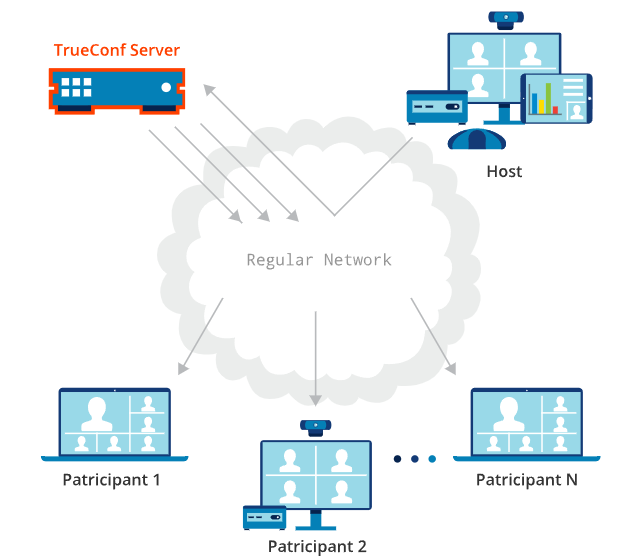
The use of UDP Multicast mode during a group conference allows meeting participants to exchange data directly with each other without the server which, in turn, decreases the network load on the server. Audio and video streams are transmitted only inside the UDP Multicast domain. These domains can be used in LAN or VPN. By default, data transmission via the UDP Multicast protocol is possible only inside a closed corporate network.
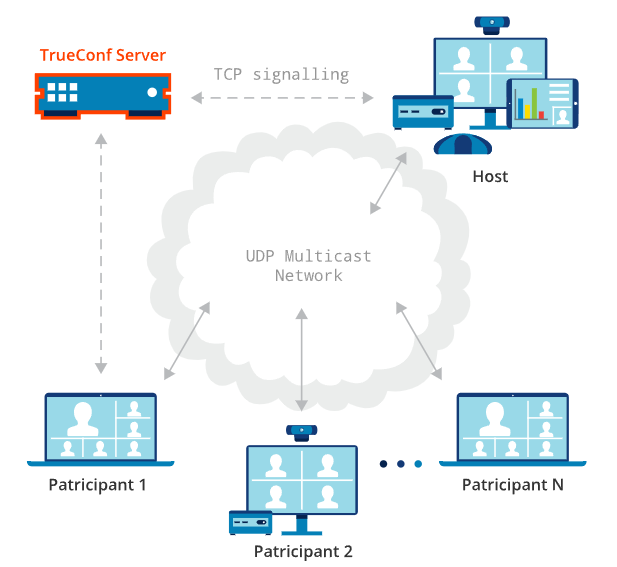
Please note that in UDP Multicast mode, some features are not supported; this includes conference recording, connections via SIP/H.323/RTSP, browser-based conferences via WebRTC, and streaming to third-party services.
TrueConf Directory
This extension will enable the users of your TrueConf Server to search for users/groups on all TrueConf servers synchronized with it and add them to the address book. As a result, your users will have a unified address book available in client applications.
TrueConf Directory is part of TrueConf Enterprise.For information on configuring TrueConf Directory, refer to the “Extension Setup” section.
TrueConf License Manager
This extension is part of TrueConf Enterprise and is designed to balance the license pool used by group TrueConf Server. Detailed documentation for configuring the balancing is provided by our technical support team upon request from enterprise customers.
TrueConf Border Controller
TrueConf Border Controller (border controller) is an extension for TrueConf Enterprise designed for installation in the corporate network's DMZ (demilitarized zone) to protect video conferencing servers from malicious external traffic.
For more information on how this extension works and how to set it up, please refer to its documentation.
TrueConf Enterprise
When using TrueConf Server in large enterprises with over 500 employees, one may find it necessary to deploy additional servers. This approach is convenient for companies with geographically dispersed branches.
For such clients, TrueConf offers a TrueConf Enterprise – a turnkey solution with a unique configuration designed to meet the customer's requirements.
Main benefits:
The complete replication of key nodes ensures 99.99 % availability of all system components across the entire enterprise.
Users of TrueConf Enterprise have access to an exclusive premium technical support package.
The ability to balance server load (by connecting additional TrueConf Server instances along with dynamic license borrowing on the main server).
Branding client applications.
You can learn more and order this solution on our website.
Advanced monitoring of video conferencing servers
In the TrueConf Server control panel, there is a monitoring page with basic information about the server's operation. Additionally, the company TrueConf offers a separate solution TrueConf Monitor for advanced performance monitoring and data collection. This solution allows you to track statistics across multiple servers and offers several other benefits:
Track active conferences, their participants, and online users from each connected server, as well as the total number of ongoing conferences.
Monitor server hardware performance metrics: average disk wait time and performance in IOPS, swap file usage, detailed RAM and CPU information.
View conference history.
Advanced analysis of data about participants' connection and errors during a video conferencing session.