
How to call SIP/H.323 and RTSP endpoints
How to call SIP/H.323 and RTSP endpoints
How to make a call
To call external devices or a server, enter the call string in the format which corresponds to the type of recipient. The UI will look similar to the cases when you enter the name of a regular user. Right above the filtered list of contacts, you will see a new slightly darkened row. You can interact with it, just like with any other.
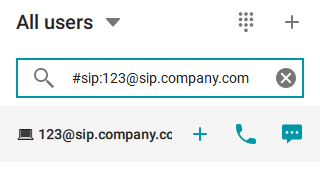
Supported devices and call string formats:
- SIP devices (including those using DTMF dialing);
- H.323 devices;
- RTSP devices.
Since TrueConf Group is a hardware SIP terminal, use the SIP device dial string for calls to it.
Automatic processing of URLs for meetings created on third-party services like Zoom, Lifesize Cloud, Cisco Webex, or GoToMeeting, for example:
https://zoom.us/j/842858705https://call.lifesizecloud.com/10132060#sip:pr1630419186@meetingsemea590.webex.com
Using tone dialing
You can send DTMF commands to DTMF-compatible devices in RTP EVENT and SIP INFO modes. To learn more about DTMF commands, please read the documentation provided by the manufacturer for your device.
The following symbols can be used to add pauses directly to the call string:
,— short pause (a few seconds);— long pause (waiting for a dial tone from the caller).
For example, if you want to call a SIP server with IP 192.168.1.99 from the TrueConf client application to a conference protected by PIN 123456, you can avoid manual PIN entry by using a URI with a preset:
#sip:@192.168.1.99;123456
To call 13478783263 with extension 222, you can use the following call line:
#tel:13478783263,222