
Electronic Meeting System (EMS): definition, operational principles, importance of usage
Updated April 2026
EMS (Electronic Meeting System) is an advanced digital platform that aims to enhance collaboration during video conferences. This state-of-the-art system enables seamless interaction between meeting participants, facilitating real-time information exchange, streamlining decision-making processes, and even enabling online voting.
In contrast to traditional meetings, electronic meetings overcome physical limitations by taking place in the virtual space. One key aspect that distinguish EMS is its ability to create a level playing field for all participants, allowing them to actively participate in discussions, regardless of their location.
|
Criteria |
Key Consideration |
TrueConf Alignment |
|---|---|---|
|
Deployment |
On-premises, cloud, or hybrid |
Full on-premises support; works inside closed networks without internet |
|
Security |
Encryption, access control, compliance |
End-to-end encryption, SSO/MFA, role-based access, GDPR-ready |
|
Scalability |
Participant limits, infrastructure flexibility |
Supports 2000 participants; modular server architecture for growth |
|
Integration |
APIs, directory sync, third-party tools |
REST API, SIP/H.323 gateway, Active Directory, calendar connectors |
|
Collaboration |
Screen sharing, voting, document exchange |
Built-in content sharing, polling, AI transcription, chat, e-business cards |
|
Admin Control |
User management, monitoring, reporting |
Centralized admin console, TrueConf Monitor for analytics and audit |
Try TrueConf Server Free!
- 1,000 online users with the ability to chats and mske one-on-one video calls.
- 10 PRO users with the ability to participate in group video conferences.
- One SIP/H.323/RTSP connection for interoperability with corporate PBX and SIP/H.323 endpoints.
- One guest connection to invite a non-authenticated user via link to your meetings.

What is an Electronic Meeting System, and How Does it Work?
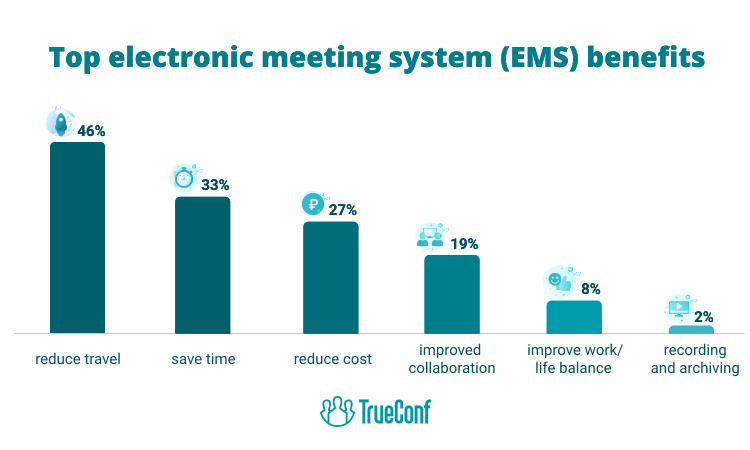
- EMS significantly improves the effectiveness of meetings. Participants can leverage a wide range of features, including screen sharing, document exchange, and other real-time collaborative tools. This way, you can facilitate smooth teamwork and seamless cross-department communication. Consequently, time is saved, allowing participants to devote attention and effort to critical issues with maximum focus and efficiency.
- EMS simplifies meeting management, thereby broadening the range of participants. It enables people with disabilities or those who are remote to actively participate in and contribute to their organization’s workflow.
- The implementation of EMS can be cost-effective for companies by reducing costs associated with the rental and maintenance of conference rooms. Also, the absence of the need for business trips leads to savings on travel, accommodation and catering for meeting participants. This, beneficial for companies located in several cities or countries, as well as for those with geographically distributed employees.
- Virtual meeting applications create a secure area for dialog. These tools are equipped with robust security features to keep important data safe and conversations private. This is very important when discussing private or sensitive issues or sharing personal information. Within this protected digital space, you can exchange e-business cards, fostering professional networking and relationship-building even in remote settings.
Key Principles of EMS Operation
The basic principles of an EMS include using a digital meeting platform or application, coordinating and maintaining order in meetings, ensuring seamless communication and information sharing, and strict security and confidentiality measures. Adherence to these norms is key to the effective management and productivity of virtual meetings and conferences.
Insight #1: Governance Architecture Matters More Than Feature Lists
Many EMS evaluations focus on visible features like video quality or screen sharing. However, the long-term success of an EMS deployment often hinges on administrative governance: who can create meetings, how recordings are stored and accessed, whether integrations require manual approval, and how audit logs are maintained.
Solutions like TrueConf prioritize granular role-based permissions and centralized policy enforcement—critical for enterprises where compliance and accountability outweigh convenience.
Self-Hosted Team Messenger with Video Conferencing
A cutting-edge team collaboration server with personal and group chats, UltraHD video conferences, and advanced AI-powered features — free for up to 1,000 users!
Features of EMS Functionality
Online meeting platforms differ from conventional groupware and video conferencing in that they promote more collaborative work. Groupware extends the functionality of online meeting systems to enhance teamwork, while video conferencing provides additional capabilities to capture and analyze group activities. Conversely, online meeting systems complement video conferencing with features such as screen sharing and voice communication.
However, the use of online meeting systems has certain limitations. There is the possibility of encountering technical problems due to unstable internet connections.
|
Deployment Model |
Best For |
Trade-offs |
TrueConf Support |
|---|---|---|---|
|
On-Premises |
Regulated industries, data-sovereign organizations, enterprises with existing infrastructure |
Higher initial setup; requires internal IT resources |
Full native support; server installs inside customer network |
|
Cloud/SaaS |
SMBs, fast-scaling teams, organizations prioritizing quick deployment |
Less control over data residency; recurring subscription costs |
Available via partner deployments; core platform designed for self-hosting |
|
Hybrid |
Organizations with mixed security zones, branch offices, or phased migration |
Complexity in managing unified policies across environments |
Modular architecture allows selective cloud integration while keeping core on-prem |
Examples of Using Electronic Meeting Systems
Virtual conferencing has become indispensable in numerous professional environments. These solutions enable companies to efficiently organize and handle a variety of events, from internal team meetings to large-scale conferences with clients and partners, as well as major virtual industry exhibitions.

Educational institutions are increasingly using these virtual solutions to conduct online classes, seminars, and gatherings, with the bonus of being able to store and archive the recordings of these events. These tools are vital for international engagement, simplifying the process for individuals in distant locations to come together and discuss issues.
In addition, many of these platforms have a built-in translator so that people speaking different languages can understand and communicate with each other in real time. Furthermore, government agencies and local organizations are more frequently using these virtual platforms to enhance the productivity of their meetings and training activities, applying them to a wide range of areas.
Insight #2: Total Cost of Ownership Extends Beyond Licensing
When comparing EMS platforms, procurement teams often focus on per-user pricing. However, hidden costs—such as bandwidth consumption, transcoding requirements for mixed endpoints, training for admins, and integration maintenance—can significantly impact long-term value.
TrueConf’s architecture minimizes these by supporting hardware endpoints via SIP/H.323, offering lightweight client apps, and providing API tooling that reduces custom development overhead.
Take your team communication to the next level with TrueConf!
A powerful self-hosted video conferencing solution for up to 1,000 users, available on desktop, mobile, and room systems.
EMS Selection Checklist: What to Evaluate Before Commitment
Use this structured framework to assess EMS platforms against organizational needs:
- Security & Compliance: Does the solution support end-to-end encryption, data residency controls, and audit logging?
- Deployment Flexibility: Can it run on your infrastructure, or does it require public cloud dependencies?
- User Experience: Is the interface intuitive for non-technical participants? Does it support accessibility standards?
- Integration Depth: Are there pre-built connectors for your directory, calendar, or CRM systems?
- Scalability Path: Can the system grow from pilot to enterprise without architectural rework?
- Support Model: Is there access to technical expertise for deployment, troubleshooting, and upgrades?
|
Feature Category |
Basic EMS |
Advanced EMS (TrueConf Tier) |
|---|---|---|
|
Video Quality |
HD up to 720p |
UltraHD 4K, adaptive bitrate, bandwidth optimization |
|
Participant Scale |
Up to 100 |
Up to 2,000 with MCU support |
|
Collaboration Tools |
Screen share, chat |
Polling, e-business cards, AI transcription, slide control |
|
Security |
TLS encryption |
E2EE, MFA, SSO, VDI support, thin client compatibility |
|
Management |
Web admin panel |
Centralized monitoring, license distribution, global user list |
|
Extensibility |
Limited APIs |
Full REST API, SDKs, GitHub examples, chatbot/calendar connectors |
Insight #3: Admin Control Directly Impacts Adoption and Compliance
An EMS platform that empowers IT administrators with clear visibility and control—over user provisioning, meeting policies, recording retention, and system health—reduces operational friction and accelerates organization-wide adoption.
TrueConf Monitor, for example, provides real-time analytics and alerting, enabling proactive management rather than reactive troubleshooting. This operational confidence is especially valuable in distributed enterprises where local IT teams need autonomy within global policy guardrails.
What is the main difference between EMS and regular video conferencing? EMS platforms integrate structured collaboration workflows—like agenda tracking, document co-editing, and decision logging—beyond basic audio/video. TrueConf extends core conferencing with polling, AI transcription, and secure content exchange, creating a purpose-built environment for productive virtual meetings rather than just face-to-face replacement. Can EMS solutions work without internet access? Yes, on-premises EMS platforms like TrueConf Server operate inside closed corporate networks without requiring public internet connectivity. This makes them suitable for secure facilities, industrial sites, or regions with unreliable external connectivity, while still enabling full-featured internal collaboration. How does TrueConf handle data privacy and regulatory compliance? TrueConf is designed for data sovereignty: all media and metadata stay within your infrastructure. It supports encryption in transit and at rest, integrates with SSO/MFA systems, and provides audit-ready logging—aligning with GDPR, HIPAA, and other frameworks where control over data location and access is mandatory. Is TrueConf suitable for hybrid meetings with external participants? Absolutely. TrueConf supports guest connections without mandatory account creation, SIP/H.323 interoperability for hardware systems, and scalable MCU resources for large events. External stakeholders can join securely while internal policies govern recording, sharing, and access—balancing openness with control. What integration options does TrueConf offer for existing enterprise tools? TrueConf provides REST APIs, WebRTC SDKs, and pre-built connectors for Microsoft Exchange calendars, Active Directory, and chatbot frameworks. This allows seamless embedding into portals, CRMs, or workflow systems, enabling context-aware meeting initiation and unified user experiences without disrupting existing investments. How does TrueConf scale from small teams to enterprise deployments? TrueConf uses a modular server architecture: start with TrueConf Server Free for up to 1,000 users, then expand with TrueConf Enterprise for million-user scale, adding MCU for transcoding or Monitor for analytics as needed. This incremental approach avoids over-provisioning while supporting organic growth. Can TrueConf replace both messaging and video conferencing tools? Yes. TrueConf unifies corporate messaging, HD video conferencing, file sharing, and collaboration features in a single client. This reduces tool sprawl, simplifies user training, and ensures consistent security policies across communication channels—making it a consolidated alternative to managing separate chat and conferencing platforms.FAQ
About the Author
Nikita Dymenko is a technology writer and business development professional with more than six years of experience in the unified communications industry. Drawing on his background in product management, strategic growth, and business development at TrueConf, Nikita creates insightful articles and reviews about video conferencing platforms, collaboration tools, and enterprise messaging solutions.


Follow us on social networks