
Chat settings
Chat settings
In section Chats, you can configure chat settings for the users of this TrueConf Server.
There is only one parameter in this section so far, but in the future versions of the video conferencing server other settings will be added.
Timeout settings for editing messages
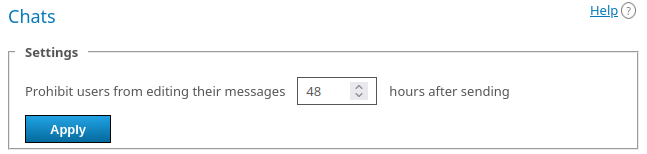
To limit the time for editing messages in chats, check the Prohibit users from editing their messages box (selected by default). In this case, after sending a message, the user on your server will have only the specified number of hours (48 by default) to edit it. Once this time has elapsed, the context menu in the TrueConf application, accessed by right-clicking on the message, will simply not include an edit option.
Limits apply to:
Authenticated users of your TrueConf Server (their application will request the information about the restriction from the server and apply it)
Guest participants of your conferences since a temporary user account is also created for them on the server.
Users of the external federated server will comply with the restrictions of the server where they are authenticated.
Automatic deletion of empty conference chats
In some cases when a conference ends, empty chats may remain, for example, if there was a meeting, but users discussed everything verbally without sending any messages to the chat. The developers of TrueConf Server made sure that such empty chats were not added to the chat list and were automatically deleted.
How it works:
You must have TrueConf Server version 5.5.0 or higher.
About once in 15 minutes, the system checks if a chat was automatically created for a one-time conference which has already ended (in other words, it is not the chat of a virtual room or the conference was started based on a group chat, but was unlinked from this chat). The system will also delete the chats of quick conferences created in a single click in TrueConf client applications. So, this chat will no longer be available to any user when the conference ends.
The system checks if the chats do not include any messages from users (however, a chat may include some service messages, e.g., notifications about a user’s connection to the conference).
All the chats, which match these criteria, will be deleted; so, they will not be displayed in the list of chats in users’ TrueConf client applications.
Please note that if some conference participants were from a federated server, the chat will be deleted depending on the settings of the server where the conference was created (for example, if the servers with different versions were used).