
What is a classic transcoding MCU server?
Purpose
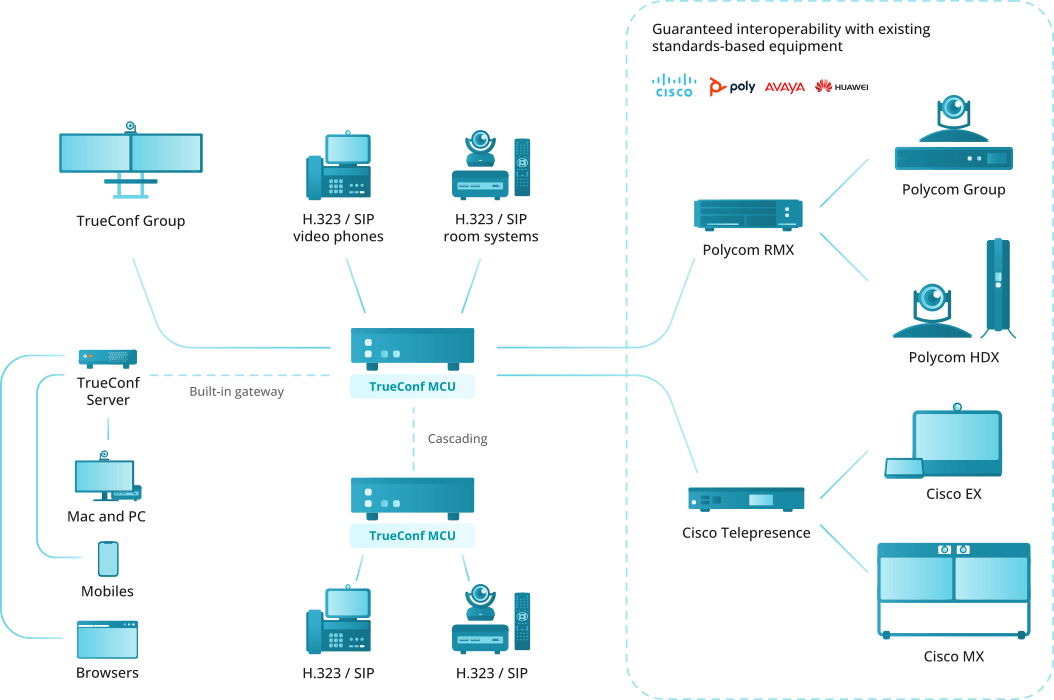
The TrueConf MCU video conferencing server is designed for organizing and conducting multipoint video conferences. It includes standard functionality of a VCS server and is fully compatible with Polycom, Cisco, Lifesize hardware terminals, as well as software like Polycom RealPresence Desktop/Mobile.
Thus, TrueConf MCU serves as a software alternative to solutions like Polycom RMX, Polycom RealPresence Collaboration Server, Cisco Meeting Server, Avaya Scopia, Pexip Meetings, and Poly Clariti.
We covered the features of TrueConf MCU in detail in our webinar:
To operate TrueConf MCU, a physical server or a virtualization environment is required.
Operation scheme
MCU Capabilities
Supported protocols
H.323 video calls, including H.221, H.225, H.231, H.239, H.241, H.242, H.243, H.245, H.281, H.283, H.350, H.460, H.460.18, H.460.19 protocols support
Video calls via SIP, including ICE, TURN, BFCP, RFC 2833 support
Video calls via RTSP protocol
Remote camera control (FECC, H.224, H.281)
TCP/IP, SRTP, TLS, Static IP, DHCP, IPv4, IPv6, DNS
Support for management via SSH, WEB (HTTP, HTTPS) and NTP
Time synchronization via NTP
MTU modifiable size
QoS support: DSCP, DiffServ
Supported video codecs
- H.261, H.263, H.264 Baseline Profile, Н.264 High Profile
Supported audio codecs
- Opus, AAC, G.711, G.719, G.722, G.722.1, G.722.1c, G.723, G.726, G.728, G.729
Features
Conference modes include general, lecture, and speaker. Each mode supports up to 250 participants with Ultra HD (2160p) video quality.
Schedule conferences or create virtual rooms, enjoy a number of scheduling options for recurring meetings (set a number of repetitions, repeat every day, every week or every month)
Send email invitations to a scheduled conference
Lock conferences from new participants (they can be added only by the administrator)
Set up a conference ID (either automatically or manually)
Automatically end conferences if there are no participants for a certain period or if only one participant remains
Select a speaker before a conference starts
Schedule media file playback before the start of a conference
Real-time monitoring and management of active conferences
Display conference participants' names in the layout
If the connection failed, a participant will be prompted to reconnect to the meeting after the connection is restored
View participant’s video, content and layout in use
Set up and manage participants' devices
Move participant from one conference to another on the fly. Participant's camera and microphone can be turned off if needed
Set both general layout for all participants or an individual layout for each user (including an active spear) and create a layout specifically intended for recording and streaming
Configure a type of every video window in the layout: empty window, autofill, fixed participant, active speaker, participant shuffle, or content window
Switch to the layout with a priority window in one click for each participant
Select a video scaling mode with or without cropping or select an automatic mode (TrueConf MCU will automatically determine the best scaling mode)
Remove a participant's self-view from the automatic layout to save up screen space
Create overlay layouts displaying a full-screen window with thumbnail windows laying on top of it
Create audio channels with attendees (able only to receive audio) and presenters (able to sent audio)
Remove non-video participants from the layout to free layout windows for other users
Select audio and video codecs, maximum resolution, fps and video bitrate when creating a conference
Display volume level in the video windows
Stream conferences to external RTMP sources
Show media files such as images and videos during a conference (they can be displayed in the primary and secondary video streams)
Stream from VNC servers during a conference
Use built-in noise cancellation and automatic gain control individually for each participant
Address book where you can add new users, edit existing ones, and form groups
Recording of conferences and presentations (second stream).
Configurable main and sub stream encoding profiles for adjusting the balance between frame rate and image quality depending on the channel bandwidth
Connect IP cameras and view IP streams via RTSP
PTZ camera control
Control participants' devices with DTMF commands
Authorize to log into TrueConf MCU control panel
Possibility of integration with TrueConf Server through cascading.
Compatible with Polycom, Cisco, Lifesize hardware endpoints, as well as Polycom RealPresence desktop and mobile software
Compatible with Debian
Support for Oracle VM VirtualBox, VMware ESXi, KVM hypervisors, Microsoft® Hyper-V, Xen.
Works in LAN/VPN without internet access
Administration features
Real-time monitoring and system data tracking
Export system logs and call history
Check connection to any video conferencing server directly from TrueConf MCU web interface without the need to call the endpoints registered on it
Capture traffic and download it in the .pcap format
Adjust settings for storing, viewing and searching though media files
Specify the maximum size of file storage
Set up network connection (TCP/IP ports, NAT passing)
Set up call parameters (protocols, their priority and order of calls)
Set up a SIP/H.323 gateway
Second channel bandwidth limitation in percentage ratio
Set a tine interval for shuffling or alternating participants in the layout
Change video layouts skins
Customize participant's display name styles
Add user avatars for address book contacts
View information about TrueConf MCU license and software module versions
Update TrueConf MCU
Import and export the built-in database
Import and export the address book
Server shutdown, MCU or OS restart directly from the web interface
Assign a specific role to each user with corresponding permissions: administrator, operator
Terminal management TrueConf Group: network update of firmware and configuration from the control panel TrueConf MCU, activity status monitoring, and the ability to link the terminal with a contact in the address book.
Configure connection with the outgoing mail server.
System requirements
| Initial Configuration | Recommended Configuration | |
|---|---|---|
| Processor | Intel(R) Xeon(R) Silver 4210 CPU @ 2.20GHz | Intel(R) Xeon(R) Gold 6230 CPU @ 2.10GHz |
| Number of CPU sockets | 1 | 2 |
| RAM capacity (DDR4) | 32 GB | 64 GB or more |
| Effective memory frequency | 2400 MHz | 2933 MHz and higher |
| Peak memory bandwidth | 19,200 MB/s | 23464 MB/s and above |
| Disk space capacity | 512 GB (SSD recommended) | 512 GB (SSD recommended) |
| Network | 1 Mbps in both directions for 720p@30fps mode | 2 Mbps in both directions for 720p@30fps mode. When using a virtual machine or server, a 1 Gbps Ethernet connection is recommended. |
| Ports | List of ports that need to be opened for full functionality → | |
| Operating System | Dedicated or virtual Debian 10/11/12 | |
| Supported Hypervisors | Oracle VM VirtualBox, VMware ESXi, KVM, Microsoft® Hyper-V, Xen | |
| Maximum number of displayed participants for standard configurations in various scenarios** | ||
| A single video layout for all participants (resolution 1080p) | 30 | 64 |
| Individual video layouts for all participants (1080p resolution) | 6 | 15 |
| Individual video layouts for all participants (720p resolution) | 12 | 30 |
** When all participants use the H.264 video codec | ||
Please note that TrueConf MCU supports up to 250 participants.
Improved performance when working with TrueConf Server and TrueConf Group endpoints
When terminal TrueConf Group connects to TrueConf MCU, the streams exchanged between them are optimized through the exchange of additional data. For instance, if the current video window with the terminal in the MCU's video layout is reduced, the server will request and receive a video stream with a lower resolution from the device. This reduces the MCU processor load, thereby allowing a greater number of TrueConf Group to connect simultaneously compared to hardware terminals from other vendors.
Automatic packet loss recovery is available TrueConf FEC. It works for SIP calls between TrueConf Server version 5.4.0+, TrueConf MCU version 2.1+, and TrueConf Group with firmware 1.1.4+. This enhances video quality during conferences when there are small but consistent packet losses in the networks. This technology can recover up to 10% of lost packets.