
Getting ready for installation and system requirements
Getting ready for installation and system requirements
Minimum steps to achieve a working corporate communication system:
Choose a machine (PC, physical or virtual server) with suitable hardware. ◀️ You are here!
Configure HTTPS (it is used for many key features such as integration with the AI server, conference scheduling, etc.) and specify the external server address (the address of the guest page).
Configure access to the server for users within the corporate network and, if necessary, from an external network (outside the corporate network).
Create user accounts or integrate the server with a directory service via the LDAP/LDAPS protocol.
Install client applications for users and show them how to connect to your server (check the documentation for the desktop application).
After taking these steps, you will have a basic functional messenger with TrueConf video conferencing. However, this system should be thoroughly configured in various parts of the control panel, depending on your needs. For more information, refer to other sections of this documentation.
For testing purposes, you can install TrueConf Server on a consumer edition of Windows, but make sure that it is not Home! Windows 10 / 11 Pro or Enterprise versions are required because they provide user group management. Additionally, regardless of the operating system (Windows or Linux), the OS user account under which you are installing the server, must have a password.
Additional explanations
When updating TrueConf Server — that is, when installing over an existing instance — we recommend ensuring that you have free space on your system drive equal to at least three times the size of the database. Multiply the current size of the database directory by 3 using the following paths:
working-directory\databaseon Windows (default:C:\TrueConf\database)/opt/trueconf/server/bin/database/on Linux.
This recommendation stems from the fact that our software is constantly evolving and improving, and sometimes it becomes necessary to completely rebuild the server database. If there isn't enough free space after a major update, the installation will simply fail, and you can try again after freeing up the necessary space.
IMPORTANT: If you plan to use Intel® Xeon® 6 or newer, keep in mind that there are two versions of CPUs: one with only E-cores (energy-efficient) and one with only P-cores (high-performance). The main differences are that P-cores include Hyper-Threading, AVX-512 and AXM instructions, larger cache memory, and higher frequencies. So, in most cases, it is preferable to use VMs or VPS based on P-cores. In other situations, it is essential to consult with technical support provided by TrueConf. In any case, desktop hybrid Intel CPUs should NOT be used.
Only x86-64 CPU architectures are supported (also known as x64, x86_64, AMD64, and Intel 64).
Different types of connections create varying loads on the CPU and network. For example, when TrueConf client applications for desktops and mobiles are connected, the server mainly uses CPU resources for transmitting media streams over the network, instead of stream management, thanks to the SVC technology. There is no need to transcode streams (as in the case of recording for mixing the resulting video). We can assume that processing 200 Mbps of traffic requires one physical core of a typical server CPU with multi-threading (Hyper-Threading or SMT). This means that if TrueConf Server is installed on a physical server, 1 core is needed to process 200 Mbps, when the server is installed on a virtual machine (VM), 1 vCPU is required to process 100 Mbps.
In practice, all users rarely participate in conferences at the same time. This is why the video conferencing server engine does not impose limitations on the bandwidth of corporate or Internet networks. However, in our estimates, we recommend that you do not exceeding 3 Gbps for the machine running a single TrueConf Server, regardless of the number of participants, types of conferences, etc. This is the maximum value that has been observed and tested in practice. If your usage exceeds this value and some problems arise, please contact our technical support. You should also take into account the capabilities of the adapter installed on the machine running TrueConf Server.
- TrueConf Server works equally well on Intel and AMD CPUs from approximately the same release year (family). It also supports multithreading technologies: Intel's Hyper-Threading and AMD's SMT.
CPUs released at different times (different generations) vary in per-core performance even if they have the same clock speed.
- TrueConf Server Works the same on Linux and Windows.
In practice, we recommend making sure that CPU load on the machine with TrueConf Server does not exceed 80%. If your use-case scenarios involve higher loads, you should either allocate more resources to the virtual machine (VM) or physically upgrade the hardware.
The software can be installed on both physical and virtual machines (including VPS), so the system requirements are the same.
When a virtual machine is used, it is necessary to configure the CPU topology to have the minimum number of sockets. Please review the instructions for your hypervisor, but general recommendations are as follows:
If we allocate N threads and this number does not exceed the number of cores in a single CPU, then there will be 1 socket, N cores, and 1 thread per core.
If we allocate N threads and this number is greater than the number of cores but less than the number of threads in a single CPU, then we have 1 socket, N/2 cores, and 2 threads per core.
If we allocate N threads and this number exceeds the number of threads in a single CPU, we need to evenly distribute N among sockets, cores per socket, and threads per core. The product of these three numbers must equal N. The priority is to have the minimum number of sockets, with no more than 2 threads per core. For example, if there are 2 CPUs, each with 24 cores/48 threads, and we want to allocate 56 threads for a VM, we would configure 2 sockets, 2 threads per core, resulting in 56/2/2 = 14 cores.
Requirements for Administrators
The administrator, who will have full access to server settings (check role descriptions), is expected to have basic knowledge and skills related to OS and networking:
Understanding the basic file system structure of the server OS (Windows or Linux) and the ability to work with it
Knowledge of the difference between regular and administrative (root) access, and the ability to run commands or installation files as an administrator
Ability to create users in the OS and add them to specific groups
Knowledge of basic networking concepts: IP, DNS, NAT, router, firewall
Understanding the basics of SSL/TLS certificates and their role in securing website access
If the server has to be integrated with third-party services and protocols (e.g., email, LDAP/AD, SIP, etc.), a basic understanding of their work is also needed.
Detailed system requirements
| Initial Configuration | Recommended Configuration | |
|---|---|---|
| CPU | x86-64 architecture (also known as x64, x86_64, AMD64, and Intel 64): Intel Core i3-8100 (3.6 GHz) Intel Core i5-7400 (3.0 GHz) Intel Xeon E-2234 (3.6 GHz) Intel Xeon W-2223 (3.6 GHz) or any other processor with at least 4 logical cores and a PassMark® score of over 7000 points. | x86-64 architecture (also known as x64, x86_64, AMD64, and Intel 64) Intel Core i7-10700 (2.9 GHz) AMD Ryzen 7 2700 (3.2 GHz) Intel Xeon E-2288G (3.7 GHz) Intel Xeon W-2245 (3.9 GHz) or any other processor with at least 16 logical cores and a PassMark® score of over 14000 points. |
Features of standard configurations |
|
|
| And also… | ||
|
| |
| Examples of other typical configurations → | ||
| GPU Hardware Acceleration Capabilities | Adding an NVIDIA Quadro P2000 graphics card increases the number of individual video layouts for SIP/H.323 participants by 20 without the need to change other equipment. | |
Operating system | Dedicated or virtual 64-bit operating system:
When deploying TrueConf Server on a VM, it is not recommended to use CPU oversubscription (i.e., the number of vCPUs should not exceed the number of processor threads on the host machine). For more detailed VM recommendations, refer to this article. | |
| RAM (Random Access Memory) | 16 GB | 32 GB and above |
| When installing memory modules, follow the motherboard vendor's recommendations for achieving maximum performance (these are usually provided for server components). Otherwise, we generally recommend using all available memory channels on the motherboard, meaning at least one memory module should be installed per channel. | ||
Hard drive | 20 GB of free disk space To calculate the required storage space for recordings, information on how video compression works during recording can be helpful. | |
| Network | Ethernet 1 Gbps | |
Ports |
If the HTTPS port is closed, the conference scheduler and real-time meeting management from the client application will not function.
| |
| IP | A static IP address is required for the server to function properly. | |
| Supported hypervisors | Microsoft® Hyper-V, Xen, KVM, Oracle VM VirtualBox, VMware Workstation, and ESXi | |
| Compatible Cryptographic Gateways | Contact our support for details | |
Please note that only two open external ports are required to ensure the minimal functionality of video communication and messaging (working with chats and files). If operations will occur exclusively within the corporate network with no external connections, Internet access can be completely disabled:
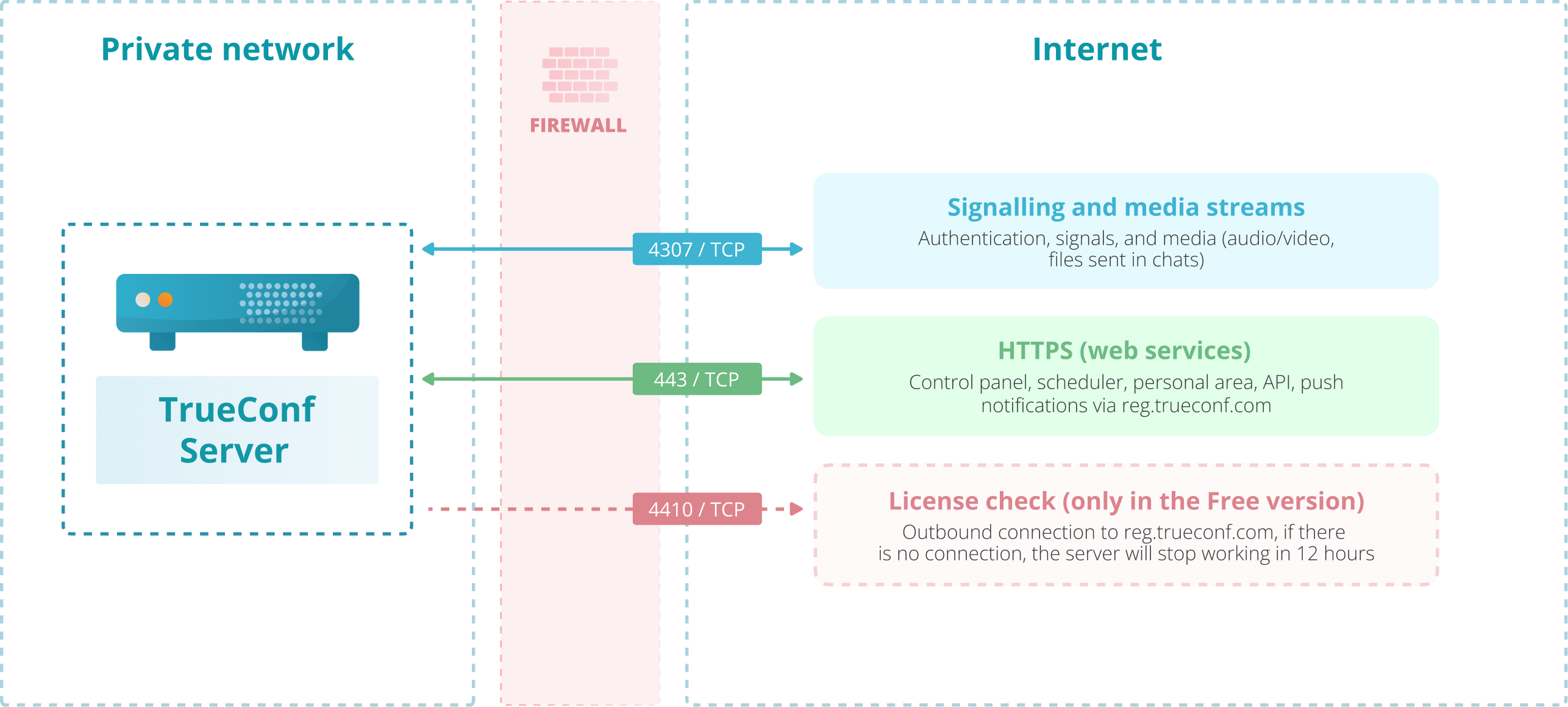
For more details on network security, see the relevant section.
Optimizing swap file usage
General recommendations for swap size on Windows and Linux:
| Installed RAM size | Minimum swap size | Recommended swap size without hibernation | Recommended swap size with hibernation |
|---|---|---|---|
| 2-8 GB | 1-2 GB | 1 x RAM | 1.5 x RAM |
| 8-64 GB | 4-8 GB | 0.5 x RAM | 1 x RAM |
| 64-256 GB | 4-16 GB | 4-16 GB | 1 x RAM |
| >256 GB | 4-32 GB | 4-16 GB | 1 x RAM |
If swap files are heavily used on a virtual or physical machine where TrueConf Server for Linux is installed, and there is plenty of available RAM, you can configure the OS settings for using swap files. As a general rule, Linux-based operating systems use swap files in the following way:
There is no single parameter for using swap depending on the percentage of RAM which is being used.
One should not rely on the mistaken belief that having a lot of RAM (e.g., 128 GB) means that you can do without swap: this file is an important part of memory management logic in the OS.
The use of swap is determined by the
vm.swappinessparameter in the system file/etc/sysctl.conf. This parameter essentially represents the ratio between anonymous and physical memory pages. Physical pages correspond to files and their parts in the file system (typically, the code of running programs). Anonymous pages are dynamically created data (for example, variable values).Reduction of
vm.swappinessprioritizes anonymous memory over physical memory which decreases the use of swap.By default, the value
vm.swappiness = 60works well on standard machines (with 8-16 GB of memory). However, machines, where TrueConf Server is installed, have more RAM, so it makes sense to choose a different value.
You can read more about how swap works in Linux on the Red Hat website.
So, to reduce the use of swap, take these steps:
Open the
/etc/sysctl.conffile with the administrator account in any text editor, for example, by executing the following command in the terminal:sudo nano /etc/sysctl.conf2. If the file already contains a line like
vm.swappiness = 60, change the value 60 to a smaller number, for example 10. If this value is not included in the file, just add a new linevm.swappiness = 10.
Track the results under different loads (e.g., with a different number of conferences, etc.) and adjust the value, reducing it from 10 to 1. Do not set it to 0 under any circumstances. The final value may vary depending on the amount of RAM and the load on TrueConf Server during your test cases.