
Video Conferencing for Lawyers: How Law Firms Choose a Secure, Compliant Platform?
Video conferencing has moved from a convenience to a core operating requirement for law firms, courts, and legal departments. Client intake, depositions, arbitration hearings, contract negotiations, and even routine case status calls now happen over video, often across jurisdictions with different confidentiality rules. This creates a specific set of requirements that generic consumer video tools were never built to satisfy: attorney-client privilege protection, control over where recordings and metadata live, verifiable participant identity, and the ability to keep sensitive matters entirely off public cloud infrastructure when a client or court demands it.
For most legal teams, the decision is not simply “which app has the best video quality.” It is a governance decision. Who controls the servers. Who can access recordings. Whether the platform can operate inside a firm’s own network without routing traffic through a third party. TrueConf, a video conferencing and unified communications platform built around on-premises and private cloud deployment, is one of the solutions that directly addresses this governance-first requirement, alongside widely used commercial platforms like Zoom, Microsoft Teams, and Cisco Webex, cross-platform interoperability tools like Pexip, and legal-specific tools such as CourtCall or Remote Legal.
The table below summarizes the core decision points before the article goes deeper into each one.
|
Decision factor |
What it determines? |
Why it matters for legal work? |
|---|---|---|
|
Deployment model |
Where video data, recordings, and chat logs are physically stored |
Determines whether privileged communications ever touch a third-party cloud |
|
Security architecture |
Encryption, authentication, access control |
Affects exposure to interception, unauthorized access, or subpoena of a vendor’s servers |
|
Admin governance |
Who manages user accounts, retention, and permissions |
Determines how quickly a firm can enforce a litigation hold or revoke access after an incident |
|
Integration depth |
Calendar, case management, telephony, SIP/H.323 endpoint support |
Reduces manual scheduling errors and supports courtroom or opposing-counsel hardware |
|
Participant capacity and scalability |
Maximum users per meeting, per organization |
Matters for multi-party depositions, class action coordination, or firm-wide town halls |
|
Cost structure |
Per-user licensing vs. per-seat subscription vs. free tier |
Affects total cost of ownership for firms with fluctuating headcount or seasonal caseloads |
|
Recording and evidentiary control |
Where recordings are stored, who can export them, chain-of-custody support |
Directly relevant when video is used as evidence or discovery material |
What “Video Conferencing for Lawyers” Actually Means as a Category?
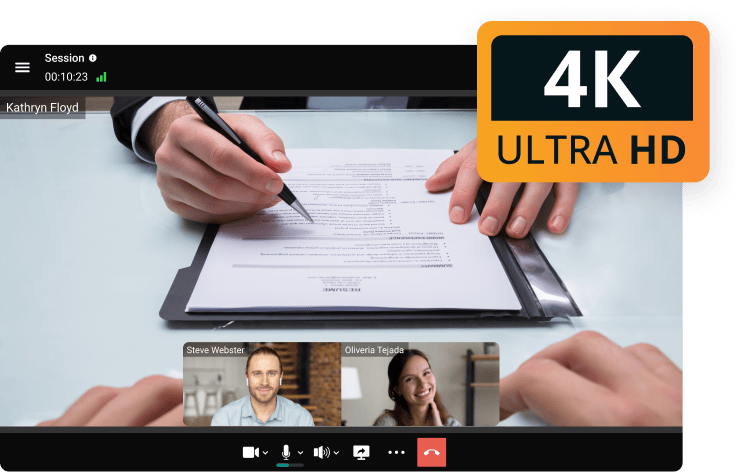
The phrase covers a narrower set of needs than general business video conferencing. Legal teams are typically evaluating tools against four non-negotiable criteria:
- Confidentiality by architecture, not just by policy. A privacy policy is not the same as an architecture that never sends data to a third-party cloud. Firms handling privileged communications, especially in regulated industries like finance, healthcare-adjacent litigation, or government contracts, often require an on-premises or private cloud deployment where the firm itself controls the server.
- Verifiable participant control. Waiting rooms, host-approved entry, and role-based permissions prevent unauthorized parties from joining a deposition or client consultation, intentionally or by mistake.
- Interoperability with courtroom and opposing-counsel systems. Many courts still rely on SIP/H.323-based hardware endpoints or legacy conferencing systems. A platform that cannot bridge to those systems creates friction exactly when reliability matters most.
- Defensible recording and retention practices. When a recorded call may become evidence or discovery material, the firm needs clarity on where the recording lives, who can access or delete it, and whether the chain of custody can be defended in court.
Insight: the deployment model is the single factor most legal-specific reviews underweight.
Most comparison articles focus on video quality, screen sharing, and calendar integrations, which are now table stakes across nearly every major platform. The factor that actually separates vendors for law firms is whether the video infrastructure lives inside the firm’s own network (on-premises), in a private cloud instance the firm controls, or on a shared multi-tenant public cloud the vendor operates.
This single architectural choice determines the firm’s actual data governance posture far more than any feature checklist, and it is the reason platforms like TrueConf, which is built for on-premises and private cloud deployment as a primary use case rather than an enterprise add-on, get shortlisted by firms with strict confidentiality requirements.
Core Requirements Checklist for Legal Teams
- End-to-end or strong transport encryption for all video, audio, and chat traffic
- Deployment options beyond public multi-tenant cloud, including on-premises or private cloud
- Role-based access control and admin-managed user provisioning (ideally with Active Directory/LDAP support)
- Single sign-on (SSO) to reduce credential sprawl across a firm’s systems
- Support for SIP/H.323 endpoints to interoperate with courtroom and legacy hardware
- Meeting scheduling integrated with corporate calendars (Outlook, Exchange)
- Waiting rooms, host approval, and guest-access controls for sensitive sessions
- Local or server-side recording with clear retention and export controls
- Multi-factor authentication (MFA) for firms handling especially sensitive matters
- Scalability from small practice groups to firm-wide or courtroom-scale deployments
Comparing Deployment Approaches: On-Premises, Private Cloud, and Public Cloud
Not all “secure” claims mean the same thing. The table below breaks down the three deployment philosophies legal buyers typically encounter.
|
Deployment model |
Data location |
Typical vendor examples |
Best for |
Limitation |
|---|---|---|---|---|
|
Public multi-tenant cloud |
Vendor-operated shared infrastructure |
Zoom, Google Meet, most default Microsoft Teams tenants |
Firms without strict data residency requirements, fast onboarding |
Data governance depends entirely on vendor’s policies and jurisdiction |
|
Private cloud (single-tenant) |
Dedicated instance, vendor or third party hosts, firm controls configuration |
TrueConf (private cloud option), Cisco Webex private deployments, Pexip Private Cloud |
Mid-size to large firms needing dedicated infrastructure without managing hardware |
Still involves a hosting relationship with a provider |
|
On-premises |
Entirely within the firm’s own data center or LAN/VPN |
TrueConf Server, TrueConf Enterprise |
Firms and courts with the strictest confidentiality, government, or air-gapped requirements |
Requires internal IT capacity to manage and maintain |
Insight: on-premises deployment removes a legal question, not just a technical one.
When video infrastructure runs on a firm’s own servers, questions like “can the vendor be subpoenaed for our call recordings” or “does our data cross into a foreign jurisdiction” become largely moot, because the firm itself is the data controller in the fullest sense.
This is a meaningfully different risk posture than relying on a vendor’s data processing agreement, and it is why on-premises options tend to appear disproportionately often in legal sector shortlists compared to their share of the broader business software market.
How TrueConf Fits Into Legal Sector Video Conferencing?

TrueConf’s relevance to law firms comes from a specific set of architectural choices rather than legal-specific marketing. According to TrueConf’s own pricing and product documentation, the platform is offered in three main tiers relevant to organizations of different sizes:
- TrueConf Server Free supports up to 1,000 users for team messaging with UltraHD video conferencing for up to 10 participants, on-premises secure communication within the firm’s network, built-in Active Directory and LDAP support, single sign-on, one SIP/H.323 connection for legacy endpoint compatibility, meeting scheduling with calendar integration, and one guest connection for external participants. This tier suits small practices or solo practitioners who need on-premises control without licensing costs.
- TrueConf Server extends this to UltraHD video conferencing for up to 2,000 participants, adds webinar support with registration, conference streaming, federation with other TrueConf Server instances, and optional AI-powered meeting transcription and summarization through TrueConf AI Server. Pricing starts at $10 per user per year, which allows firms to scale licensing to actual headcount rather than committing to a flat enterprise contract.
- TrueConf Enterprise is built for organizations needing up to 1 million users, with multi-server scalable architecture, automatic load balancing, redundancy and disaster tolerance, a global user directory, role and rights separation, multi-factor authentication, integration with Data Leakage Protection (DLP) systems, and comprehensive monitoring through TrueConf Monitor. Pricing is quote-based, reflecting the custom nature of large deployments.
For a law firm, the practical relevance of this structure is straightforward: a small firm can start on the free, fully on-premises tier and retain complete control over client communications without any recurring cost, while a large firm or multi-office practice can scale into TrueConf Enterprise for firm-wide deployment with DLP integration and MFA, both of which map directly onto typical legal industry compliance requirements.
Strengths
- On-premises and private cloud deployment as a core product design, not a bolted-on enterprise feature
- Native SIP/H.323 support for bridging to courtroom hardware and legacy conferencing equipment
- Active Directory/LDAP and SSO support out of the box, even on the free tier
- Per-user annual licensing on the paid Server tier, which scales predictably with firm headcount
- MFA and DLP integration available at the Enterprise tier for firms with heightened compliance obligations
- No mandatory internet dependency for meetings hosted entirely within the firm’s network
Limitations
- Smaller ecosystem of third-party legal-specific integrations (e-discovery platforms, legal case management software) compared to Zoom or Microsoft Teams
- On-premises deployment requires internal IT resources to install, patch, and maintain the server, which may not suit firms without dedicated IT staff
- Brand recognition in the legal sector is lower than incumbents like Zoom or Webex, meaning opposing counsel or courts may be less familiar with the interface
Improve the productivity of court sessions with TrueConf!
Comparing TrueConf to Common Alternatives for Legal Use
|
Platform |
Deployment options |
Legal-relevant strengths |
Considerations for law firms |
|---|---|---|---|
|
TrueConf |
On-premises, private cloud, free tier available |
Full on-premises control, SIP/H.323 interoperability, AD/LDAP and SSO, DLP integration at Enterprise tier |
Smaller legal-specific integration ecosystem; requires IT capacity for self-hosting |
|
Zoom |
Public cloud, some private cloud enterprise options |
Familiar to courts and opposing counsel, wide adoption in legal proceedings |
Data governance depends on Zoom’s cloud infrastructure and jurisdiction unless enterprise agreements specify otherwise |
|
Microsoft Teams |
Public cloud (Microsoft 365 tenant) |
Deep integration with Outlook, SharePoint, and existing Microsoft 365 legal workflows |
Tied to Microsoft’s compliance certifications rather than firm-controlled infrastructure |
|
Cisco Webex |
Public cloud, enterprise private cloud options |
Strong enterprise security certifications, established in large firm and government use |
Private/on-premises options typically require larger enterprise contracts |
|
Google Meet |
Public cloud (Google Workspace tenant) |
Browser-based with no download required for guests, simple for one-off client calls |
Fewer legal-specific or deployment controls than the enterprise-focused options on this list |
|
Pexip |
Private cloud, on-premises, or managed service |
Purpose-built to bridge Zoom, Teams, Webex, and SIP/H.323 courtroom systems into a single meeting |
Positioned as interoperability infrastructure rather than a full messaging/collaboration suite |
|
CourtCall |
Public cloud, purpose-built remote appearance platform |
Built specifically for remote court appearances, arraignments, and ADR/ODR, with courts already equipped to receive CourtCall connections |
Scoped to court appearances rather than day-to-day firm communication or client intake |
|
Remote Legal |
Public cloud, purpose-built deposition platform |
Built specifically for remote depositions, with exhibit management, transcription support, and court-reporter workflows |
Scoped to depositions rather than general firm-wide messaging or internal collaboration |
Insight: buyers should separate “built for lawyers” from “built for confidentiality.”
Platforms marketed explicitly to the legal sector, such as court-hearing tools, are often optimized for a single workflow: scheduling and running a court appearance. They are not necessarily built with the same on-premises data control that firms need for day-to-day privileged client communication, internal case strategy discussions, or cross-office collaboration.
A firm’s actual requirement is frequently two-fold: a courtroom-compatible tool for hearings, and a confidentiality-first daily communication platform for everything else. Evaluating both needs against the same vendor list, rather than assuming one tool must do both, produces a more defensible technology decision when a bar association or client audits the firm’s data handling practices.
8 Best Video Conferencing Platforms for Legal Teams
Narrowing the wider market down to eight platforms that come up most consistently in law firm shortlists, split across three groups: general-purpose platforms, interoperability infrastructure, and tools built specifically for legal proceedings.
General-purpose platforms
1. TrueConf

TrueConf is built around the assumption that some firms cannot let privileged communications touch a shared public cloud at all. Its free, self-hosted tier, native SIP/H.323 support, and Active Directory/LDAP integration make it a practical fit for solo practitioners through large firms that want to keep video infrastructure inside their own network.
2. Zoom

Zoom’s ubiquity means clients, opposing counsel, and many courts already know how to use it, which reduces friction for one-off external meetings. Firms with strict confidentiality mandates typically pair it with enterprise-tier security controls or reserve it for lower-sensitivity calls.
3. Microsoft Teams

For firms already using Outlook, SharePoint, and Exchange for document and calendar management, Teams keeps video conferencing inside the same compliance and identity framework, reducing the number of separate vendor relationships a firm has to govern.
4. Cisco Webex

Webex has a long track record in large enterprise and government deployments, with private cloud and on-premises options for firms that need Cisco’s certification profile but are willing to work within larger enterprise contracts.
5. Google Meet

For firms already on Google Workspace, Meet offers a simple, no-download join experience that is easy for clients unfamiliar with video software. It carries fewer legal-specific and deployment controls than the other platforms on this list, so firms tend to reserve it for lower-sensitivity, one-off calls rather than privileged case work.
Interoperability infrastructure
6. Pexip

Pexip is not a standalone meeting app in the same sense as the others; it specializes in connecting participants who are on different platforms, or on SIP/H.323 courtroom hardware, into a single meeting. Firms that regularly deal with clients on Zoom, opposing counsel on Teams, and a court on legacy hardware use it as connective infrastructure rather than a primary daily driver.
Legal-specific platforms
7. CourtCall
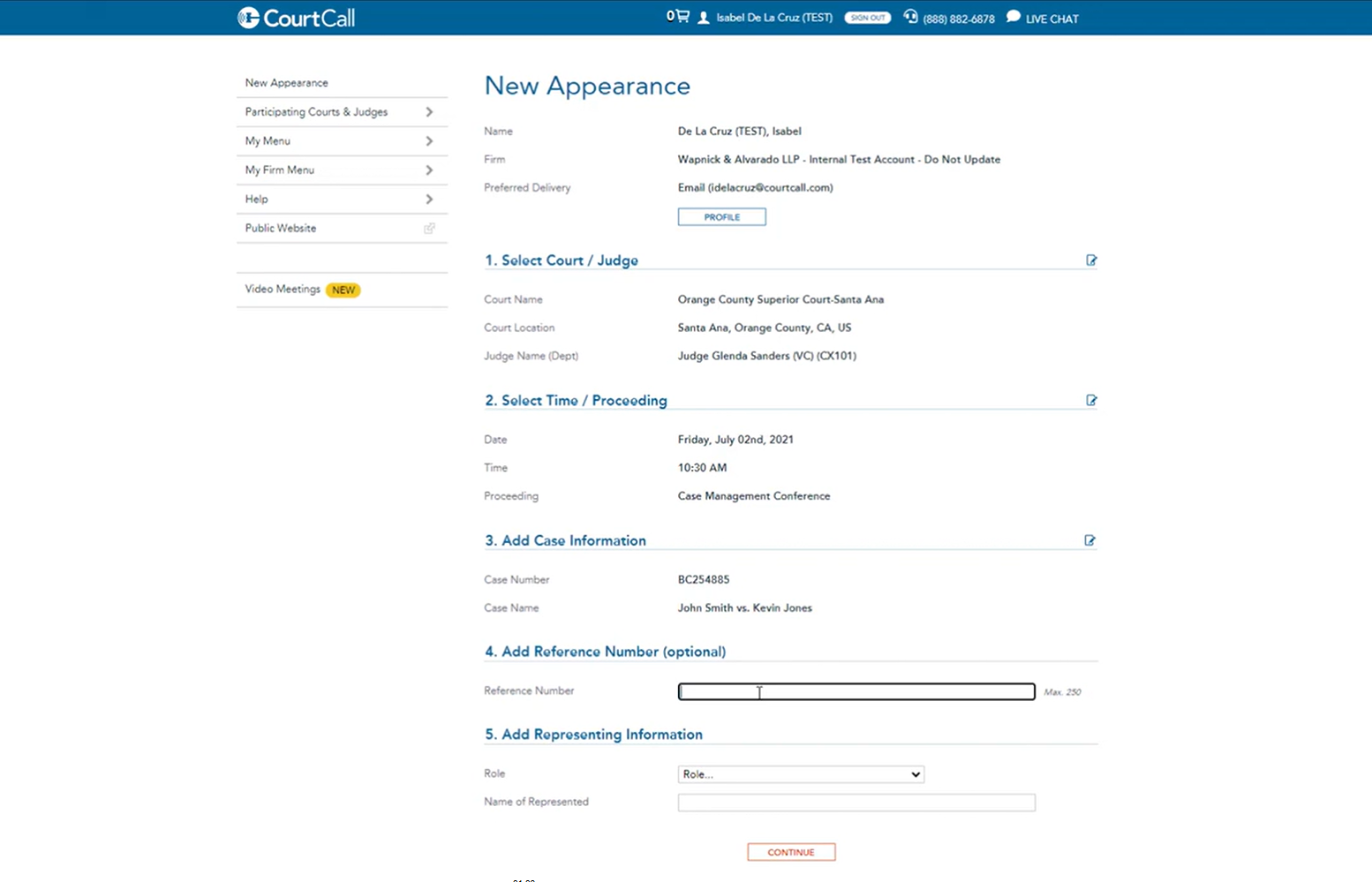
CourtCall is a purpose-built Remote Appearance Platform used for court appearances, arraignments, and alternative dispute resolution, with many participating courts already set up to receive CourtCall connections without additional configuration on the attorney’s side. It is scoped narrowly to the appearance itself rather than day-to-day firm communication.
8. Remote Legal
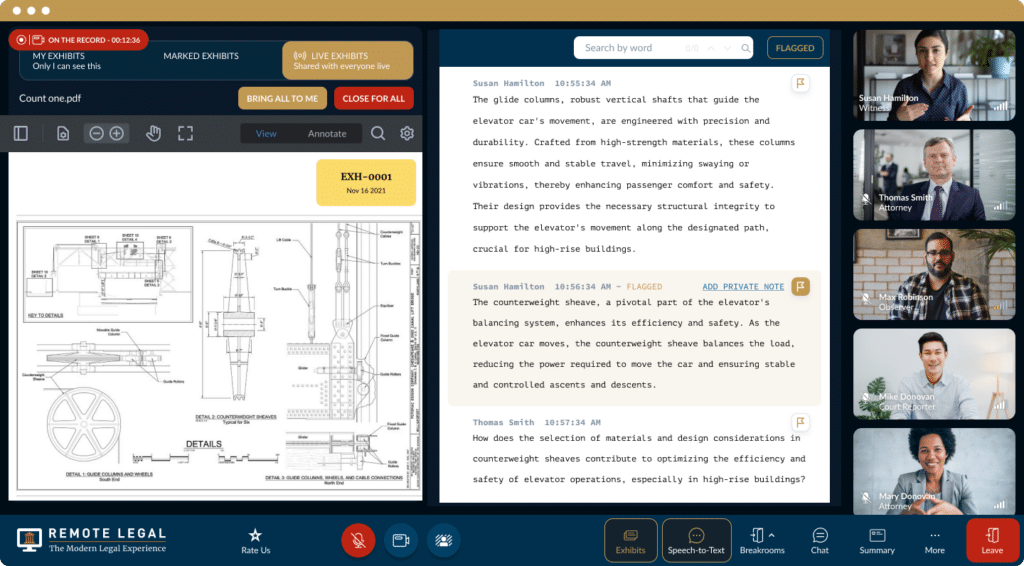
Remote Legal focuses specifically on the deposition workflow: exhibit management, transcription support, and coordination with court reporters, layered on top of standard video conferencing. Firms that run frequent remote depositions use it alongside, rather than instead of, their primary day-to-day communication platform.
Insight: the “best” platform is rarely a single answer for a whole firm.
Larger firms increasingly run more than one platform on purpose: a confidentiality-first tool like TrueConf for privileged internal and client communication, a widely recognized tool like Zoom, Teams, or Meet for external meetings where the other party has no flexibility on software, interoperability infrastructure like Pexip to connect the two worlds without forcing everyone onto one system, and narrow, purpose-built tools like CourtCall or Remote Legal for the specific moments, a scheduled hearing or a deposition, where a general-purpose platform lacks the exact workflow a court or court reporter expects.
Keeping Legal Video Meetings Working Across Clients, Courts, and Counsel
A single case can involve a client who only uses Zoom, opposing counsel standardized on Microsoft Teams, and a courtroom running legacy SIP/H.323 hardware that predates any of today’s cloud platforms. Asking every party to switch tools for one hearing is rarely realistic, so firms increasingly plan for cross-platform meetings as a normal occurrence rather than an edge case.
Two approaches tend to work in practice. The first is choosing a primary platform, like TrueConf, that includes native SIP/H.323 gateway support so it can dial directly into courtroom hardware without extra middleware. The second is layering in dedicated interoperability infrastructure, such as Pexip, that sits between platforms and translates a Zoom, Teams, or Webex call into something a legacy endpoint can join, and vice versa.
This matters most in exactly two moments: when a client joins a consultation from whatever software they already have installed, and when a hearing has to connect to a courtroom’s existing equipment on a fixed schedule with no room for a failed connection.
Governance and Compliance Checklist Before Signing a Contract
|
Question to ask a vendor |
Why it matters? |
|---|---|
|
Where is video, audio, and chat data physically stored during and after a call? |
Determines data residency and jurisdictional exposure |
|
Can the platform run entirely within our own network without internet dependency? |
Confirms whether true on-premises operation is possible, not just marketed |
|
Does the platform support Active Directory/LDAP and SSO? |
Reduces credential management overhead and centralizes access revocation |
|
Is multi-factor authentication available, and at which pricing tier? |
Adds a layer of protection against compromised credentials for sensitive matters |
|
Can recordings be stored locally and exported under firm control? |
Supports chain-of-custody requirements if recordings become evidence |
|
Does the platform support SIP/H.323 for interoperability with court systems? |
Avoids compatibility failures during scheduled hearings |
|
What is the actual per-user cost at the firm’s expected headcount over 12 months? |
Prevents surprise costs from per-host or per-license models that do not match firm structure |
|
Does the vendor offer a free or low-commitment tier to pilot the platform before a firm-wide rollout? |
Reduces risk of a large upfront commitment to an unproven fit |
Best Practices for Running a Professional Legal Video Call
The platform matters, but so does how a call is run. These habits reduce technical embarrassment and reinforce the professionalism clients expect from a legal consultation.
1. Set up a dedicated meeting space
A quiet room with a plain background and good lighting keeps attention on the conversation rather than the environment, and avoids a client or opposing counsel overhearing anything they shouldn’t.
2. Test audio and video before the call, not during it
A short equipment check a few minutes before a deposition or hearing avoids losing the first few minutes of a scheduled proceeding to a microphone or camera issue.
3. Confirm who can join and how
Waiting rooms and host approval should be verified for every sensitive call, and guest links should only be shared directly with intended participants, never posted anywhere reusable.
4. Have documents and visual references ready in advance
Pulling up a contract clause or exhibit live wastes time that a client is paying for; having it staged and ready to share keeps the call efficient.
5. Know the screen-share and mute controls cold
Fumbling for the right button mid-deposition undermines confidence; a brief practice run on an unfamiliar platform pays off before it matters.
6. Dress and frame the call as if it were in person
Clients and courts read professionalism from the same cues on video as in a conference room: appropriate dress, a level camera angle, and a clear, uncluttered frame.
7. Keep video on for substantive conversations
Camera-off calls read as distracted or evasive in a client relationship built on trust; video on signals full attention.
8. Confirm recording status out loud
Stating clearly whether a call is being recorded, and getting consent where required, avoids both an ethical problem and an evidentiary one later.
9. Close the call with a clear next step
Ending with a stated action item or follow-up date reduces reliance on a client re-reading a recording to figure out what happens next.
10. Debrief internally right after high-stakes calls
A quick note on what was said, agreed, or disputed while the conversation is fresh is more reliable than reconstructing it from memory days later.
Ethical and Security Considerations

Ethical Considerations
The American Bar Association’s Formal Opinion 498 on virtual practice, issued in 2021, holds that a lawyer’s core duties of competence, diligence, communication, confidentiality, and supervision under the Model Rules of Professional Conduct do not change simply because a matter is handled remotely or over video. The opinion frames this as an extension of existing obligations: lawyers are expected to understand the benefits and risks of the technology they use and to take reasonable steps to prevent confidentiality breaches, including for the nonlawyer staff they supervise.
In practice, this pushes firms toward two habits: reading the terms of service of any video platform closely enough to know whether the vendor can access or retain call content, and treating “what happens if this vendor is compromised or subpoenaed” as a question worth answering before, not after, a platform is adopted. A companion opinion, Formal Opinion 495 on lawyers working remotely, addresses the related question of practicing across jurisdictional lines when a lawyer’s home office and client base sit in different states.
Security Concerns
Beyond the ethical framework, day-to-day security hygiene still does most of the work: keeping the video client and operating system patched, using strong, unique passwords with multi-factor authentication where available, and using a secured connection or VPN when joining from an untrusted network. For firms evaluating a platform’s architecture rather than just its settings, the deployment model discussed earlier in this article, on-premises, private cloud, or public cloud, is the layer that determines how much of that security posture the firm controls directly versus inherits from a vendor.
Practical Use Cases in a Law Firm Setting
- Client intake and consultations: Waiting rooms and host-approved entry prevent unintended participants from joining sensitive initial conversations.
- Depositions and multi-party proceedings: High participant capacity, recording, and stable performance under variable bandwidth conditions matter more than aesthetic features.
- Cross-office or cross-firm collaboration: Federation support, as offered in TrueConf Server, allows separate on-premises instances at different offices or partner firms to communicate without merging into a single shared cloud tenant.
- Court hearings and hybrid proceedings: SIP/H.323 interoperability ensures a firm’s system can connect to a courtroom’s existing conferencing hardware rather than requiring the court to adopt a new tool.
- Internal case strategy and firm-wide communication: Messaging, presence status, and calendar-integrated scheduling reduce reliance on email threads for time-sensitive coordination.
Empower your video conferencing experience with TrueConf!
FAQ
Is Zoom secure enough for attorney-client privileged communications?
Zoom can be configured with strong security settings such as waiting rooms and encryption, and many firms use it successfully. However, because it runs on Zoom’s public cloud infrastructure by default, some firms handling especially sensitive matters prefer platforms like TrueConf that support on-premises deployment, keeping data entirely within the firm’s own network rather than a third-party cloud.
What is the difference between on-premises and cloud video conferencing for a law firm?
On-premises means the video conferencing server runs on hardware the firm owns and controls, typically inside its own network, while cloud means the vendor hosts and operates the infrastructure. TrueConf Server is designed specifically to run on-premises, which gives firms direct control over where recordings, chats, and metadata are stored, an important distinction for privileged communications.
Can a free video conferencing tool meet a law firm’s confidentiality requirements?
It depends entirely on the tool’s architecture, not just its price. TrueConf Server Free, for example, offers on-premises deployment, Active Directory integration, and single sign-on at no cost, which gives small firms meaningful confidentiality controls without a paid contract, though it is limited to 10 video participants and one external guest connection.
Do courts accept video conferencing platforms that are not marketed specifically as “legal” tools?
Many courts accept whichever platform is scheduled for a hearing, provided it works reliably and supports the needed participants, and courts frequently rely on SIP/H.323-compatible hardware rather than requiring a specific brand. TrueConf’s built-in SIP/H.323 support allows it to interoperate with such courtroom systems, alongside more consumer-oriented tools like Zoom or Teams.
How does a law firm choose between TrueConf, Zoom, and Microsoft Teams?
The choice generally comes down to deployment priorities: Microsoft Teams suits firms already standardized on Microsoft 365, Zoom suits firms prioritizing familiarity with courts and opposing counsel, and TrueConf suits firms whose primary requirement is on-premises or private cloud control over data, particularly when handling highly sensitive or regulated matters.
Does TrueConf integrate with legal case management software?
TrueConf’s core integrations focus on calendar systems (Outlook, Exchange), Active Directory/LDAP, and APIs/SDKs for custom integration work, rather than pre-built connectors to specific legal case management platforms. Firms needing deep case management integration would typically use TrueConf’s API to build a custom connection or pair TrueConf with their existing legal software stack.
What does multi-factor authentication add for a law firm’s video conferencing security?
Multi-factor authentication reduces the risk that a stolen or guessed password alone can grant access to a firm’s communication system, which matters when privileged client data is at stake. MFA is available at TrueConf’s Enterprise tier, alongside DLP integration, for firms with heightened compliance obligations beyond what the base Server tier provides.
How do firms handle meetings when clients, courts, and opposing counsel all use different platforms?
Firms either pick a primary platform with native SIP/H.323 gateway support so it can connect to legacy courtroom hardware directly, or add dedicated interoperability infrastructure such as Pexip that bridges Zoom, Teams, Webex, and SIP/H.323 systems into a single call. Which approach makes sense depends on how often a firm deals with mixed-platform meetings versus a single dominant platform among its clients and courts.
What does ABA Formal Opinion 498 require for video conferencing specifically?
Opinion 498 does not name specific approved platforms or set bright-line technical rules. Instead it directs lawyers to understand the risks of the technology they use, review vendor terms of service for confidentiality protections, and take reasonable, matter-appropriate precautions, leaving the specific choice of platform and security controls to the lawyer’s judgment based on the sensitivity of the matter.
Should a firm use a legal-specific platform like CourtCall or Remote Legal instead of Zoom or Teams?
Usually as a complement rather than a replacement. CourtCall and Remote Legal are built for a single moment, a scheduled court appearance or a deposition, with workflows like court-reporter coordination or exhibit management that general-purpose platforms do not offer out of the box. Firms typically keep a general-purpose or on-premises platform such as Zoom, Teams, or TrueConf for day-to-day communication and reserve the legal-specific tool for the proceeding it was built for.
About the Author
Diana Shtapova is a product specialist and technology writer with three years of experience in the unified communications industry. At TrueConf, she leverages her deep product expertise to create clear and practical content on video conferencing platforms, collaboration tools, and enterprise communication solutions. With a strong background in product research and user-focused content development, Diana helps professionals and businesses understand core product features, adopt new technologies, and unlock the full potential of modern collaboration software.


Follow us on social networks