
Sovereign Communications Platform: What It Means and How to Evaluate One
A sovereign communications platform is a communication environment that gives an organization meaningful control over the infrastructure, data, identities and technical dependencies required for everyday communication.
The word sovereign is often used loosely. A service may be hosted in a local data center, comply with regional regulation or offer a private-cloud option and still depend heavily on infrastructure controlled by another provider.
That is why the most useful question is not:
Where is the platform hosted?
It is:
Who ultimately controls the critical communication environment, and what continues working if an external dependency becomes unavailable?
This distinction is important for governments, critical infrastructure operators, regulated organizations and enterprises that want to reduce dependence on external communications providers.
What Is a Sovereign Communications Platform?
A sovereign communications platform provides an organization with control over the systems employees use to communicate and collaborate.
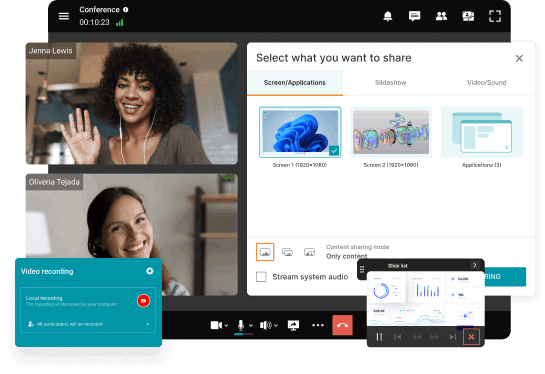
Depending on the product, this can include messaging, voice and video communication, conferencing, presence, files, user directories and administration.
Sovereignty is not determined by any single feature. It comes from the relationship between several parts of the system.
The organization needs to understand who controls:
- the communication infrastructure;
- the communication data;
- user identities and access;
- administration;
- software operation;
- critical external dependencies.
A platform becomes more sovereign as these components move under organizational or otherwise explicitly controlled infrastructure.
The important word here is control.
A server may physically reside in an organization’s data center while essential parts of the service still depend on an external cloud.
Conversely, an organization may deliberately accept some external dependencies while keeping the most critical communication functions under its own control.
Sovereignty is therefore better understood as a degree of operational and technological independence rather than a simple yes/no property.
Sovereignty Is About Control, Not Just Location
Data location is often the first requirement in a sovereignty project.
It is also one of the easiest to misunderstand.
Suppose a communications service stores all customer data inside the European Union. That provides a useful data-residency guarantee.
But the same service may still depend on a provider-controlled cloud for authentication, administration, meeting creation, licensing or other core functions.
In that case, the organization controls where data is stored but not necessarily how the communication environment operates.
A stronger sovereignty model asks a broader question:
Can the organization operate the communications environment according to its own technical and operational requirements without being dependent on a remote control plane?
Data residency can contribute to sovereignty.
It is not the same thing.
Security and Sovereignty Are Different Requirements
Security and sovereignty overlap, but they solve different problems.
Security focuses on protecting the communication environment against unauthorized access, compromise and data exposure.
Sovereignty focuses on who controls that environment.
A highly secure public cloud service can still leave the customer dependent on the provider for availability, administration and technical operation.
A customer-operated platform can provide greater sovereignty while still being badly configured or poorly maintained.
For that reason, self-hosting should never be treated as a substitute for security controls such as patching, access management, backups, monitoring and endpoint protection.
A sovereign communications platform still needs to be a secure communications platform.
Sovereign Team Messenger with Video Conferencing
A sovereign team collaboration server with personal and group chats, UltraHD video conferences, and advanced AI-powered features — free for up to 1,000 users!
The Critical Question Is Dependency
The clearest way to evaluate sovereignty is to stop looking at the product interface and examine what the service depends on.
A typical communications environment may depend on several systems that users never see directly.
Identity services authenticate users. Communication servers process conversations and sessions. Databases store application data. Administrative systems control policies. Other services may handle notifications, updates, licensing or integrations.
The sovereignty question is not whether external dependencies exist. Almost every modern technology stack has them.
The real question is:
Which dependencies are critical enough that losing them would prevent the organization from communicating?
This is where sovereignty becomes practical.
An organization may reasonably accept an external update service while refusing to depend on an external control plane for internal communications.
Another organization may accept cloud identity but require all communication data and application infrastructure to remain under local control.
The correct architecture depends on what the organization needs to protect against.
Operational Sovereignty Matters as Much as Infrastructure Ownership
Owning or controlling the servers is only useful if the organization can operate them.
A real communications sovereignty strategy therefore needs to consider who can administer, update, monitor, back up and recover the environment.
This is where some sovereignty projects become difficult.
Moving a communication service from SaaS to customer-operated infrastructure reduces one dependency but creates new responsibilities for the internal IT team.
The organization must be able to keep the service available, patch vulnerabilities, manage capacity and restore the environment after a failure.
In other words:
Sovereignty increases control, but it also transfers responsibility.
That trade-off should be explicit.
Identity Is Part of Communications Sovereignty
Communications platforms are often evaluated around servers and data while identity is treated as a separate topic.
That can be a mistake.
If every employee depends on an external identity provider before being allowed to access the communications environment, that identity system becomes part of the critical communication path.
Organizations evaluating sovereign communications should therefore understand whether the platform can work with their existing directory and authentication infrastructure and what happens if an external identity dependency becomes unavailable.
For many enterprises, control over identity is just as important as control over message or meeting data.
Interoperability Reduces Strategic Dependency
A sovereign communications platform should not necessarily be an isolated platform.
In many cases, interoperability improves sovereignty because it allows organizations to retain and replace components independently.
An enterprise may already operate PBXs, SIP devices, conference rooms, directory services and other communications infrastructure.
If adopting a new platform requires all of those systems to be replaced with proprietary alternatives, the organization may simply exchange one dependency for another.
Support for established protocols and APIs can make the communications architecture easier to evolve over time.
This is why technological sovereignty should include not only control over today’s deployment but also the ability to change tomorrow’s deployment without rebuilding the complete environment.

How Much Sovereignty Does an Organization Actually Need?
Not every organization needs maximum independence from every external service.
For some companies, regional cloud hosting and contractual data controls may be sufficient.
Others may require customer-operated infrastructure because communications must remain available across private networks or because external cloud control is unacceptable.
The appropriate level depends on the consequence of losing control.
A useful question is:
Which communications capabilities must remain operational even if external infrastructure, public Internet connectivity or the provider itself becomes unavailable?
The answer defines the sovereignty requirement more clearly than a generic request for an “on-premises” or “European” platform.
A Practical Test for a Sovereign Communications Platform
One of the most revealing ways to evaluate a platform is to consider failure rather than normal operation.
Imagine that the vendor’s public infrastructure becomes unreachable.
- Can employees still sign in?
- Can internal communication continue?
- Can administrators manage the environment?
- Can the organization access its communication data?
- Can the platform be restored from backups controlled by the organization?
Now imagine that the vendor relationship itself ends.
- Can the organization export the information it needs?
- Can it preserve communication history and recordings?
- Can existing infrastructure continue to operate long enough to plan a migration?
These questions reveal more about sovereignty than a long feature matrix.
Sovereignty becomes visible when a dependency fails.
Where TrueConf Fits

TrueConf Server follows a customer-operated communications model.
Organizations can deploy the platform on infrastructure they control instead of making internal communication depend entirely on a public SaaS environment.
TrueConf combines persistent messaging, voice and video communication, conferencing and administration within the same server-based environment.
It can operate across organization-controlled LAN and VPN infrastructure and can integrate with existing enterprise directory systems.
Support for SIP and H.323 also allows organizations to connect existing telephony and video conferencing infrastructure rather than necessarily replacing it as part of a communications migration.
This is particularly relevant when the goal is broader than data residency.
The organization can control where the communication server runs, how it is administered and how it connects to the existing enterprise communications environment.
The resulting model is closer to:
organization-controlled communication infrastructure
than to:
a cloud meeting service hosted in a preferred region
That distinction is central to communications sovereignty.
TrueConf does not remove the need to plan infrastructure, backups, security, availability or disaster recovery. Those responsibilities remain part of the deployment.
But that is also the nature of operational control: the organization gains more authority over the platform while accepting greater responsibility for how it operates.
Try TrueConf Server Free!
- 1,000 online users with the ability to chat and make one-on-one video calls.
- 10 PRO users with the ability to participate in group video conferences.
- One SIP/H.323/RTSP connection for interoperability with corporate PBX and SIP/H.323 endpoints.
- One guest connection to invite a non-authenticated user via link to your meetings.

What to Verify Before Calling a Platform Sovereign
Before adopting the term sovereign, an organization should be able to answer a small number of concrete questions.
- Where does the communication infrastructure run?
- Who administers it?
- Who controls identities and access?
- Where is communication data stored?
- Which external services are required for normal operation?
- What stops working if public Internet access disappears?
- What happens if the vendor’s cloud infrastructure becomes unavailable?
- Can the organization recover the platform using resources under its own control?
- Can existing communication systems remain interoperable with the new platform?
These questions are intentionally operational.
They make it harder to confuse sovereignty with marketing terminology.
Sovereign Communications Is Not Technological Isolation
Complete technological independence is rarely realistic.
Modern communication environments depend on operating systems, hardware, networking technologies, cryptographic libraries, mobile platforms and software supply chains.
A practical sovereignty strategy therefore does not try to eliminate every external dependency.
Instead, it identifies the dependencies that create unacceptable operational or strategic risk and brings the critical ones under greater control.
That is a much more achievable objective.
The goal is not isolation.
The goal is controlled dependency.
FAQ
What is a sovereign communications platform?
A sovereign communications platform is a communication environment in which an organization retains meaningful control over critical infrastructure, data, identities, administration and technical dependencies.
Is a self-hosted communications platform sovereign?
It can provide a high level of infrastructure control, but self-hosting alone does not guarantee sovereignty. The platform may still rely on external services for authentication, licensing, administration or other core functions.
Is European hosting the same as communications sovereignty?
No. European hosting can address data residency and jurisdictional requirements, but sovereignty also depends on infrastructure control, operational independence and external dependencies.
Does a sovereign communications platform need to be open source?
Not necessarily. Open source can improve transparency and portability, but practical sovereignty depends on whether an organization can operate, maintain, integrate and eventually replace critical components.
Why is interoperability important for sovereign communications?
Interoperability reduces dependence on a single closed ecosystem. It allows organizations to preserve existing communication infrastructure and replace individual components without rebuilding the complete communications environment.
Can TrueConf be used as a sovereign communications platform?
TrueConf Server can be deployed on customer-controlled infrastructure and combines enterprise messaging, video communication, administration and SIP/H.323 interoperability. It is relevant to organizations that need greater control over communications infrastructure and private-network operation.
Conclusion
A sovereign communications platform is not defined by server location, encryption, compliance or self-hosting alone.
The central issue is control.
An organization needs to understand who controls the infrastructure, identities, communication data and operational dependencies required for the service to function.
The strongest sovereignty test is therefore not:
Where does the platform run?
It is:
What remains under our control when an external dependency disappears?
That question separates genuine communications sovereignty from data residency, private hosting and other related but narrower concepts.
For organizations that need customer-operated communications infrastructure, private-network operation and interoperability with existing enterprise systems, TrueConf represents one possible architecture built around organizational rather than public-cloud control.
About the Author
Olga Afonina is a technology writer and industry expert specializing in video conferencing solutions and collaboration software. At TrueConf, she focuses on exploring the latest trends in collaboration technologies and providing businesses with practical insights into effective workplace communication. Drawing on her background in content development and industry research, Olga writes articles and reviews that help readers better understand the benefits of enterprise-grade communication.


Follow us on social networks