
What is TrueConf Room PRO?
What is TrueConf Room PRO?
Purpose
TrueConf Room is a videoconferencing application. It functions as a client application at the software level but features key characteristics of a hardware VCS terminal.The primary purpose of TrueConf Room is to display video conference participants on a large screen in a meeting room. Conference management is carried out by the participants themselves using external devices such as PCs, tablets, or mobile phones. To start, simply scan a QR code or follow a link.
The main principle of TrueConf Room is user-friendly management accessibility and full screen usage during the conference without overlaying the interface elements.
TrueConf Room Designed to operate on Windows and Linux-based operating systems, it can use TrueConf Online as a video conferencing server or a corporate TrueConf Server (including its free version TrueConf Server Free).You can download TrueConf Room completely free on our website.
If you need to manage this solution using scripts for automation, or if you want to integrate management into your corporate software, use the built-in API.
Connection structure
This section gives only a general description.
Check out the corresponding sections to learn how each of these connections can be configured:
To conduct video conferences, TrueConf Room must be authorized via an account on TrueConf Server or TrueConf Online.
TrueConf Room the product does not include peripheral conference equipment. A microphone and camera must be connected to the computer running TrueConf Room.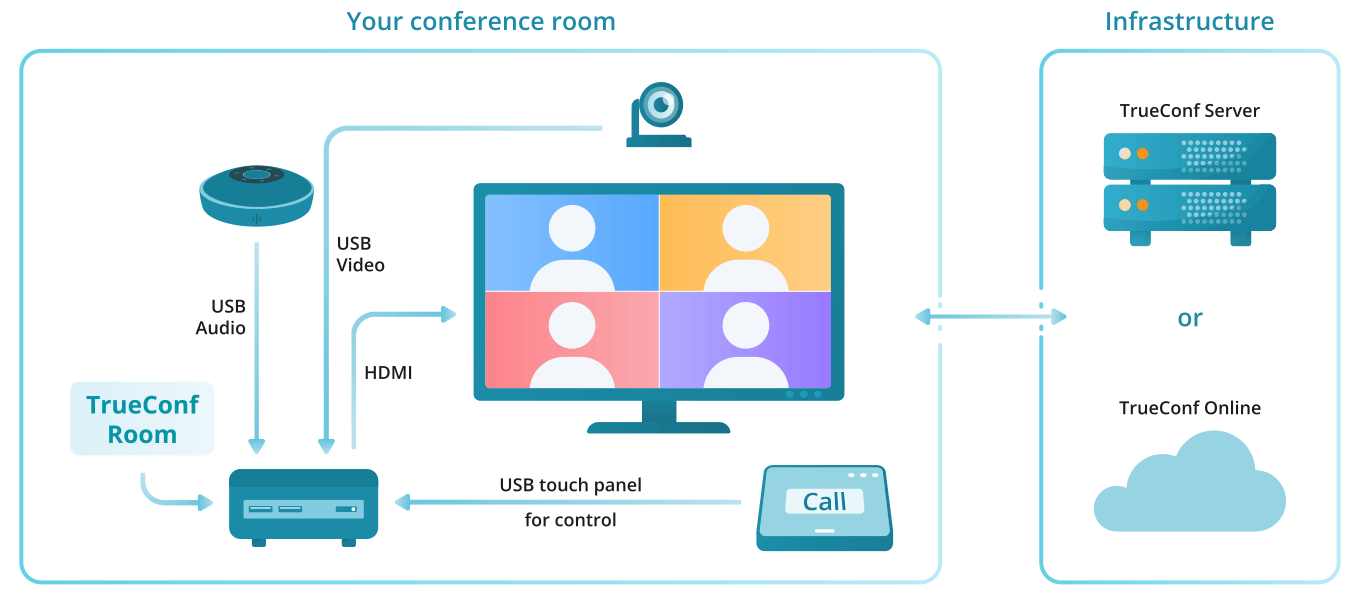
TrueConf Room features
You can use the TrueConf Online service or a corporate TrueConf Server (including TrueConf Server Free) as a video conferencing server. We recommend using the on-premises version of TrueConf Server, as it offers many more features and can also be deployed in the cloud.
Enjoy 4K (Ultra HD) video calls and conferences
Conferences with up to 2000 participants.
Video conferencing modes: one-on-one call (point-to-point) and four types of conferences : all on screen, video lecture, smart meeting, and moderated role-based conference
Use QR code or follow the link on the start screen to enter TrueConf Room control panel (also available for mobile devices)
View your upcoming conferences on the main screen
Capability to extend the conference.
Real-time management of the video layout TrueConf Room (including via mobile devices).
Wireless content streaming from Apple devices using AirPlay.
Sharing presentation slides in a conference: pdf, ppt, pptx, slides, and odp (for Linux OS).
Use image files for slideshows
Show slides from a participant’s laptop over HDMI.
Wake up your PC monitor when logging into the control panel
View video layouts in the control panel
Displaying participants' reactions in the conference.
Control PTZ cameras (available for moderators and conference owners)
Set up different authorization rights for users and administrators (PIN code, password, or unsecured login)
Control your own camera or microphone. Moderators and conference owners can also control participants’ devices.
During a video conference, participants can request to become speakers, while moderators can manage the meeting roles
Meeting owners or operators have access to real-time meeting management tools, which allow them to lock layout for all participants or set individual layouts for each user, including SIP/H.323 endpoints and browser participants
Put participants in the waiting room: this feature can be activated or deactivated during an ongoing meeting (available to conference moderators)
Route video calls through the server (optional)
Call SIP/H.323 and RTSP devices
Call VoIP users, landline and mobile phone numbers
Send DTMF commands
Use with popular USB peripherals
Enjoy built-in algorithms of echo cancellation and automatic gain control (AGC)
Perform audio tests to adjust automatic echo cancellation.
Use multi-monitor configurations (display the meeting and control panel on different screens, drag and drop separate video windows)
Manage your address book (search, view information about a contact, delete and block users)
Explore notification center
Play with meeting room devices (Lenovo ThinkSmart Hub 500, HP Elite Slice, Logitech Tap)
Compatible with popular ARM platforms (e.g. Raspberry Pi)
Creating custom interfaces for application management using the TrueConf Room API.
Configure bandwidth limitation settings
View system information and current license details TrueConf Room.
Activation of secure access for administrators and users to differentiate their capabilities when working with the application (available in the full version of TrueConf Room).
Branding the main screen interface: upload your own logo, change the background, hide certain interface elements (available in the full version of TrueConf Room).
Offline activation of the full version of TrueConf Room.
Remote device management from the TrueConf Room control panel: reboot and shutdown.
Capture and broadcast NDI streams (available in the full version of TrueConf Room).
Join a PIN-protected conference
Escalate a one-on-one call into a conference
Enable or disable video and audio from a conference participant
Pin the main window to the selected screen
Easily manage instances of TrueConf Room using TrueConf Discovery.
Advanced launch using TrueConf Room Service.
Control a PTZ camera with presets and gestures.