Follow us on social networks

Secure Video Conferencing: Complete Guide for Enterprise and B2B Teams


Updated in August 2026

Secure video conferencing is a system for conducting online video meetings in which audio, video, messages, and shared files are protected from unauthorized access. It combines encrypted data transmission with user authentication, access controls, and administrative security policies. Unlike standard video calling tools, secure video conferencing is designed to ensure that only approved participants can join meetings and that confidential communication cannot be intercepted, viewed, or stored by unauthorized third parties.

Encryption is the foundation. A secure video conferencing system encrypts the media stream (audio, video, screen share) and the signaling channel (connection setup and metadata) separately.

The two most common approaches are:

  • Transport encryption (TLS/SRTP): Traffic is encrypted between the client and the server, but the server itself can decrypt the stream. This is the standard model for most cloud SaaS platforms.
  • End-to-end encryption (E2EE): The server transmits encrypted packets without being able to read them. True E2EE is significantly harder to implement for multi-party conferences and often limits features like cloud recording.

Access control covers who can join, how identities are verified, and what permissions different roles have during a session. Weak access control is the most common cause of conference intrusion incidents.

Data residency defines where meeting data, recordings, and metadata are stored. For regulated organizations, data processed outside a specific jurisdiction can create compliance violations regardless of encryption quality.

Admin governance determines whether IT teams can set and enforce organization-wide policies: recording permissions, guest access, chat retention, idle timeouts, and integration with identity providers.

YouTube

This content is blocked because YouTube cookies have not been accepted.

Why Standard Cloud Tools Are Not Always Enough for Secure Video Conferencing?

Sovereign cloud in video conferencing

Most mainstream video conferencing platforms (Zoom, Microsoft Teams, Google Meet) provide acceptable security for general business use. Their limitation is not encryption quality per se but the deployment model: your traffic flows through third-party infrastructure, and the vendor retains administrative access to the platform.

For a legal firm sharing privileged case materials, a hospital conducting patient consultations, a defense contractor discussing technical specifications, or a government agency running internal policy meetings, this model introduces unacceptable risk. The issue is not that these vendors are untrustworthy. The issue is that the organization cannot independently verify, audit, or control where data goes and who has access to it.

Insight 1: Deployment model is often more important than encryption algorithm.

Two platforms can both advertise AES-256 encryption, but if one runs on shared cloud infrastructure outside your legal jurisdiction and the other runs on a server inside your own data center, they are not equivalent from a compliance standpoint. Buyers frequently compare feature checklists without accounting for where the encryption keys are held and who controls them.

What Goes Wrong When Video Conferencing Isn’t Secure?

Data security

Most insecure video conferencing incidents fall into a small number of recurring categories, and understanding them helps explain why the security criteria later in this guide are the ones that matter.

  • Unauthorized meeting access (“bombing”). A guessable or reused meeting ID, combined with no waiting room or password, lets uninvited participants join and disrupt or record a session.
  • Data interception in transit. Traffic sent without proper transport encryption, or over a public Wi-Fi network without a VPN, can be intercepted between the participant and the server.
  • Vendor-side data exposure. Even with strong transport encryption, a vendor that retains metadata, recordings, or chat logs on infrastructure it controls creates a second party that must also be trusted and secured.
  • Malware delivered through shared files or links. Screen sharing and file transfer features, if not restricted, become a delivery channel for malicious content inside an otherwise legitimate meeting.
  • Unmanaged recordings. A recording saved without a defined retention and access policy can persist indefinitely on a device or cloud drive well outside the organization’s actual security boundary.

Core Security Criteria for Secure Video Conferencing

HIPAA (Health Insurance Portability and Accountability Act)

When assessing any video conferencing solution for enterprise or regulated-sector use, evaluate the following:

Encryption

  • Protocol: TLS 1.2 or higher for signaling, SRTP or DTLS-SRTP for media
  • Key management: whether keys are held by the vendor or by your organization
  • End-to-end encryption availability for one-on-one and group calls

Identity and Access Management

  • Single sign-on (SSO) support (SAML 2.0, Kerberos, LDAP/Active Directory sync)
  • Multi-factor authentication (MFA) enforcement
  • Role-based access control for hosts, participants, observers, admins
  • Guest access policies: whether external users can join without an account and under what conditions

Network and Infrastructure

  • Ability to operate inside a corporate network without internet access (air-gapped or intranet-only deployment)
  • Support for NAT traversal, firewall, and proxy environments without exposing additional ports
  • Compatibility with VDI (Virtual Desktop Infrastructure) for organizations with thin-client environments

Admin Control and Governance

  • Centralized web-based admin panel covering all user accounts, groups, licenses, and session policies
  • Recording management: where recordings are stored, who can initiate them, retention rules
  • Audit logs and monitoring integrations

Compliance Posture

Whether the platform has relevant certifications (ISO 27001, SOC 2, GDPR readiness, FIPS, HIPAA) or supports your organization’s own compliance requirements through on-premises deployment.

Industry-Specific Security Requirements

TrueConf for healthcare

The same platform can be an appropriate choice for one sector and an unacceptable risk for another, since the security bar shifts with what a breach would actually expose.

Defense

Requirements typically include air-gapped or fully isolated network deployment, no vendor-side access to any session data, and interoperability with existing SIP/H.323 secure communication hardware already in use.

Government

Agencies generally need data sovereignty guarantees tied to a specific jurisdiction, centralized identity integration with existing government directory systems, and detailed audit logging for public accountability requirements.

Healthcare

Video platforms used for patient consultations need a signed Business Associate Agreement or an on-premises deployment that removes the BAA requirement entirely, session-level access logging tied to a specific patient encounter, and, where used for telehealth, some path for integrating consultation notes back into an EHR system rather than leaving the visit undocumented.

Enterprise

Corporate buyers typically weigh SSO and directory integration, admin governance depth, and total cost of ownership more heavily than the maximum available encryption strength, since most enterprise data is sensitive but not classified.

Justice

Courts running remote hearings need verifiable participant identity, tamper-evident recording for evidentiary use, and a chain of custody for session data that a shared cloud platform’s standard retention policy was not designed to provide.

Secure Video Conferencing: Cloud, On-Premises, and Hybrid Deployment

The choice of deployment model has a larger impact on security posture than almost any individual feature.

Deployment Model

Data Location

Key Control

Internet Required

Best For

Public cloud SaaS

Vendor’s servers

Vendor holds keys

Yes

SMBs, general business use

Private cloud (VPC)

Cloud, isolated tenant

Shared or org-held

Yes

Mid-market with cloud mandates

On-premises (self-hosted)

Your own servers

Organization holds keys

Optional

Regulated sectors, government, defense

Hybrid

Mixed

Depends on config

Yes

Distributed enterprises with mixed compliance needs

Buyer’s Checklist: What to Ask a Vendor Before You Sign?

A vendor’s marketing page rarely surfaces the answers that actually matter during a security review. Ask for specifics on each of the following before signing.

Question to ask

Why it matters?

Which certifications does the platform hold, and for which specific tier?

Certifications like ISO 27001 or SOC 2 frequently apply only to enterprise tiers, not the plan initially quoted

What is the vendor’s breach history and disclosure track record?

A documented, transparently disclosed past incident is often a better signal than a vendor claiming a perfect record with no independent verification

What are the disaster recovery and business continuity guarantees?

A cloud outage that takes down video conferencing organization-wide is a business continuity failure, not just an inconvenience

Who physically controls the data, and can that be verified rather than taken on faith?

A contractual promise and an architectural guarantee are not the same thing, and only one survives a change in vendor policy

Does it interoperate with existing SIP/H.323 hardware and identity infrastructure?

Replacing working conference room hardware or running a parallel identity system adds cost that a compatibility check would have avoided

How granular are the access control and admin governance options?

Role separation between participant, host, and administrator determines what a single compromised account can actually access

Does the vendor run a transparent security program with published audits?

A vendor unwilling to share audit results or a security whitepaper is asking for trust it has not earned through evidence

Self-hosted deployment is the most secure model for organizations that need verifiable data isolation. The trade-off is that IT teams must manage infrastructure, perform updates, and handle capacity planning. The operational burden is higher, but the security and compliance control is absolute.

TrueConf Server is designed specifically for the self-hosted model. It installs on a standard Windows or Linux server within your corporate network and does not require a persistent internet connection to function. All meeting data, recordings, chat history, and user credentials remain inside your infrastructure.

The admin panel allows a single administrator to manage thousands of users, configure access policies, and monitor system status from a single web interface.

Insight 2: Air-gapped operation is a real differentiator that most vendors cannot offer.

TrueConf Server does not require a permanent internet connection. For organizations in critical infrastructure, manufacturing, industrial, or government environments where network segments are intentionally isolated, this is not a minor technical detail but a prerequisite. Most cloud-dependent platforms simply cannot be deployed in these environments at all.

An Overview of Video Conferencing Solutions

Ensuring the security of video conferencing requires careful selection of the solution you trust. Many vendors are quite negligent regarding user privacy, ignoring the threat of cyberattacks.

That is why we have compiled a list of solutions for you that provide security using various methods of data protection, including encryption.

TrueConf

Secure Video Conferencing - TrueConf app

TrueConf is an on-premises solution that works without an internet connection and is deployed on your local area network (LAN) or virtual private network (VPN). With this video conferencing platform, users can take advantage of various collaboration opportunities, such as secure chats and content sharing. You have complete control over all communications, ensuring protection against leaks.

Security

In addition to the fact that the video conferencing solution operates on your company’s equipment, all media streams are encrypted according to the AES-256 standard and are transmitted over secure TLS connections. Personal data is located only within your corporate network, and only the administrator has access. Thus, TrueConf is equipped with 9 levels of protection, ranging from basic to cryptographic.

Let’s understand the device of the platform in more detail:

Mandatory Authorization. Unless they enter their username and password, users cannot access the TrueConf server, except for guests of public conferences.

Access rights. You can grant the ability to use the control panel only to a specific range of IP addresses, individual administrator accounts, or computers within your corporate LAN.

Vulnerabilities

As previously mentioned, your server resources are not shared with third-party users or companies, thus greatly reducing the chances of anyone accessing your data.

Boost your team’s productivity with TrueConf Server Free!

Google Meet

Google Meet

Google Meet is a secure cloud solution that enables you to organize both individual and group video conferences. The platform offers many opportunities for collaboration, such as the well-known Jumpboard. As for the participants, Google Meet allows even unregistered guests to join the conference using the meeting code.

Security

The solution was initially created as a business tool in the Google Workspace suite, but eventually became available for non-commercial use. To protect personal data, the online meeting platform adheres to TLS and SSL standards for encryption at the transit level. Registered Google users also have the option to enable two-factor authentication using FIDO-compatible text messages, authentication apps, or security keys.

Vulnerabilities

Google Meet does not support end-to-end encryption: instead, it uses DTLS-SRTP to protect connections. However, it may be an unpleasant discovery for some that the vendor of the solution stores data on delays and performance. Such “collectible” information includes the data transfer rate, estimated bandwidth, names of conference organizers, IDs of participants, IP addresses, as well as the date and calendar ID of the meeting.

Security researchers recently highlighted a vulnerability in Google Meet’s URL redirection feature, which could lead users to counterfeit domains and make them victims of cybercriminals. Furthermore, if you join a meeting from a smartphone, the audio is transmitted over the telephone network and may not be encrypted.

Slack

Secure Video Conferencing - Slack

Slack is a corporate messenger that can support video chats for up to 15 users. As with other vendor services, this solution requires mandatory login to your account and uses a secure system to protect confidential data. This is explained by the fact that Slack supports integration with almost 100 third-party services, such as Dropbox, Google Drive, and even Twitter.

Security

Data transfer between the messenger and the Slack service is carried out using reliable encryption protocols and signatures, such as TLS 1.2, AES-256 and SHA2. It is noteworthy that such a protection system only works with the consent of the user, who must approve the processing of his or her personal information. Confidential data at rest in the Slack production network is encrypted in accordance with FIPS 140-2 standards, including relational databases and file storage. At the same time, all encryption keys are stored on a secure server with restricted access.

Vulnerabilities

If you are going to use Slack for business purposes, you need to be aware of the associated risks.

In 2015, Slack was hacked, revealing flaws in the messenger’s security system. The company announced that its system had been hacked, and the attackers had access to the database for four days, jeopardizing the privacy of its users. After the cyberattack, Slack experts also discovered suspicious activity from some accounts that had been clearly compromised by criminals.

In 2019, Tenable specialists also discovered a vulnerability in the Windows version of Slack. The client application provided an opportunity to change the download destination and steal, modify, or add malware to files. The critical vulnerability also allowed for remote code execution (RCE). Hackers could gain full remote control over the Slack desktop application with a successful exploit, thereby gaining access to private channels, conversations, passwords, tokens, and keys.

Skype

Secure Video Conferencing - Skype

Skype, created by Microsoft, is a free software for making video calls. The “Meet Now” option allows presenters to invite both registered participants and anyone else in general to a virtual meeting, without needing an account. As for commercial purposes, it is worth noting that Skype for Business will cease to exist on July 31, 2021.

Security

Skype uses AES, also known as Rijndael, which is employed by the US government to safeguard confidential information. At the same time, the encryption itself is 256-bit and has proven to be reliable. The Skype server uses 1536 or 2048-bit RSA certificates to certify users’ public keys.

Vulnerabilities

By default, Skype does not use end-to-end encryption, meaning that Microsoft can view all messages, calls, and files. In addition, the vendor records people’s interactions on their platform, including but not limited to:

  • Chat history
  • Activity status
  • Telephone numbers
  • Files sent and received
  • Time and duration of calls

Microsoft claims that it also collects user data from third parties, including those associated with the best affiliate programs, and even brokers. Additionally, the corporation utilizes personal information for targeted advertising, personalization, research and development, and to improve its products. Personal data is also shared with Microsoft affiliates, subsidiaries, and suppliers.

WebEx

Secure Video Conferencing - WebEx

The WebEx video conferencing platform has existed since 1995 and is widely used by privacy-conscious companies in the healthcare, information technology, and financial services industries. This is partly because all three sectors had resorted to virtual meetings long before the COVID-19 pandemic, but mostly due to the solution’s reputation for maintaining strong cybersecurity and cyber resilience. WebEx’s parent company, Cisco, has long established itself as a reliable and secure vendor for corporate interactions.

Security

By default, WebEx makes user data readable by the server, but it also offers additional end-to-end encryption for up to 200 users, which is more than many of its competitors. Holders of free accounts can contact customer support to further protect themselves. Despite considering the possibility of hosting an on-premises solution, the vendor offers a Cisco Meeting Server for these purposes.

Vulnerabilities

In 2020, Cisco engineers prepared fixes for three vulnerabilities that hackers could exploit during WebEx conferences. IBM discovered security breaches that allowed an attacker to join an online meeting as a ghost user and gain access to personal data. Therefore, a cybercriminal could discover the full names, email, and IP addresses of conference participants.

WhatsApp

Secure Video Conferencing - WhatsApp

It is highly likely that you have friends or relatives on WhatsApp, as this messenger already has over two billion users. The solution was created in 2009, but it reached its peak popularity in 2015 and even became the main means of communication in several countries, including Latin America. WhatsApp enables users to organize personal and group chats, make audio and video calls, share files, locations, and even create polls.

Security

To ensure privacy, the solution supports end-to-end encryption, which prevents even company employees from viewing your messages or listening to conversations. WhatsApp also allows users to enable two-step verification to further protect their personal data and send disappearing messages.

Vulnerabilities

In January 2021, Meta announced an update to its privacy policy, stating that WhatsApp would store personal metadata and share it with Facebook and its “family of companies” (e.g., Facebook Messenger, Instagram) starting in February of that year. Previously, users could refuse to transfer information in the settings, but now this feature is not possible. So cyber awareness is something you need to keep in mind at all times using WhatsApp.

In 2022, as a result of the leak, nearly 500 million users’ personal data was released into the network. As it turned out, Meta had been storing users’ confidential information in an almost unencrypted form for many years, resulting in hackers being able to easily bypass the security system and gain access to it. In the following years, residents of 84 countries, including the United States, Italy, and France, suffered from the actions of fraudsters and criminals.

Zoom

Secure Video Conferencing - Zoom

Zoom is a video communication platform that offers a wide range of collaborative tools. The solution gained the most popularity in 2020 during the pandemic, as many companies and organizations started using it for remote work. It is noteworthy that many enterprises continued to use Zoom even after the lockdown was lifted, demonstrating its continued great demand.

Security

When using a Zoom client, video, audio, and screen sharing are protected in transit with AES-256 and a one-time key for that specific session. To further protect your privacy, the solution allows you to enable additional end-to-end encryption.

Vulnerabilities

“Zoombombing” is still a huge stain on the company’s reputation in terms of security. The precedent of intruders appearing in conferences and subsequently demonstrating profanity has become one of the largest hacker attacks in the history of video communication. Attackers could also send, edit, and remove chat messages, as well as remove other participants from online meetings.

Common Attack Patterns Across These Incidents

Looking at the seven vendor cases above as a set rather than one at a time reveals a pattern that a single vendor review would miss.

Insight 3: The exploited weakness is almost never the encryption algorithm itself.

Zoom’s most damaging incidents came from meeting access controls, not from a break in AES-256. WebEx’s 2020 flaw was a ghost-user identity bypass, not a cryptographic weakness. Slack’s 2015 breach exploited its database access layer, not its TLS implementation. WhatsApp’s 2022 exposure came from unencrypted metadata storage sitting alongside a product that markets end-to-end encryption for message content.

Every one of these incidents happened at a vendor with strong, industry-standard encryption already in place. The common failure point was access control, identity verification, or vendor-side data handling around that encryption, not the cipher itself. A buyer who evaluates a platform primarily on encryption strength is checking the one specification least likely to be the source of the next incident.

Meeting-Level Best Practices for Every Platform

Authentication via SSO

Even the most secure platform architecture can be undermined by how individual meetings are actually run. These practices apply regardless of which vendor an organization chooses.

  • Write a video conferencing policy. Define who can host external meetings, what can be recorded, and how guest access is granted, rather than leaving each employee to improvise their own settings.
  • Enable a waiting room and unique meeting IDs. Never reuse a personal meeting link for sensitive sessions, and require host approval before a participant joins.
  • Enforce two-factor authentication for all accounts. This closes the most common path from a phished or reused password to a compromised meeting.
  • Ask permission before recording. Beyond the legal requirement in many jurisdictions, an announced recording changes what participants are willing to discuss openly, which matters for accurate decision-making.
  • Use a VPN on untrusted networks. Joining a sensitive meeting from public Wi-Fi without a VPN exposes signaling traffic to anyone else on that network.
  • Keep client software up to date. Most exploited vulnerabilities, including several referenced above, were patched by the vendor before wide exploitation, but only for users who had actually updated.
  • Train employees on the specific risks, not generic advice. Staff who understand why a meeting ID should not be reused are far more likely to actually avoid reusing it than staff handed a generic security slide deck once a year.

Where Video Conferencing Security Is Heading?

Five shifts are changing what buyers expect from a secure video conferencing platform beyond the criteria covered above.

  • Security concerns are growing, not leveling off, as video conferencing has become a default business channel and therefore a default target, rather than a niche tool evaluated once and forgotten.
  • Cybersecurity regulation is tightening across finance, healthcare, and government sectors, which is pushing data residency and audit logging from a competitive differentiator toward a baseline procurement requirement.
  • AI features raise a new data protection question, since transcription, summarization, and meeting intelligence tools process the same sensitive conversations the video call itself was meant to protect, and where that processing happens now matters as much as where the call itself is hosted.
  • Self-hosted deployment is gaining renewed attention as organizations that adopted cloud-first video conferencing during rapid remote work expansion re-evaluate whether that architecture still matches their actual compliance requirements.
  • Open source and auditable platforms are drawing more serious enterprise evaluation, not just from budget-constrained teams but from security organizations that want to verify security claims in code rather than accept them in a sales deck.

Empower your video conferencing experience with TrueConf!

FAQ

What is the most secure way to run video conferencing for a government agency?

The highest-security configuration for government use is a fully self-hosted on-premises deployment with no internet dependency, operating inside a segmented network. TrueConf Server supports this model natively: it runs without a persistent internet connection, routes all traffic through a single port, and gives IT administrators full control over user accounts, access policies, and data storage. For agencies with extremely sensitive requirements, this architecture eliminates the third-party vendor access risk that exists in all cloud-based solutions.

Does end-to-end encryption make a video conferencing platform secure?

E2EE is valuable but not sufficient on its own. A platform can offer E2EE for one-on-one calls but use server-side encryption for group meetings, which is the actual use case for most enterprise scenarios. Additionally, E2EE does not address access control weaknesses, compromised endpoints, or data governance gaps. TrueConf’s approach combines AES-256 encryption with on-premises deployment, so encryption keys and data never leave the organization’s own infrastructure, which is a stronger guarantee than E2EE on a shared cloud platform.

Can secure video conferencing platforms work without internet access?

Most cloud-based platforms cannot. Self-hosted solutions like TrueConf Server are specifically designed for this use case. TrueConf Server operates fully within a corporate intranet, does not require a permanent internet connection, and supports satellite and multicast networks for bandwidth-constrained environments. This makes it suitable for industrial plants, offshore facilities, military installations, and other locations with limited or prohibited external connectivity.

How does Active Directory integration improve video conferencing security?

LDAP and Active Directory integration allows organizations to manage video conferencing users through their existing identity infrastructure. When a user’s account is disabled in AD, their access to the conferencing system is revoked automatically. It also enables single sign-on, eliminating the need for separate credentials that could be phished or reused across systems. TrueConf Server supports LDAP/AD sync and Kerberos SSO as standard features.

What should I look for in a video conferencing admin panel?

The admin panel is where your security policy is actually implemented. Look for: centralized user and group management, the ability to enforce MFA organization-wide, granular recording permissions, guest access controls, SSO configuration, audit logs exportable to SIEM tools, and license management that lets you control which users have elevated conference privileges. TrueConf’s web-based control panel covers all of these, including manual PRO-license assignment so administrators control exactly who can create and host conferences.

Is TrueConf Server Free suitable for a company with real security requirements?

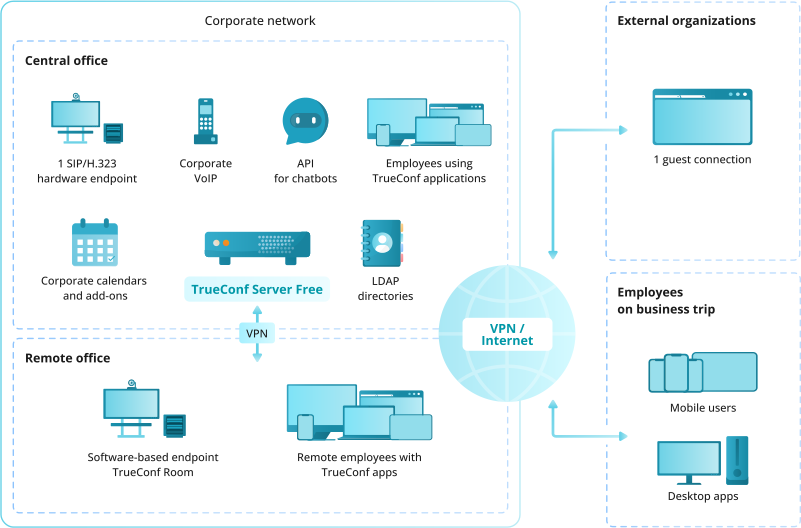
Yes, with appropriate understanding of its limits. TrueConf Server Free supports up to 1,000 registered users, provides the same encryption and self-hosted deployment model as the paid version, and includes full AD/LDAP integration. The key constraints are a maximum of 10 participants per conference and one SIP/H.323 gateway connection. For teams that primarily conduct small meetings and need a fully sovereign, self-hosted infrastructure at zero license cost, it is a legitimate enterprise option. The license renews annually through the TrueConf website and supports commercial use.

How does self-hosted video conferencing affect TCO compared to SaaS?

Self-hosted deployments have higher upfront infrastructure costs (server hardware or VM provisioning, maintenance, IT staff time) but typically lower per-user costs at scale compared to per-seat SaaS pricing. At 500 or more users, TrueConf’s active-user licensing model often produces a lower five-year TCO than per-seat cloud services, especially when SaaS costs include add-on security or compliance modules billed separately. Organizations should also account for the cost of audits and compliance work that SaaS deployments require but self-hosted deployments simplify by keeping data fully internal.

What is a safer enterprise alternative to Zoom for organizations with strict security requirements?

For organizations where the concern is vendor-side data access rather than encryption strength, TrueConf Server is a stronger fit than Zoom, since it removes the third-party cloud dependency entirely through on-premises deployment. Zoom remains a reasonable choice for general business use with its standard or FedRAMP authorized tiers, but organizations in defense, government, or highly regulated sectors typically need the architectural guarantee that on-premises deployment provides rather than a contractual one.

Previous article Next article