
How to Use Conference Cascading on TrueConf Server and TrueConf MCU

How to Use Conference Cascading on TrueConf Server and TrueConf MCU
Cascaded conferencing is one of the many unique features of TrueConf products, available in TrueConf Server and TrueConf MCU. This feature allows you to add other conferences from TrueConf Server or TrueConf MCU as a regular participant.
E.g., here is what a default conference window looks like:

And here is what it looks like after connecting another conference as a participant:

Cascading in TrueConf Server
Calling another conference using the SIP and H.323 protocols works both between different servers and within a single server. To enable communication between two servers, each server must have an available SIP/H.323 gateway license.
Adding a Conference to the Address Book
In the address book of the client application, click the button
 and select User.
Enter the conference ID and server adress you want to add in the format
#sip:<id>@<server>for SIP protocol connection and#h323:<id>@<server>for H.323. For example:#sip:123@example.com.Click the button
 .
.
Now you will be able to quickly add a conference as a regular participant to another event, both during creation and while it is in progress.
Adding a Conference into an Ongoing Session
To add a conference to an ongoing one, ust select it in the address book as a regular user and invite it to the conference. It will be automatically added to the participant list without requiring confirmation from the moderators of the invited conference.
You can also add a conference via SIP and H.323 protocols "on the fly", without adding it to the address book. To do this, in the active conference window, add the conference by its ID and server address: #sip:<id>@<server> for the SIP protocol, and #h323:<id>@<server> for H.323.
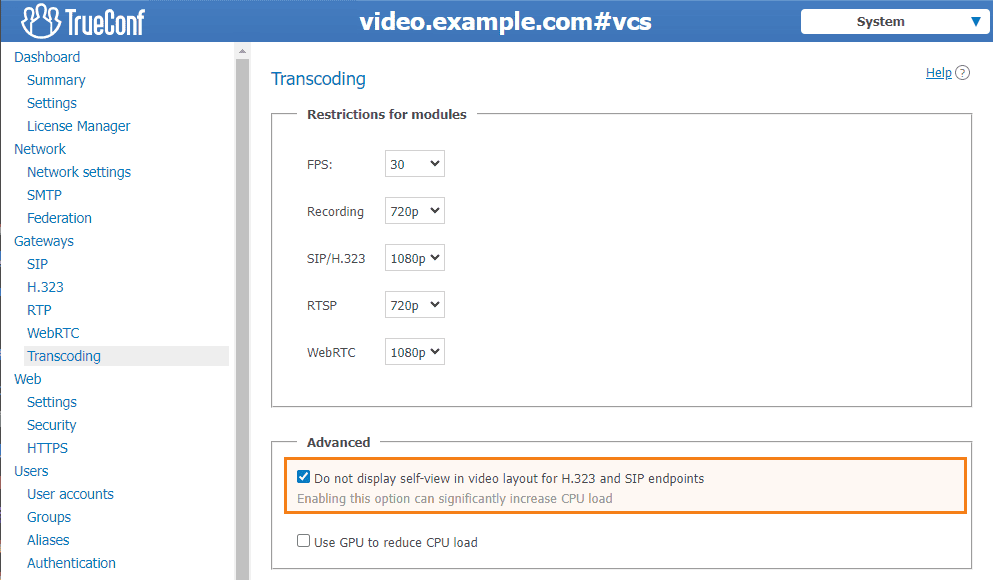
To avoid seeing a copy of your camera's image in the window of the joined conference, you need to activate the option Do not display self-view in video layout for H.323 and SIP endpoints in the Transcoding section of the server control panel.
This configuration item needs to be activated on each of the servers between which conference calls will be made via SIP and H.323 protocols.
Cascading in TrueConf MCU
In TrueConf MCU, you can also add a conference to the address book in advance and then invite it to another event, or add it by address to the participant list "on the fly".
Adding a conference to the directory and inviting to another event
Calling another conference works only between different TrueConf MCU servers; this feature is not available within a single server.
In the MCU control panel, go to the Address book.
Click the button
 .
.Enter the User name for the TrueConf MCU address book.
In the Address click the Add button.
The process of adding a SIP/H.323 terminal and conference is identical, as the external conference connects to the MCU via the SIP or H.323. Select SIP or H.323 protocol and enter the address in the format
00<id>@<server>:<port>, where:Optionally, you can also specify a label that will be displayed in the MCU conference. Otherwise, the conference ID in the format id@server will be used as the display name.
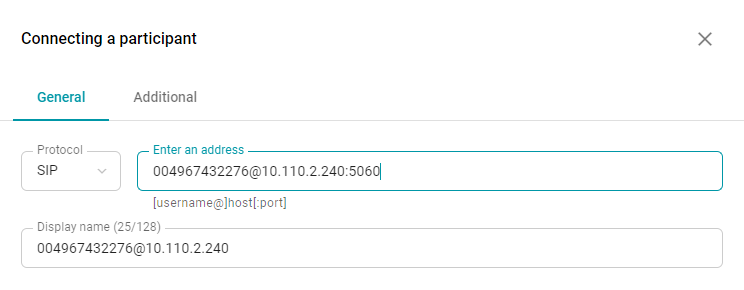
In the Additional tab, check the Cascading option.

Click the Save button.
Now you can add a conference from TrueConf Server or another TrueConf MCU to an event hosted on TrueConf MCU using the address book.
Quickly add a conference by its address
You can add a conference as a participant by specifying its address, without adding it to the directory first. To do this, either during the conference creation or while it is already in progress invite the desired conference as a participant with the address 00<id>@<server>:<port> as mentioned above.