एआई-आधारित अभिनव क्षमताएँ

स्मार्ट एल्गोरिदम ने वीडियो कॉन्फ्रेंसिंग को गुणात्मक रूप से नए स्तर पर ला दिया है — सबसे शोरगुल वाले स्थानों में भी बातचीत करें, पृष्ठभूमि बदलें, और चर्चा से विचलित हुए बिना बैठक के महत्वपूर्ण विवरणों का प्रोटोकॉल बनाएं।

Artificial intelligence assistant enhancing productivity and collaboration in TrueConf video meetings

स्मार्ट शोर दमन

भीड़-भाड़ वाली जगहों में भी तृतीय पक्ष ध्वनियों और पृष्ठभूमि शोर को दबाने की सुविधा के कारण आरामदायक सहयोग का अनुभव करें।

और जानें

TrueConf और आर्टिफिशियल इंटेलिजेंस

यह जानें कि एआई-आधारित फीचर्स ऑन-प्रिमाइसेस वीडियो कॉन्फ्रेंसिंग को कैसे बेहतर बनाते हैं।

वीडियो देखें

पृष्ठभूमि धुंधला करना और बदलना

पृष्ठभूमि धुंधलाना

स्मार्ट पृष्ठभूमि धुंधलाने की तकनीक के साथ, सम्मेलन के प्रतिभागी आप पर पूरी तरह से केंद्रित रह सकते हैं, साथ ही संचार की गोपनीयता भी सुनिश्चित कर सकते हैं।

वर्चुअल पृष्ठभूमि

बिना क्रोमाकी की आवश्यकता के, पृष्ठभूमि परिवर्तन टूल का उपयोग करके किसी भी छवि को वर्चुअल वातावरण के रूप में सेट करें।

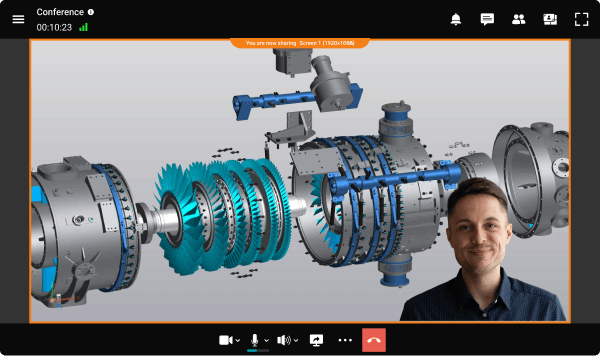
इंटरैक्टिव स्पीच

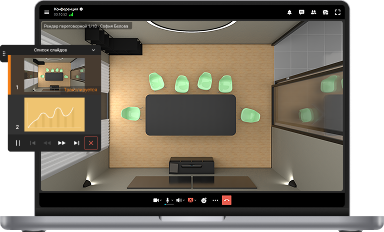
अपने भाषण को बढ़ाएं, पृष्ठभूमि को प्रस्तुति या अन्य साझा सामग्री से बदल कर.

और जानें
Participant sharing a 3D engineering model during a TrueConf video conference using AI-powered collaboration tools

लेआउट का स्वत: निर्माण

सम्मेलन के दौरान, लेआउट सक्रिय वक्ताओं और प्रदर्शित की जा रही सामग्री के आधार पर स्वचालित रूप से उत्पन्न होता है।

और जानें

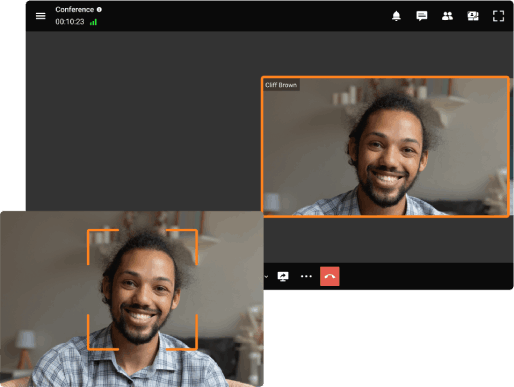
चेहरे पर स्वत: फोकस

स्मार्ट एल्गोरिथ्म स्वचालित रूप से उपयोगकर्ताओं के चेहरों का पता लगाता है और उन्हें फ्रेम के केंद्र में रखता है, जिससे किसी भी अनावश्यक स्थान को समाप्त कर दिया जाता है।

AI auto framing feature in TrueConf video conference automatically focuses on the speaker's face

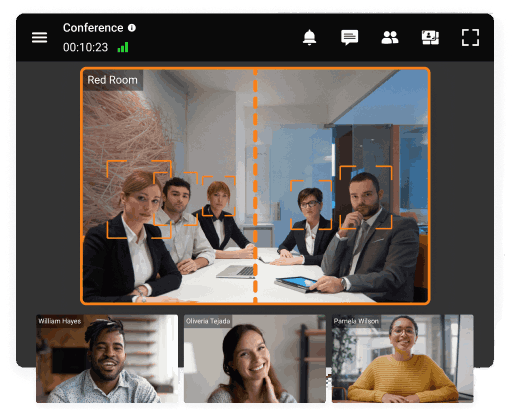
प्रतिभागियों पर स्वत: फोकस

एआई-आधारित एल्गोरिदम कई दूरस्थ उपयोगकर्ताओं को एकत्र करता है और उन्हें एक ही फ्रेम के भीतर रखता है।

AI-powered group framing feature in TrueConf video conference automatically detects and centers all participants in the meeting room
TrueConf AI Server

TrueConf AI Server

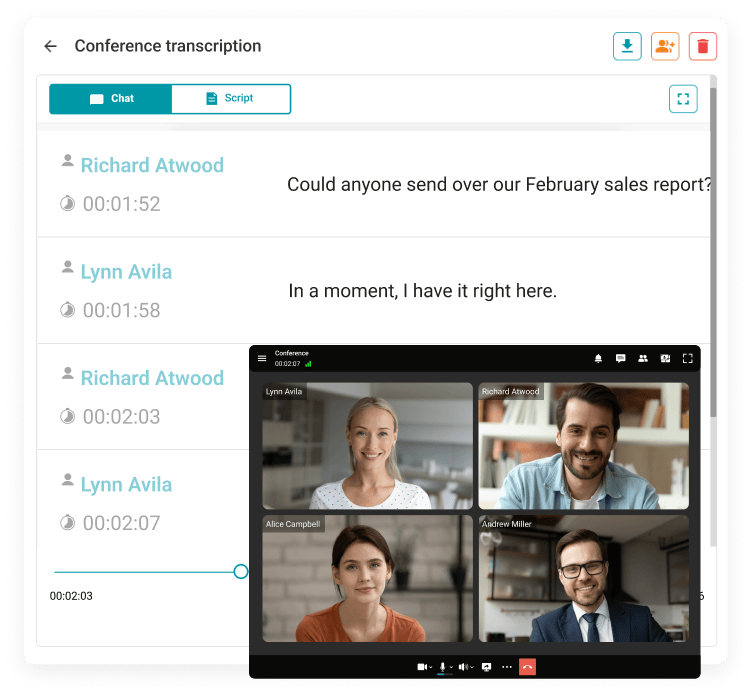
कृत्रिम बुद्धिमत्ता आधारित सम्मेलन ट्रांसक्रिप्शन सर्वर कॉर्पोरेट नेटवर्क के भीतर सुरक्षित डेटा प्रसंस्करण सुनिश्चित करता है।

और जानें
AI-powered transcription feature in TrueConf automatically converts video conference speech into text in real time

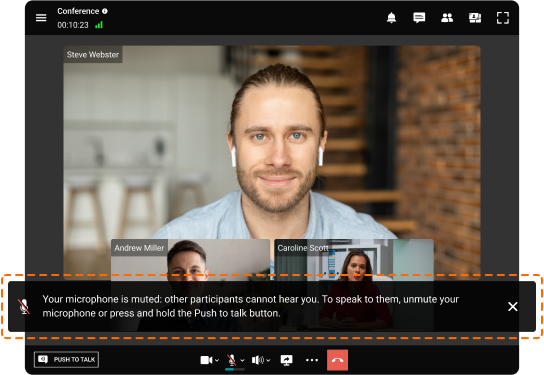
उपयोगकर्ता सहायक

तकनीकी या सामान्य समस्याओं की स्थिति में, स्मार्ट सहायक तुरंत संकेत देगा ताकि आप व्यवस्थापक से संपर्क किए बिना अपनी संचार जारी रख सकें।

और जानें
AI User Assistant in TrueConf video conference provides real-time notifications and helpful tips for participants

एआई-आधारित वीडियो कॉन्फ्रेंसिंग उपयोग के मामले

टेलीमेडिसिन

ई-लर्निंग

पृष्ठभूमि को धुंधला और बदलने के उपकरण, साथ ही एक बुद्धिमान शोर कमी प्रणाली, पाठ के विषय पर ध्यान केंद्रित करने में मदद करते हैं, जिससे दूरस्थ शिक्षा में उत्पादकता बढ़ती है।

ई-लर्निंग

टेलीमेडिसिन

दूरस्थ परामर्श के दौरान, स्मार्ट एल्गोरिदम डॉक्टर के कुछ कार्यों को संभाल लेते हैं, जैसे कि मरीज के चिकित्सा इतिहास का प्रोटोकॉल करना। साथ ही, पृष्ठभूमि को धुंधला या बदलने की क्षमता के कारण संचार एक निजी वातावरण में होता है।

सार्वजनिक क्षेत्र

सार्वजनिक क्षेत्र

स्वचालित रूप से प्रोटोकॉलिंग कॉन्फ्रेंस और स्मार्ट लेआउट्स का संयोजन दूरस्थ बैठकों के संचालन और प्रबंधन को बहुत सरल बनाता है।

सामान्य प्रश्न

What is AI in video conferencing?

AI in video conferencing integrates intelligent technologies into meeting platforms to automate and enhance communication. It helps improve meeting quality, accessibility, and efficiency by performing tasks that usually require human attention — such as noise suppression, auto framing, real-time transcription, and meeting summarization.

Modern AI tools can analyze speech, recognize participants, adjust layouts dynamically, generate captions and translations, and even provide contextual hints or notifications during calls. These features create a seamless experience where participants focus on collaboration while AI manages the technical details.

Benefits of AI video conferencing for meetings

Integrating AI into meetings brings tangible benefits for both hosts and participants:

Increased productivity: AI automates routine tasks such as note-taking and organizing transcripts, allowing participants to stay focused on collaboration.

Clearer communication: AI enhances audio and video quality by removing background noise and automatically adjusting camera settings, ensuring smooth conversation.

Accessibility: Real-time transcription and translation make meetings inclusive for participants with hearing challenges or language differences.

Higher engagement: Auto-framing and smart speaker tracking help remote participants feel more connected and reduce fatigue.

Cost efficiency: AI-based compression and optimization reduce bandwidth use and shorten meeting durations through clearer communication.

Convenience: Automatic recording, summaries, and background adjustments simplify the meeting process and reduce user effort.

How does AI help in video conferencing? Use cases

AI transforms virtual meetings across multiple industries by improving efficiency, communication, and collaboration.

Education: AI-powered transcription and real-time captioning make online classes accessible to students with hearing impairments and those speaking different languages. Auto framing and noise suppression help teachers focus on interaction instead of managing equipment.

Healthcare: During telemedicine sessions, AI automatically records and transcribes patient consultations, ensuring accurate medical documentation while allowing doctors to focus on care rather than note-taking.

Corporate and business meetings: Intelligent assistants summarize discussions, identify action items, and send follow-up notes automatically, reducing administrative workload and meeting fatigue.

Engineering and design: Smart video layouts and background enhancements make remote project reviews and 3D model presentations clearer and more interactive.

Customer service and support: AI analyzes conversations to detect sentiment, highlight issues, and generate post-call summaries that improve response quality and training efficiency.

Public sector and government: Automated transcription and summarization tools streamline meeting records and increase transparency in council or committee sessions.