
Free and Pro Versions
Free and Pro Versions
Some features of TrueConf Weathervane are available in the free mode (TrueConf Weathervane Free), while others require the activation of the TrueConf Weathervane Pro version.
For which features is the Pro version required
TrueConf Weathervane Pro allows for the management of a matrix switcher (configuring it as part of a preset).How to Get Pro Version
You do not have to download any additional files to activate Pro version.
When the application is run for the first time, it is available as a free version. To switch to Pro version, you only need to receive and activate a license key within the application.
In the application's top menu, select Help → Get Pro Version. Then, follow the instructions provided in the window that appears:
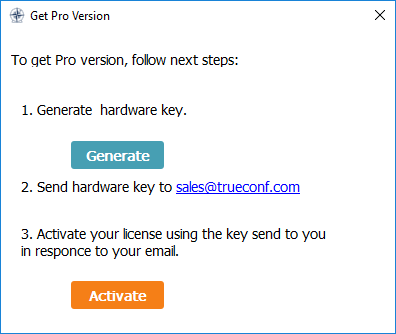
- Generate a hardware key and save the file on your computer (button Generate). The hardware key is a checksum of your computer's system parameters and/or virtual machine (similar to the hardware key TrueConf Server).
The license key generated at the next stage depends a hardware key i.e. you can’t use it on a different virtual machine or after changing virtual machine parameters.
2. Send the key to the TrueConf sales department (sales@trueconf.com) with a request for activation. After activation, you will receive a file with the license key.
- Click Activate and select the file sent by the sales department.