Text formatting
The API supports three message formatting types (parameter parseMode):
text— plain text. All characters will be preserved and displayed;markdown— basic Markdown formatting is supported. Special characters are converted into formatted text (bold, italics, links, etc.);html— HTML tags will be interpreted and displayed as formatted text.
Supported Syntax
| Style | Markdown | HTML |
|---|---|---|
| Bold | **text** | <b>text</b> |
| Italic | text / text | <i>text</i> |
| Underlined 5.5.6+ | __text__ | text |
| Strikethrough | ~~text~~ | |
| Link | [text](https://url) | <a href="https://url">text</a> |
| Line break | \n | <br> |
| Quote reply 5.5.6+ | >text\n\nresponse | response |
| Mention (mention) 5.5.3+ | [John](trueconf:john_doe@d.com) | <a href="trueconf:john_doe@d.com">John</a> |
at the same time:
Starting from TrueConf Server version TrueConf Server 5.5.6+, the syntax
__bold__is no longer supported for bold text. Use it only for underlining text.To create a line break in
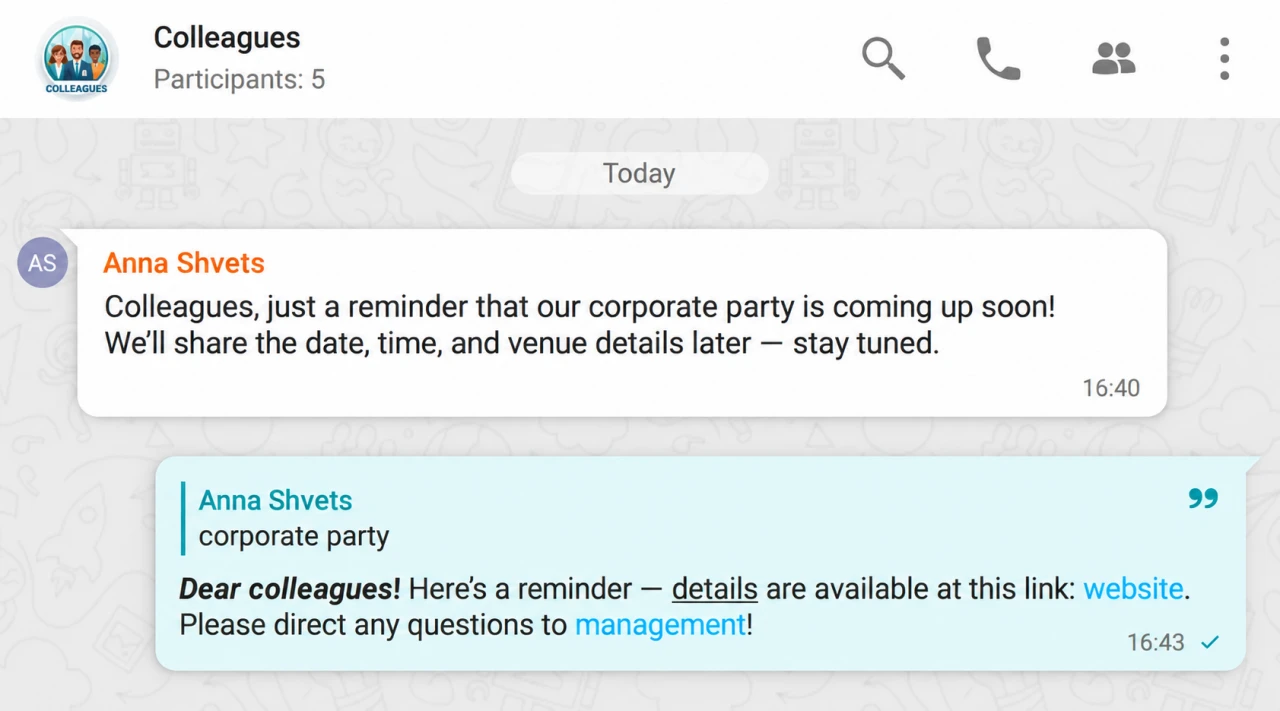
markdownformat, use the control character\n. Inhtmlformat, all\ncharacters are replaced with a single space. To insert a line break, use the<br>tag.A quoted reply is displayed in the client application only if the message is a response to another message. For this, the
payloadmust include thereplyMessageIdparameter. The quote should be at the beginning of the message; if placed within the text, it will not be displayed.All unsupported HTML tags and their attributes are removed. To display an HTML tag as text, it must be escaped. For example,
<i style="position: fixed; top:0">Hacked</i>will be converted to Hacked;If a user is part of a group chat or channel with notifications disabled, they will still receive a notification with the @ symbol when mentioned.
Formatting examples
Examples of formatting for each mode:
**bold text**
*italic text* / _italic text_
__underlined text__
~~strikethrough text~~
[website](https://example.com)
[mention](trueconf:mention@example.com)
first line\nsecond line\n\nafter the empty line
>quoted text\n\nresponse to the quote<b>bold text</b>
<i>italic text</i>
<u>underlined text</u>
<s>strikethrough text</s>
<a href="https://example.com">website</a>
<a href="trueconf:mention@example.com">mention</a>
first line<br>second line<br><br>after an empty line
<quote class="reply">quoted text</quote><br><br>responseQuery examples
An example of sending a formatted message in each of the modes:
{
  "type": 1,
  "id": 1,
  "method": "sendMessage",
  "payload": {
    "chatId": "c8c3eee8-9ad0-4638-9692-ad16391a4256",
    "replyMessageId": "3d968a21-543c-4fb2-9d8e-e31e3fbb35eb",
    "content": {
      "text": ">corporate\n\n**Dear _colleagues_!** Please find __details__ at the link: [website](https://example.com). For any questions, contact [management](trueconf:ceo@example.com)!",
      "parseMode": "markdown"
    }
  }
}{
"type": 1,
"id": 1,
"method": "sendMessage",
"payload": {
"chatId": "c8c3eee8-9ad0-4638-9692-ad16391a4256",
"replyMessageId": "3d968a21-543c-4fb2-9d8e-e31e3fbb35eb",
"content": {
"text": "<quote class=\"reply\">corporate event</quote><br><br><b>Dear <i>colleagues</i>!</b> Please refer to the <u>details</u> at the following link: <a href=\"https://example.com\">website</a>. Direct all questions to <a href=\"trueconf:ceo@example.com\">management</a>!",
"parseMode": "html"
}
}
}