
WebSocket Message Base Format
WebSocket is a bidirectional transport: both parties can send any set of data in JSON format at any time. The protocol operates on a "request-response" mechanism, where each incoming message must be acknowledged by the recipient.
Message types
The protocol defines three message types corresponding to the enumeration MESSAGE_TYPE:
- RESERVED = 0 – reserved (not in use);
- REQUEST = 1 – request;
- RESPONSE = 2 – response.
Currently, only REQUEST and RESPONSE are used.
Any message, whether from the client or the server, contains at least two mandatory fields:
{
  "type": 1,
  "id": 1,
}| Field | Type | Mandatory | Description |
|---|---|---|---|
| type | uint32 | Yes | Message type: 1 for request (REQUEST), 2 for response (RESPONSE). |
| id | uint32 | Yes | A unique message identifier represented as an incrementing number. It is used for linking "request-response" pairs. For information on how to work with it, see below. |
Parameter id
Since WebSocket does not have a request-response concept and the order of incoming messages can be arbitrary, the id parameter is used to link outgoing commands with their responses. This parameter must be included in every sent request, and the same value will appear in the incoming message that serves as the response to the request. It can also be interpreted as a counter of sent requests for each party. A response with the same id must be sent for each incoming request.
For example, the client sends a ping message to the server:
{
"type": 1,
"id": 1,
"method": "ping",
"payload": {
  "data": "Hello, World!"
  }
}
The server responds to the client (note the id parameter):
{
  "type": 2,
  "id": 1,
  "payload": {
    "some_field": true
  }
}
Another example. The client sends a message to the server:
{
  "type": 1,
  "id": 23768,
  "method": "getCurrentTime"
}
The server responds:
{
  "type": 2,
  "id": 23768,
  "payload": {
    "data": 1724936321584
  }
}
Unique ID in requests
If we send two requests with the same id, the second request will be rejected, and an error will be returned in response. Similarly, if the id value in a new request is less than an already used value, that request will also be rejected with an error.
Request:
{
  "type": 1,
  "id": 12,
  "method": "ping"
}
Response:
{
  "type": 2,
  "id": 12
}
Resending request with id = 12:
{
  "type": 1,
  "id": 12,
  "method": "someTest"
}
Error response with errorCode = 2:
{
  "type": 2,
  "id": 12,
  "payload": {
    "errorCode": 2
  }
}
Client response to server request
Within the operation of WebSocket, the server can initiate the sending of system messages without a prior request from the client. These messages notify about changes, system events, or actions of other users.
To maintain a stable connection, the client must acknowledge the receipt of each such message. The acknowledgment is sent as a separate response indicating the identifier of the original event.
{
  "type": 2,
  "id": 123456
}
If the server does not receive a response within 300 seconds, the connection is considered inactive and will be automatically closed, regardless of other signs of activity (e.g., ping/pong).
System messages
System messages are server notifications sent using the sendMessage method in the Envelope format and are part of the general chat message stream:
{
    "method": "sendMessage",
    "type": 1,
    "id": 6,
    "payload": {
        "chatId": "0b88a6d4ff2f15ee9234f8871a88789b2ec645dd",
        "messageId": "49b35c1b-f570-4c0e-acdb-79b6e41b5afd",
        "timestamp": 1766057730627,
        "author": {
            "id": "john_doe@video.example.com",
            "type": 1
        },
        "type": 1,
        "content": {
            "userId": "echo_bot@video.example.com",
            "role": "user"
        },
        "box": {
            "id": 9,
            "position": "0"
        }
    }
}
It should be noted that system messages do not confirm the occurrence of specific actions, such as a participant appearing in a chat. They are meant solely for logging purposes. For each action, such as adding a new participant to a chat, there are separate commands and events.
To determine if a message is a system message, check that the type parameter value:
type < 200— system message;type ≥ 200— user message.
You can find a list of all supported system messages in the relevant section of the documentation.
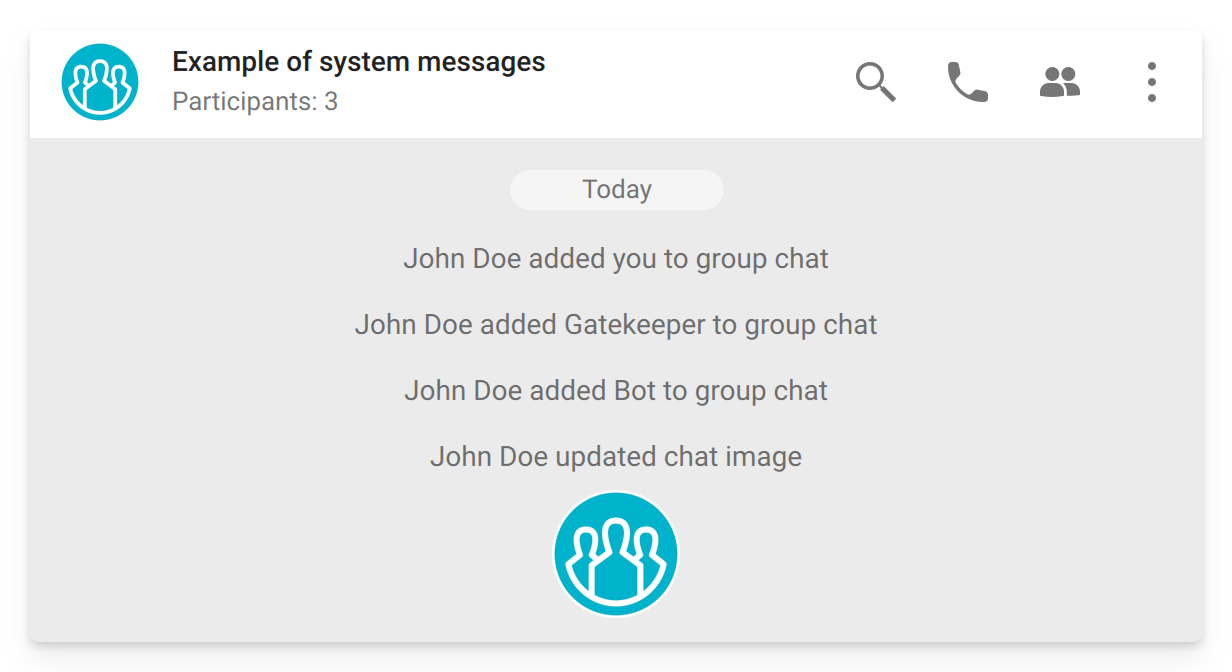
Essentially, system messages are used to implement labels and annotations for events in chat history, standardize message rendering, and are intended for visual accompaniment of events in client applications (GUI), for example:
You can disable receiving system messages by using the optional parameter receiveSystemMessageEnvelopes during authorization via the auth method.
Timeouts and Long-Running Operations
If a response to the request is not received within 300 seconds (5 minutes), the server will assume that the connection has been lost or the client has become unresponsive, and will close the WebSocket session. For certain tasks, generating a response may take more than 300 seconds. In such cases, multiple request-response cycles will be generated.
As an example, let's consider the call handling logic. A person may not answer (reject) a call for more than 300 seconds. In such a case, we receive the call status as a separate message from the server after any length of time:
Client request:
{
  "type": 1,
  "id": 4444,
  "method": "callToUser",
  "payload": {
    "callId": "john"
  }
}
The server immediately responds with a call creation confirmation:
{
  "type": 2,
  "id": 1,
  "payload": {
    "userId": "john@as1.trueconfServer.loc#vcs"
  }
}
After some time, when the user answers the call, the server sends a notification to the client:
{
  "type": 1,
  "id": 4445,
  "method": "conferenceCreated",
  "payload": {
    "userId": "john@as1.trueconfServer.loc#vcs",
    "isP2P": true,
    "conferenceId": "477dh6731ac54e322@as1.trueconfServer.loc#vcs"
  }
}
The client confirms that it has received the conference start event:
{
  "type": 2,
  "id": 4445
}
Asynchronous requests
Since WebSocket libraries provide asynchronous APIs, the client or server can send responses to requests in any order and multiple at a time, without waiting for a response to a previous request. The key point is that the request must be sent within 5 minutes:
Request 1:
{
  "type": 1,
  "id": 278,
  "method": "someLongTask"
}
Request 2:
{
  "type": 1,
  "id": 279,
  "method": "createChat",
  "payload": {
    "chatTitle": "TEST"
  }
}
Request 3:
{
  "type": 1,
  "id": 280,
  "method": "createChat",
  "payload": {
    "chatTitle": "TEST 2"
  }
}
Request 4:
{
  "type": 1,
  "id": 281,
  "method": "someFastTask"
}
Response 1 to request 4:
{
  "type": 2,
  "id": 281
}
Response for request 2:
{
  "type": 2,
  "id": 279,
  "payload": {
    "chatId": "1390r4f03f"
  }
}
Response 3 to request 3:
{
  "type": 2,
  "id": 280,
  "payload": {
    "chatId": "1f4f9f9f39j9f3"
  }
}
Response 4 to request 1:
{
  "type": 2,
  "id": 278
}
Message Structure
Each message received as an event (a request from the server), loaded by message ID, or retrieved from the chat message history corresponds to an Envelope object:
{
    "method": "sendMessage",
    "type": 1,
    "id": 3,
    "payload": {
        "chatId": "1c1230635432aa7be051e4fda53a3d5a07c8c151",
        "messageId": "dfb127d0-d174-4e11-8394-19482a98607d",
        "timestamp": 1741881175593,
        "author": {
            "id": "user@video.example.com",
            "type": 1
        },
        "isEdited": false,
        "box": {
            "id": 2,
            "position": "0"
        },
        "type": 200,
        "content": {
            "text": "What's up?",
            "parseMode": "text"
        }
    }
}
You can find the description of the parameters in this section.
Message Storage "Box"
According to TrueConf's internal protocol, each message is placed in a separate storage called a Box, also known as an "envelope" (object EnvelopeBox):
{
"id" : 1,
"position" : ""
}
In most cases, there will be only one message in the box, and to properly sort the messages, it is sufficient to consider the id parameter. The id field is an automatically incrementing number, starting from zero within each chat. In the vast majority of cases, the first message in a chat will have a Box with id = 0, the second with id = 1, and so on. In this case, the position field for each message will be an empty string.
However, in some cases, a single "box" may receive two or more messages. This is a very rare occurrence, possible, for example, when two or more users simultaneously send messages to the chat, and both of those users experience network connection issues.
If two or more messages end up in the same "box", the position field is filled with the ordinal number of that message within the "box". A unique feature is that the message position in the box is not a number, but a string containing the characters 0123456789ABCDEFGHIJKLMNOPQRSTUVWXYZabcdefghijklmnopqrstuvwxyz{}.
To sort messages by position, it is sufficient to compare two strings based on their ASCII codes. This type of comparison is available by default in most programming languages.
Comparison of three messages that ended up in the same "box":
//Message 1:
{
"id" : 15,
"position" : "A"
}
//Message 2:
{
"id" : 15,
"position" : "B"
}
//Message 3:
{
"id" : 15,
"position" : "AAA"
}
In "standard" string comparison, the ASCII value of each character in the strings is compared sequentially. The string with the greater ASCII value is considered greater. If the ASCII values of all characters are equal, then the string with the greater number of characters is considered greater.
Compare the first and second message:
ASCII("A") = 41
ASCII("B") = 42
42 > 41
Thus, the second message has a sequence number greater than the first.
Compare the second and third messages:
ASCII("B") = 66
ASCII("AAA") = 65 65 65
66 < 65
As you can see, the comparison does not go beyond the first character because the character B has a higher ordinal value than the character A. Therefore, the third message has a lower ordinal value than the second one.
Compare the first and third messages:
ASCII("A") = 41
ASCII("AAA") = 41 41 41
41 = 41
The ordinal numbers of characters in both strings match, and in this case, the string with the greater number of characters is considered larger. Thus, the third message has a higher ordinal number than the first.
After sorting, the order of messages will be as follows:
//Message 1:
{
  "id": 15,
  "position": "A"
}
//Message 3:
{
"id" : 15,
"position" : "AAA"
}
//Message 2:
{
"id" : 15,
"position" : "B"
}