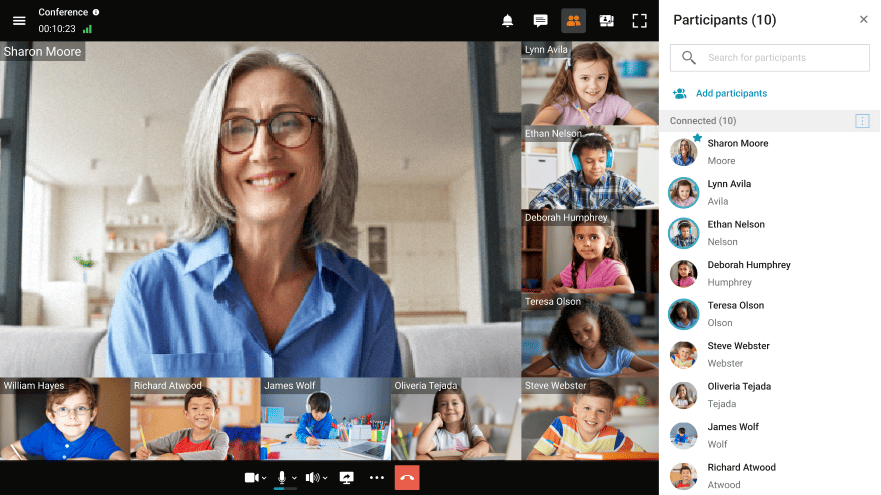
TrueConf virtual classroom mode is designed to provide students with life-like learning experience. It is a replica of a real-life classroom, where each student can interact with the teacher face-to-face, while the instructor can see the whole classroom and every student at the same time. In the virtual classroom students are fully focused on the presentation and cannot interrupt or distract one another. You can also use this mode for anonymous meetings or conferences where the attendees are not supposed to see or interact with other meeting participants but the presenter.
In the virtual classroom mode students are supposed to see the teacher only, and the teacher can see and hear each meeting participant. If you want to hold roundtables or board meetings where all meeting participants can see and hear one another, try a
multipoint video conference.
Yes, each video meeting hosted on TrueConf Server is assigned with a unique meeting URL and can be assessed via browser. To learn more about TrueConf web conferences and how to enable them
read this article.
Yes. Students can join online lessons from their smartphones using browsers or TrueConf mobile apps for
Android and
iOS.
If you are the owner or a moderator of the virtual classroom, you can click on the participant’s video window directly in the layout or on a name in the participant’s list and manage their devices using the context menu.
First you need to register them on your TrueConf Server and add them to your contact list. After that you can invite them in your meetings by simply calling them, like any other user.
Yes. You can schedule a class in your personal area on the TrueConf Server guest page, in your TrueConf Server control panel or in your client app.
Create a virtual classroom in advance and add all the users you wish to invite to the conference, then go to advanced settings. Uncheck the Enable uninvited users to join the conference option, and no uninvited user can join your conversation.